September 2026
4 updates
New participation page
Until now, answers were sent straight after the last question, with no chance to check them first. The new participation page ends on Your answers, which shows every answer at a glance, with Not answered for skipped questions. Nothing is sent until someone clicks Submit. Answers in progress are saved in the browser: reopening the survey on the same device picks up where it was interrupted. On a personal invitation link that holds until the survey or cycle ends (at most 30 days), on an open link for one hour. If the connection drops while sending, the answers go out automatically once the device is back online. Admins switch the new page on for the whole account under New participation page in the settings. They can switch back to the previous page at any time until 31 October 2026; after that, the new page applies to everyone.When someone cannot take part through a link right now, the new page says why: Not started yet or No cycle active right now with the time from which they can take part, Survey closed with the time until which it was open, You have already taken part, or Invalid link.Open New participation page ↗Mask personal data in open answers
Open text answers sometimes hold names, email addresses, phone numbers, postal addresses or customer numbers, and there was no built-in way to remove those details before answers were translated, classified or exported. Data masking in the account settings now detects personal data automatically and replaces it in every new answer through Automatically mask personal data, across five categories: first and last name, email address, phone number, postal address, and unique IDs or customer numbers. Whatever the automatic detection misses, you mask yourself on the Data masking page: select a passage in the text and pick a category under Mask as what?. With Mask every match you apply the same selection to every other answer that contains the same wording, after a preview that lists each occurrence with a checkbox, so you can leave out the ones that should keep their wording. The page itself reads as a list you work through: compact rows with a checkbox, a Question filter beside the survey filter, Answers per Page at 10, 20, 50, 100 or 250, the number of answers on the To review and Reviewed tabs, and a bar above and below the list that clears everything you ticked with Mark as Reviewed in one step. A mask can be taken back whichever way it was set: the × on it restores the original wording, for a passage you masked yourself and for one the automatic detection found. Only answers that come in or are reviewed while masking is active are masked, and masking requires consent for Microsoft (Azure OpenAI) as a sub-processor. For accountability, audit or a works council, the Masking report produces a per-survey breakdown of how often each category was masked, without the original values.Go to Data masking ↗ · Review open answers ↗ · More informationDelete several employees at once
Employees could only be deleted one at a time from their profile, so clearing out a department or a batch of leavers meant working down the list person by person. Edit multiple on the employee list turns the rows into a selection: tick the people you mean, take the whole page, or, with a filter applied, take every employee the filter matches, however many pages that is. Delete then shows what is about to happen: how many people are affected, that your own profile is left out, and a stop if the selection would leave the account without an administrator. You confirm by typing the number of employees, and the deletion runs in the background with its progress on the button, so a large batch does not tie up the page. It removes those people and their data for good, on exactly the terms that deleting a single employee always had.Open the employee list ↗ · More informationCopy a feedback run
A second run that should look like the first had to be built again from the beginning: the questionnaire, the welcome and goodbye messages, the anonymity settings, every language. Copy run in a run’s actions duplicates all of it under a name you choose, and Also copy participants brings the same ratees and raters along. The copy arrives without dates, so it sits there until you schedule it and nothing goes out by accident.Open 360° Feedback ↗ · More informationAlso fixed: 6 items
Also fixed: 6 items
- Dashboards printed to PDF: Scrollbars are no longer painted into the file, labels and text are no longer cut off at the edge of a chart, and charts no longer leave a blank strip above themselves.
- A trend chart split over two pages: A trend chart’s answer options stay on the page its bars are on.
- Answers from the previous cycle: Resuming a recurring survey no longer brings back what was answered in an earlier cycle.
- Text fields on iOS: Tapping a text field in a survey on an iPhone or iPad puts the cursor in it reliably again.
- An import that left no admin: An employee import that would strip the account of its last administrator is refused instead of carried out.
- Azure AD: The integration is now called Microsoft Entra ID, the name Microsoft gives it.
August 2026
9 updates
Roles and permissions handed out by rule
A role and its data access were decided per person: set by hand in the profile, or carried for everyone in the Role and PermissionGroup columns of each import file. Automatic role assignment in the account settings derives them from rules instead, using job title, department or job level, or whether someone has direct reports. Rules are sorted by priority and the first match wins, with a fallback rule for everyone none of them catch, and they are checked again after every change to a person and after every CSV or HCM import. Nothing changes while you are editing: rules start as a draft, and Review and publish first shows you who would change, who is skipped because a name, email address or language is missing, and confirms that admins are left alone. Each person carries where their role came from, whether a rule, the fallback, an import or set by hand.Open Automatic role assignment ↗ · More informationKeep employees in sync through the REST API
Keeping the people list current meant an Excel upload, a file drop or one of the ready-made HR connectors, and an HR system that was not among them left you with the file route. The REST API tile on the Integrations page issues a key for your own system to send active employees whenever your data changes. Disconnecting deletes the key and turns away further requests; the employees already imported stay in Honestly and simply stop being updated.Open integrations ↗ · More informationThe employee export includes the role
The export left the role out, so anyone reconciling roles against an HR system had to look each person up again by hand. The export file now carries a Role column, and people without a login are exported as Respondee.Open the employee list ↗Topic analysis starts on its own and quotes only the part that fits
Categorising open text meant remembering to start the AI assistant after every survey closed, and answers nobody came back to stayed uncategorised. A long answer that touched three subjects was also assigned to all three topics in full, so every topic showed the same wall of text and the reader had to work out which sentence belonged where. Automatic Topic Analysis in the account settings now starts the analysis as soon as a survey reaches its end date, at the end of each run for recurring surveys, and again at the new end date if a survey is reopened and closed once more; it is an account-wide setting for admins and needs the AI subprocessor accepted. With Topic Split switched on, each topic additionally shows only the excerpt that actually belongs to it, while the wording of the answer stays untouched. Both apply to every analysis started after you switch them on; answers already analysed stay as they are until you run the analysis again.Open Automatic Topic Analysis ↗ · Open Topic Split ↗ · More informationRoles and permissions on one page
What each role is actually allowed to see was spread across help articles and habit, so granting access meant asking someone who had done it before. Roles and Permissions in the account settings lists all five roles with what each one can do by default, and gathers the permissions you can set for the whole account: which employees are visible when a survey is distributed, whether results can be read while a survey is still running, and who reaches the Topics area.Open Roles and Permissions ↗ · More informationThe new employee list
On large accounts, sorting or filtering the employee list by an attribute was slow enough to interrupt the work, and the columns you saw were fixed. Columns now lets you choose which personal details and attributes are shown and remembers your choice, people are created and edited in a sectioned dialog where data access is built from rules, sorting and filtering by attribute is considerably faster, and a divider marks where the attribute columns begin.Open the employee list ↗ · More informationQuestion templates show their dimension
Templates worded almost identically were impossible to tell apart in the picker, their text was cut off, and saving a question as a template dropped its dimension. Each template now shows its dimension, and you can search by dimension name. The list runs full width with wrapping text, and Save as template keeps the dimension.Open surveys ↗ · More informationDeleting a survey asks you to type its name
A single misplaced click confirmed the deletion, and the survey and its results were gone for good. The delete dialog now asks you to type the survey name before it will proceed.Open surveys ↗ · More informationNew dashboards open on a matching period
A newly created dashboard opened on a custom date range instead of the survey’s own interval, so the first thing you did was fix the period filter. The period filter now matches the stored range against the dashboard’s known periods and selects the survey interval, falling back to a custom range only when nothing fits.Open dashboards ↗ · More informationAlso fixed: 4 items
Also fixed: 4 items
- Charts stuck in the loading state: Charts no longer keep spinning after quick filter changes or after a chart is added or removed.
- The pooled group in split charts: The group that pools values too small to show on their own now names the groups it contains, and long axis labels no longer overlap.
- Response imports stuck on processing: An import that fails now reports the failure instead of staying on processing indefinitely.
- Chat replies in the email history: The email history of an employee no longer lists the notification about a reply in the anonymous chat, which would have shown that the person is taking part in one.
July 2026
11 updates
Company information is now called Benchmark
The tab holding your company size and industry was called Company information, which said nothing about what the data is actually for. The tab is now called Benchmark and states plainly that the information is used to select the right external benchmark data for your dashboards.Open the Benchmark tab ↗ · More informationCompany context makes the AI suggestions fit your company
AI suggestions were written from the question text and the results alone, so they read like advice for any company rather than yours. Company context in the account settings holds what your company stands for, the phase it is in, how decisions are made, what you are working towards right now, the levers you can actually pull and what has changed in the last six to twelve months. Fill the wizard in yourself, or let the AI prepare it from your web domain and check every field before you save. Suggestions that used it are marked with a Company context used label, and you can reset the context at any time.Open Company context ↗ · More informationTranslate a survey without leaving Honestly
Getting a survey into another language meant exporting the text, mailing it to whoever spoke the language and pasting the result back in, with no way to see what was still missing. The translation overview now lists every language of a survey and opens an editor that shows question text, answer options, scales and the invitation and result emails next to the source language. Automatic suggestions fill the gaps, search and replace applies a wording change across a whole language at once, the editor points out a translation that has lost the survey name placeholder, and a review link opens one language for someone without a Honestly account, where their changes save as they type.Open surveys ↗ · More informationAnswer open questions by speaking
Open questions on a phone meant typing a considered answer on a touch keyboard, which is where a lot of free-text feedback quietly stops. Open text questions in the mobile survey now show a microphone button. Speech is transcribed into the answer field as the participant talks, and the audio is not stored.More informationSD Worx as an HR system
SD Worx was not among the HR systems you could connect, so those accounts kept importing employees by file. SD Worx now appears on the Integrations page alongside the other HR connectors.Open integrations ↗ · More informationSee which emails an employee actually received
When someone said they never got the invitation, there was no way to tell whether it had been delivered, bounced, been blocked or gone to an address that no longer exists. Email history on an employee shows the emails sent to them in the last 30 days, each with its delivery status in plain language, what the status means and what to do next.Open the employee list ↗ · More informationTell people with the same name apart
When picking survey recipients or granting permissions, two employees with the same name were indistinguishable. You had to guess which one you meant. Under Employees → Attribute Management, admins use Information shown next to names to pick up to three attributes, and whether the email address is included, to appear as a second line under the name. The choice applies to the whole account and shows up wherever employees are listed, among them distributing a survey and granting permissions.Open the employee list ↗ · More informationChoose which filters appear on a dashboard
Narrowing a dashboard down meant working through a column of separate filter fields, with nothing showing at a glance what was currently applied. Every dashboard now has a filter bar you put together yourself: under More filters → Configure filter bar… you choose which employee attributes, survey properties and questions sit in the bar and drag and drop them into order, while Period and Survey are fixed context filters that always come first. The arrangement is saved for the dashboard, so everyone who opens it sees the same filters, and it can be changed by anyone allowed to edit the dashboard: admins and the person who created it. Reset all filters clears everything at once.Open dashboards ↗ · More informationDeleting a dashboard asks you to type its name
The confirmation asked only whether you were sure. It named neither the dashboard nor the fact that deleting it removes it for everyone. The dialog now names the dashboard, says it will be deleted for all users, and asks you to type its name.Open dashboards ↗ · More informationImport problem emails say who they are for
A problem email went to every admin without saying who had started the import or who was expected to act, so it was either handled twice or not at all. The email now states that it goes to all admins, whether the import was started by hand or ran automatically, and tells anyone who did not start it that they can ignore it.Open imports ↗ · More informationThe new survey list
The survey overview was a card list with no search, no sorting and no way to act on more than one survey at a time. It is now a table: search by name, filter by status, level, frequency, date and survey property, sort by column, and activate, deactivate or archive several surveys at once. Before a bulk action runs, a preview shows which surveys will change, which stay as they are and why, and how many people will be emailed.Open surveys ↗ · More informationAlso fixed: 7 items
Also fixed: 7 items
- Help and support links across the app: Links to the Help Center and to support pointed at retired addresses and led nowhere. They now open the right page.
- Duplicate dashboard names: Two dashboards in one account can no longer share a name, and trying to reuse one says so instead of failing silently. Copying a dashboard now opens the copy.
- Deleted assignees and custom due dates: A card whose assignee had been deleted broke the board, and a custom due date could not be picked because the calendar was cut off. Both work again.
- Topic analysis and case-variant topic names: The whole analysis failed when the AI proposed a topic name differing only in capitalisation from an existing one. It now merges into the existing topic.
- Multi-select answers in exports: Exports kept only the last selected option of a multi-select question. All selected options are now included.
- Free text typed into an “Other” option: Text written into the “Other” option of a select question was missing from text charts and never started a chat conversation. It now appears in both.
- First sync of a new HR connection: A newly connected HR system reported its first sync as a failed import and emailed admins about it. The first sync is now recognised as still running.
June 2026
10 updates
Excel import reports every bad row at once
An Excel import stopped at the first row with a missing ImportId, so a file with fifty bad rows took fifty uploads to clean up. The import now lists every offending row in one pass, and a file with a duplicated ImportId is rejected before anything is written.Open imports ↗ · More informationConnect Microsoft Teams for survey notifications
The Microsoft Teams tile on the Integrations page only linked to an article. There was no way to actually connect a tenant from inside Honestly. Enter your Tenant ID on the Integrations page to connect, then import employees and have survey notifications delivered in Teams. The tile shows Import and Disconnect once connected.Open integrations ↗ · More informationReply to an open text answer straight from a chart
Replying to a comment you noticed in a chart meant leaving the dashboard for the Chat area and finding it again there. Free-text, sentiment bubble and topic charts now show a reply thread on each answer, with the reply count, quick reactions and a reply box, all without leaving the dashboard. It is hidden in print view.Open dashboards ↗ · More informationStart the AI assistant for a whole survey
The AI assistant had to be started question by question, so a survey with many open questions meant working through them one at a time. Start AI Assistant for All Questions categorizes every eligible open text question in the survey. Reset All Topic Assignments clears them again, after you type the survey name to confirm.Open Topics ↗ · More informationQuestion filters now apply to text and topic charts
Free-text, topic summary, sentiment bubble and topic trend charts ignored question and answer filters, so a filtered dashboard showed contradictory numbers side by side. Those charts now honour question and answer option filters, and the bubble chart no longer warns that the filter is unsupported.Open dashboards ↗ · More information360° Feedback and custom result scales
Gathering feedback on one person from their manager, their peers and their reports meant running separate surveys and combining the results by hand. 360° Feedback puts a run together in a guided editor, with configurable invitation and result emails, a text anonymity threshold set per run, a competency matrix and profile chart, and Excel export. Results evaluation in the account settings lets you define how average values are shown in your dashboards, with an optional per-dashboard override.Open 360° Feedback ↗ · More informationCreate and manage your own API keys
Getting a key for the Export API meant asking support and waiting. API keys in the settings lets admins create, review and delete keys themselves. A new key is shown once, at creation. Copy it then, because it cannot be displayed again afterwards. Deleting a key immediately cuts off anything using it.Open API keys ↗Collapsible question cards in Topics
Every question card was open at full height and the AI actions sat inside the body, so starting the assistant meant expanding a question first and scrolling past everything else. Question cards now collapse and show their answer and topic counts in the header, where Start AI assistant and Reset now sit. Hide empty topics takes the empty ones out of the way, and the setting is remembered.Open Topics ↗ · More informationPersonio via Kombo, and choosing who syncs
Personio could only be connected through its own integration, and a connected HR system always brought across the whole directory. Personio via Kombo now appears among the HR connectors, and the connection flow lets you filter which employees are imported. The filter is set while connecting, so it applies to new connections.Open integrations ↗ · More informationSee and end your active login sessions
There was no way to see where your account was logged in, so a session left open on a shared or lost device stayed open. Active Sessions in your profile lists every session currently signed in with your account. Log out a single one, or all others at once while staying signed in here.Open active sessions ↗ · More informationMay 2026
6 updates
Export initiatives to Excel
Reporting on initiatives outside Honestly meant copying them out of the board by hand. Export to Excel downloads the initiatives currently shown, using exactly the filters you have set.Open initiatives ↗ · More informationSafer password changes
Changing your password left every other session signed in, sent no confirmation, and allowed you to set the password you already had. On an SSO account the attempt simply failed without saying why. Changing your password now signs you out everywhere else and sends a confirmation email. A password identical to your current one is refused, SSO accounts get a clear explanation instead of an error, and password reset emails are rate-limited.Open your profile ↗ · More informationDecide where a chart sits
A new chart always landed at the top of the dashboard, and moving an existing one meant dragging it past everything in between. Choose whether a new chart goes to the top or the bottom when you create it, and use Move to Top and Move to Bottom in the chart menu afterwards.Open dashboards ↗ · More informationSet up code participation yourself
Letting employees without an email address take part required us to configure the access link and login code for you. Code participation in the account settings lets you set the access address, pick the attribute that carries the login code, download the QR code as PNG or SVG, and translate the login screen per language.Open Code participation ↗ · More informationRedesigned initiatives board
Filtering meant working through a column of form fields, and the create form had grown long enough that finding a single setting took a scroll. Initiatives sit on a board with a filter bar: assignee, survey and questions, employee attribute, assigned to me. There is also a reworked create and edit dialog with due-date presets, visibility and notification settings, and per-card actions.Open initiatives ↗ · More informationAI suggestions that know which chart you came from
Suggestions were generated from the question texts alone, so they could not take account of what the chart actually showed, and arrived as a flat list. The suggestion request now carries the chart’s title, type and data. Suggestions open in a two-pane view listing benefits, challenges and implementation steps, and heatmaps offer the button again.Open dashboards ↗ · More informationAlso fixed: 3 items
Also fixed: 3 items
- Surveys translated into only some languages: A survey without a title in every language showed as “-” in lists and could fail to save. Missing texts now fall back to another language, and invitations pick the right one.
- Duplicate questions from a double click: Clicking twice in the add-question dialog added the question more than once. The dialog now saves only once.
- The “sending soon” reminder warning: The warning that a reminder is about to go out appeared for times in the past and never for imminent ones. It now appears when it should.
April 2026
3 updates
Employees can translate chat messages
An employee reading a reply in the anonymous chat had no way to translate it, so a conversation across languages stalled at the first message. Translate now appears on the original answer and on every message in the employee chat view, with Show Original to switch back.More informationSingle sign-on settings in the new design
The SSO page still used the old form styling, the ACS URL and Entity ID had to be selected and copied by hand, and one save error had no message at all. The page now matches the rest of the settings, the ACS URL and Entity ID have a copy button, and the previously silent save error now explains what to check.Open the SSO settings ↗ · More informationProfile page redesign
One long form held your personal details, language, notifications and your password, so changing a single setting meant scanning the whole page. Settings are split into separate cards, password changes happen inline, and each field validates on its own instead of showing one banner at the top.Open your profile ↗Also fixed: 3 items
Also fixed: 3 items
- The “Other” option in library templates: Questions taken from the template library lost their free-text “Other” option. Existing templates were repaired.
- Several charts showing no data: Heatmaps with an external benchmark column, score charts showing only a benchmark or period comparison, and gauge charts using the Top 2 calculation on smiley questions all render correctly again. Answer labels in split bar charts are translated.
- The “all employees” warning: The warning claimed that employee uploads trigger sending, which is not what happens. It now describes the real behaviour: people added while the survey is active are included at the next scheduled send.
March 2026
5 updates
The rich text editor keeps your formatting
Bold text, lists and links disappeared whenever you switched between rich text and source view, so formatting had to be redone from scratch. Formatting is now preserved across both views: in question descriptions, welcome and closing messages, and email templates.Open surveys ↗ · More informationMandatory questions are enforced on mobile
On phones, required questions could be left blank and the submit simply failed, without telling the participant what was missing. Touch input is now validated exactly like desktop, and participants get an inline hint on the question they skipped.Permissions carry over when you copy a dashboard
Copying a shared dashboard silently carried its sharing settings, so people kept access to a copy they were never meant to see. The copy dialog now shows the inherited permissions up front and lets you widen or narrow access before the copy is created.Open dashboards ↗ · More informationAdjustable anonymity threshold for draft surveys
The anonymity threshold was fixed the moment it was set, so a wrong value meant deleting the draft and starting over. Drafts and scheduled runs can now be corrected within your account’s limits. The threshold still locks once the survey goes live.Open the anonymity settings ↗ · More informationPagination and filters in Chat
Every conversation loaded into one endless list, so finding the messages still waiting for a reply meant scrolling. Filter by reply status, survey and time period, page through the results, and keep your filters when you open a conversation.More informationFebruary 2026
2 updates
Custom scales on dashboard charts
Scores were always shown as percentages, even for teams who discuss results on a 1-to-5 scale, so every number had to be translated in the meeting. Gauge, heatmap, trend and impact charts can now each display their own scale, and exports use the same one.Open dashboards ↗ · More informationThe survey editor keeps concurrent edits
When two people saved at the same time, the later save overwrote the earlier one and the work was gone without a warning. Concurrent edits are now merged rather than replaced, and the saved indicator reflects the merged result.Open surveys ↗ · More informationAlso fixed: 1 item
Also fixed: 1 item
- PowerPoint export for gauge charts: Exporting a dashboard that contains gauge charts no longer fails under certain configurations.
January 2026
4 updates
Warning before you leave unsaved account settings
Navigating away mid-edit discarded everything you had typed without asking. Both in-app navigation and closing the tab now prompt first, and discarding returns the form to its last saved state.Open the account settings ↗Trend charts show one decimal place
Rounded whole percentages hid small movements, so a real shift between two periods looked like no change at all. Trends now read to one decimal place in labels, tooltips and exports.Open dashboards ↗ · More informationEmployee attribute filters that remember your state
Long people lists could only be scanned by eye, and whatever filter you did apply was gone after a reload. Attribute filters now come with collapsible groups, and both your selection and the expanded groups persist per user.Open the employee list ↗ · More informationMore room and permanent values in time-series charts
Charts were cramped and their values only appeared on hover, which made them useless in a screenshot or a printed report. More vertical space, permanently visible data labels, and an optional percentage score next to the distribution.Open dashboards ↗ · More informationDecember 2025
4 updates
Topic library and topic trend analysis
AI categorisation invented its own labels each round, so one theme showed up under three names and could not be compared over time. A reusable topic library keeps the naming consistent, and a trend chart plots topic volume across periods.Open Topics ↗ · More informationReset and override topic assignments
Re-running categorisation stacked new assignments on top of the old ones, with no way to start clean. Assignments can now be reset per question and period, and a new run replaces the previous result.Open Topics ↗ · More informationLinks in welcome and closing messages
Welcome and closing messages were plain text, so pointing people to a policy or intranet page meant pasting a bare URL. Both messages now support proper links, which open in a new tab for participants.Open surveys ↗ · More informationHyperlinks in question descriptions
A question description could only hold plain text, so any reference material had to be pasted as a raw address. Question descriptions now take hyperlinks through a Markdown-style interface.Open surveys ↗ · More informationAlso fixed: 2 items
Also fixed: 2 items
- Question search in chart creation: Search now looks only inside the selected survey’s questions.
- Duplicate topics in bubble charts: Bubble charts no longer list the same topic twice, and manual assignment offers every topic in the account.
November 2025
10 updates
Sort heatmaps by value
Rows and columns kept their original order, so finding the weakest dimension in a large heatmap meant reading every cell. Sort either axis by value with one click, and the order carries into exports.Open dashboards ↗ · More informationA dedicated drag handle for charts
Charts moved as soon as you clicked anywhere on them, so rearranging a dashboard was fiddly and selecting text inside a chart was impossible. Charts now move only by their handle, which stops the jumping and lets you select text again.Open dashboards ↗ · More informationChoose how many employees to show per page
Employee management showed a fixed page size, so working through a large list meant a lot of paging. Pick 10, 25, 50 or 100 rows per page in employee management.Open the employee list ↗ · More informationBubble chart drilldown summaries
Clicking a bubble gave you a raw list of responses and no sense of what they added up to. Each bubble opens with a written summary, filterable by sentiment, date range, survey and employee attributes.Open dashboards ↗ · More informationSelect all questions when creating a chart
Every question had to be ticked one at a time, which was slow for long questionnaires. Select all questions of a survey at once. The first selected question still determines which other questions are compatible.Open dashboards ↗ · More informationEmployee export
There was no way to get the people list out of Honestly to reconcile it against your HR system. Export the full list with all attributes from the employee page. The download stays available for seven days.Open the employee list ↗ · More informationExcel import template in your language
The import template explained its columns in English only, which made it easy to fill in the wrong field. German-speaking users now get a template with German column descriptions; everyone else gets English.Open imports ↗ · More informationShow the number of responses on text charts
A text chart showed the responses but not how many there were, so you could not tell whether a quote represented two people or two hundred. Text charts can now optionally display the number of responses.Open dashboards ↗ · More informationClearer import error messages
A failed Excel import reported that something was wrong without saying which row or column caused it. Import errors now name what went wrong and where, so the file can be corrected in one pass.Open imports ↗ · More informationSummary after every Excel import
An import finished without telling you what it had actually changed, so verifying the result meant checking the list by hand. A summary now lists errors, warnings and a recap of the changes, and the list can be refreshed straight from it.Open imports ↗ · More informationAlso fixed: 1 item
Also fixed: 1 item
- Branching logic when going back: Branching rules apply only where they are defined when a respondent navigates back without clearing answers.
Earlier updates
Updates published before November 2025, kept in their original wording.2025
2025
29 October 2025 — Autofill Survey Name in Emails · NewYou can now use a survey placeholder in email subject and body of survey invitation emails to automatically insert the survey name where needed.28 October 2025 — Quick Chat Reactions · NewChat now supports one-click reactions like “Thanks” , “Insightful” , and “Great” to respond quickly without typing.27 October 2025 — Statement-Style Question Descriptions · NewQuestion descriptions can now be formatted to appear like a secondary header below single-select questions, enabling clearer statement A versus statement B design.7 October 2025 — Faster Employee Imports · ImprovedThe employee import logic has been revamped for improved performance across manual and automated imports (Excel, Personio, Kombo). Functionality remains the same but runs faster.8 September 2025 — DeepL-Powered Translations · ImprovedSurvey question translations now use DeepL for supported languages, and fall back to Google Translate for others, providing better overall quality.1 September 2025 — Subprocessor Consent Configurable · NewAdmins can now configure consent for subprocessors in account settings, currently covering Kombo Technologies GmbH and Microsoft Deutschland GmbH.20 August 2025 — AI Summary in Bubble Charts · NewBubble Charts can now provide an AI summary to help gauge insights quickly.14 August 2025 — “All” periods filter for survey-based dashboards · ImprovedSurvey-based dashboards can now be filtered by an “All” periods option. With a single click, you can view data across all time periods without having to manually set large custom date ranges.13 August 2025 — Sentiment analysis + Bubble Chart · NewTopic categorizations now include sentiment analysis. Each response is assigned a sentiment per topic, and results can be displayed in a new Bubble Chart. This makes it easier to quantify qualitative feedback and spot patterns in employee sentiment.5 August 2025 — More concise and informative question list · ImprovedThe question list in the survey editor has been improved to show more at a glance. You’ll now immediately see whether a question has branching rules, is connected to a benchmark, or has a dimension assigned, along with a longer preview of the question text.31 July 2025 — Statement questions UI · ImprovedSurvey editor now transfers line breaks in question names. This makes it easier to present statement questions or similar types in a clear, structured way, improving the overall survey experience for participants.18 July 2025 — Customisable size of survey list · ImprovedYou can now choose how many surveys are displayed per page in the survey tab. Available options are 10, 20, 50, 100, or 250, giving you more control over how you browse and manage surveys.15 July 2025 — Group questions by dimensions · NewSurvey questions can now be grouped into meaningful thematic categories. Use standard frameworks such as JDR sub-factors or define your own custom dimensions, making it easier to organize surveys and generate powerful, high-level insights.15 July 2025 — Employee chat on open texts · NewYou can now start secure, anonymous two-way conversations with employees directly from their open-text feedback. Managers, analysts, or admins can thank, clarify, or follow up with feedback, all while preserving employee anonymity through secure links and email notifications.11 July 2025 — Historic comparison for bar charts · ImprovedBar charts can now be configured to show comparisons with the previous period. This lets you quickly see performance trends over time and identify improvements or declines at a glance.30 June 2025 — AI Recommendations for Initiatives · NewYou can now use AI-generated initiative recommendations based on your survey results. This feature helps you quickly identify and act on the most impactful areas for improvement by suggesting tailored next steps, saving time and bringing clarity to your post-survey planning.30 June 2025 — Benchmark Data in Heatmaps · NewYou can now compare your survey results against industry-wide external benchmarks directly within Honestly Heatmaps. This functionality offers valuable insights into how your organization performs relative to others in your sector or of similar size.30 June 2025 — Sort Employees by Attributes · ImprovedYou can now sort employees alphabetically by attribute values. This helps you get an overview of employee data more quickly and reliably.24 June 2025 — Copy Charts & Dashboards · NewCharts & dashboards can now be duplicated and then be edited as independent entities. Copied charts will be appended to the end of a dashboard, while copied dashboards will be added to the list of dashboards with a ” (Copy)” suffix.15 May 2025 — # What’s Changed
-
Navigation is now on the left side , making it easier to explore.
- The main frame expands to better fit your screen.
- A modernized visual design brings a cleaner, more streamlined experience.
-
The new design is available starting today.
- You can switch between the new and legacy design using a toggle in the app.
- This toggle will be available for 4 weeks to give you time to get used to the new layout. After that, the legacy design will be retired.
2024
2024
7 November 2024 — Top 2 Heatmap Option · NewThe popular Top 2 option is now available for Heatmaps! Previously offered for all other charts, this feature allows you to focus on the top two most favorable response categories directly within the Heatmap. Gain deeper insights and easily identify key strengths and areas for improvement across various dimensions.31 October 2024 — Dynamic Text Anonymity Settings for Surveys · NewWe’ve introduced dynamic anonymity settings for text responses in surveys, providing more flexibility than ever before. This new feature allows you to apply different anonymity levels specifically for text responses compared to other types of responses.30 October 2024 — Initiatives Management · NewWe’ve revamped the Initiative Management system to make it more functional and user-friendly! With improved features and an intuitive interface, you can now quickly create, manage, and track initiatives, allowing you to organize projects and monitor progress with ease. This enhancement addresses key usability challenges, ensuring the system meets your needs and drives greater value for your workflows.1 October 2024 — Survey Properties: Expanded Survey Annotation Capabilities · NewEnhance your survey management process with our new feature that allows you to add detailed annotations to each survey. This functionality is ideal for accounts with numerous surveys, facilitating better organization and retrieval of specific survey information. By enabling more robust metadata handling, this update simplifies the task of tracking and categorizing surveys, making it easier to manage and analyze large volumes of data efficiently.4 August 2024 — Split Participation Rate Chart by Employee Attributes · NewWe’re excited to introduce a new feature that allows users to split the Participation Rate chart by selected employee attributes, such as region or department. This powerful tool enables more detailed analysis and insights, helping you better understand engagement across different employee groups.4 August 2024 — Participation Rate Calculation Logic Updated · ImprovedDetailed scenarios and rules were added to explain the impact of adding or removing participants on the participation rate. 🔗 Help Center22 July 2024 — Multiple Select Filter Revamp · ImprovedWe have improved the consistency and usability of the filter feature across the entire application. A unified multiple-select filtering system has been implemented, enhancing the user experience on key pages, including the dashboard and employee management page.22 July 2024 — New Role Filter on Employee Management Page · ImprovedWe’ve introduced a new filter feature on the Employee Management page, allowing you to filter employees by role. This enhancement improves the efficiency of managing and viewing employee data, making it easier to focus on specific groups within your organization.17 July 2024 — Improved Language Handling in Excel Uploads · ImprovedWe have updated the system to disregard capitalization for all mandatory column fields during Excel and CSV uploads. This enhancement ensures that language fields, such as “EN” and “en,” are processed correctly, providing a more seamless experience for survey imports.14 May 2024 — Full Excel Import for Comprehensive Employee Management · NewWe have expanded the capabilities of our Excel import feature to include options for both updating existing employees and removing inactive ones. This new functionality addresses the critical need for maintaining up-to-date and accurate employee records within our system. Admins can now choose between a partial import, which updates and adds employees without deletion, and a full import, which removes employees not listed in the uploaded file. 🔗 Help Center8 May 2024 — Enhanced Employee Attribute Management · ImprovedThis update introduces a more streamlined and efficient way to manage employee attributes, ensuring a user-friendly and error-free experience. Attributes can now only be added or edited within the dedicated “Attribute Management” tab, with new safeguards against duplicate entries and more intuitive navigation options like sorting, search, and pagination. This alignment with survey property management practices improves consistency and ease of use across our platform. 🔗 Help Center23 April 2024 — Update on Dashboard Chart Loading · FixedWe have improved the loading behavior of charts on your dashboards. Previously, some users experienced issues where charts did not load correctly on the first attempt. This has now been addressed, and you should see all charts loading smoothly when you access your dashboard.9 April 2024 — Consistent Logo Placement in PDF Reports · ImprovedWe’ve standardized the logo placement in PDF reports across all accounts to ensure a uniform appearance. Regardless of the dashboard title length, the logo will now always be centered at the top of each report, maintaining a professional and consistent layout.4 April 2024 — Improved Tooltip Display for Chart Selection · ImprovedWe have updated the tooltip functionality when adding new charts to a dashboard to ensure clarity and ease of use. Now, tooltips that explain why certain chart types cannot be selected for specific question types will appear directly when you hover over the respective chart type.2 April 2024 — Dashboard Data Refresh Information · NewTo enhance your experience and ensure optimal performance, we’ve implemented a caching system for dashboard data, refreshing it every 10 minutes. To keep you fully informed, we’ve added an info icon next to the dashboard controls, which explains the refresh timing when you hover over it.27 March 2024 — Update on Survey Question Deletion · FixedWe’ve made improvements to ensure that deleting a question from your survey no longer causes the question edit form to disappear.27 March 2024 — Enhanced Survey Deactivation Process · FixedWe have updated our system to ensure that deactivating a survey no longer impacts the associated thank you or goodbye messages. Previously, deactivating a survey from the survey page inadvertently deleted these messages, which did not occur when deactivating within the survey itself. This inconsistency has been corrected across all platforms, and you can now deactivate surveys without affecting any custom messages.26 March 2024 — Survey Deactivation Dialog Update · FixedWe have resolved an issue where the dialog did not automatically close after successfully deactivating a survey when the language was set to English. Now, once a survey is deactivated, the dialog will close as expected, streamlining the process and enhancing your user experience.25 March 2024 — Improved Chart Loading Performance · ImprovedWe’ve optimized the loading process for charts on our dashboards to enhance your experience. Initially, simultaneous chart requests resulted in cache misses, causing slower load times.14 March 2024 — Improved Labeling in Heatmap PPT Exports · ImprovedWe have enhanced the labeling functionality in our heatmap PPT exports to ensure a more consistent and readable presentation. Now, x-axis labels are correctly rotated to avoid inconsistencies across similar scenarios, and we’ve eliminated issues of label overflow, guaranteeing that all information is fully visible without any cutoffs. Additionally, we’ve fixed a problem where y-axis labels were previously truncated; now, all labels are displayed in full. These updates collectively improve the clarity and usability of your charts, enhancing the overall quality of your presentations.8 March 2024 — Enhanced Search Functionality for Dashboard and Employee Permissions · ImprovedWe have improved the search capabilities within our dashboard and employee permissions modules to address issues where users could not find specific employees by typing their full names or email addresses. Previously, searches were limited to the first few suggestions, and users experienced difficulty when entering complete names, which did not yield the expected results. To resolve this, we have now included email in our search queries and enhanced the filter to recognize and handle multiple words, such as both first and last names, individually.6 March 2024 — Navigation Update: Employee Management Moved to Settings Menu · ImprovedTo streamline your experience and maintain a focus on our core survey solutions, we’ve relocated the “Employees” section from the main top header to a more suitable area within the settings menu. This change aligns employee management with other administrative functions like account settings, imports, exports, and integrations, ensuring that these tasks do not interfere with your daily operations.6 March 2024 — Enhanced Chart Management in Dashboards · ImprovedWe’ve improved the functionality of moving charts within the dashboard to enhance user experience and efficiency. Previously, when creating a new chart, it was automatically placed at the bottom of the dashboard, and moving it to a desired position, especially towards the top, was cumbersome and often caused the chart to get ‘stuck’ during drag-and-drop actions outside the current viewport. That works now much smoother.5 March 2024 — Enhanced Attribute Management: Age Group and Seniority · NewWe’ve upgraded our attribute management system to include new attribute options such as Age Category and Seniority. This update ensures attributes like birthdate and employees’ start date are automatically transformed into these new categories during imports, providing more insights and options for results’ analysis.The recent updates to our system include several key changes aimed at enhancing data handling flexibility and accuracy. Firstly, attribute matching has been improved to be case-insensitive, which allows for more flexibility in how data is uploaded. For optimal use, data should now be inputted exclusively in the year format (yyyy), as other date formats like dd/mm/yy or mm/yy will no longer be accepted. Additionally, there is now more flexibility in renaming attributes: changes to capitalization won’t affect data linkage. However, more significant name alterations could result in the creation of new attributes, which may lead to duplicate data columns unless these are managed with care.To effectively utilize the new attributes, integrations with platforms such as Personio will require reauthorization and must be set up from scratch.
2023
2023
8 December 2023 — Customizable Survey Banners · NewWe’ve launched a new feature allowing you to add customizable banners to your survey invitations. Now, you can personalize each survey with attractive banners that reflect your brand and theme, enhancing the visual appeal and engaging your participants more effectively. This update simplifies the process of making each survey feel unique and tailored, potentially increasing response rates and improving participant experience.18 July 2023 — New HCM integrationsWe have released many new native HCM integrations. On top of the HCMs we already support you can now directly import data from rexx systems, Oracle HCM, Hailey HR, Sesame HR, Azure AD, Eurécia, Sage HR, PayFit, BambooHR, Rippling, Charlin, Lucca, HiBob, HeavenHR, Nmbrs, AFAS Software, Officient, People HR or Humaans.13 July 2023 — Our browser policyWe wanted to inform you about an important update regarding our supported browsers policy. In order to provide you with the best experience possible, we recommend to use the most recent versions of the following browsers: Chrome, Firefox, Edge, and Safari.All of these browsers will automatically update to their latest version. Therefore, we will only support the last 10 released versions of each of these browsers.We hope this update ensures a seamless experience while using our product. If you have any questions or concerns regarding this change, please do not hesitate to reach out to our customer success team.29 June 2023 — Enhanced AI Capabilities for Employee Comment Analysis · NewWe have upgraded our platform with advanced artificial intelligence features that can efficiently cluster and analyze large volumes of employee comments. This new functionality enables deeper insights and trends to emerge from your feedback data, helping you understand employee sentiment more comprehensively and make informed decisions based on nuanced employee feedback.5 April 2023 — New HCM integration: HRworksWe have released a new native integration with HRworks. This allows data from this HCM to be imported directly, via API, to Honestly and kept up to date.
2022
2022
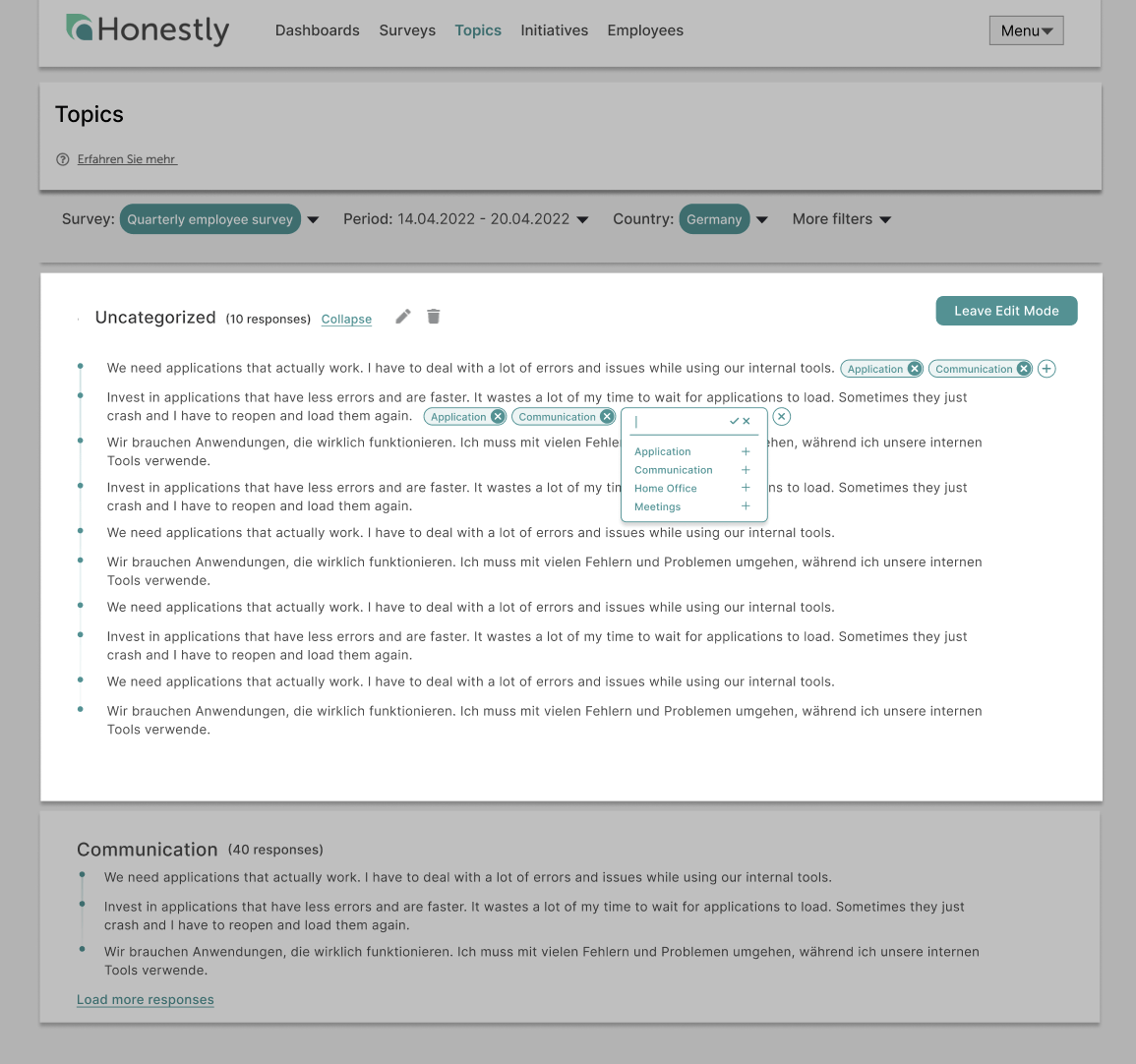
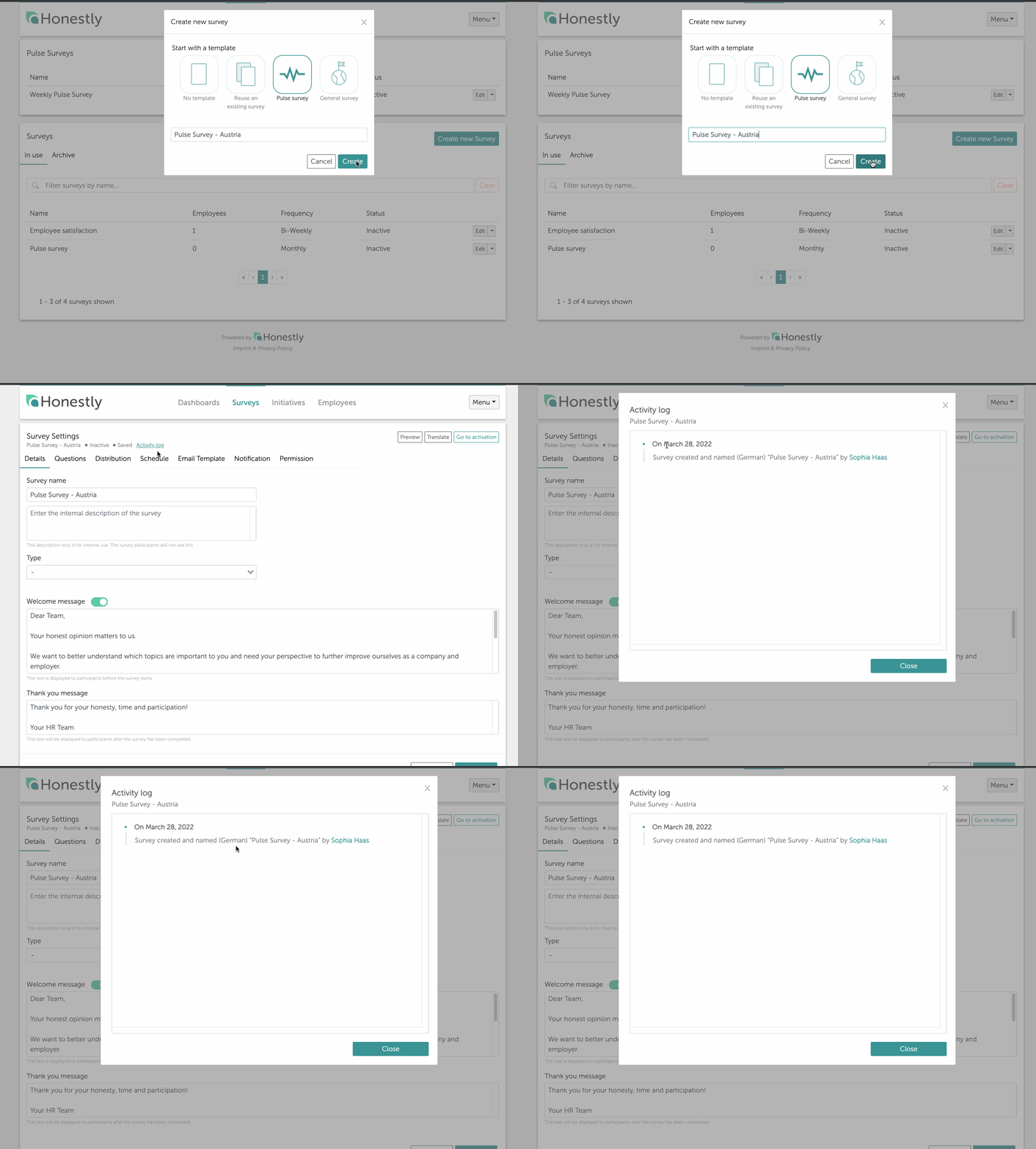
19 December 2022 — External Benchmark DataAs an addition to the internal benchmarking, which you can already use flexibly in the Honestly system, we now also offer external benchmark data for our new Honestly Engagement concept.Compare your key figures with other companies from the financial sector, industry, the service sector or others and gain valuable insights for your company.In future, just contact us and we’ll be happy to send you the benchmark data best-suited to your company.19 December 2022 — Honestly Engagement Solution™Would you like to have a validated insight into your business? Simply use our newly developed and scientifically validated Honestly Engagement Solution™ - a fully comprehensive concept for direct implementation.With the help of our large Honestly Engagement Survey and the Honestly Pulse Survey, you are now optimally equipped to collect valid data on the satisfaction of your employees and to continuously develop your corporate culture!Our new concept is based on the JDR model (Job-Demands-Resources-Model) and describes the connection between characteristics of the work task, the situation at the workplace and the well-being of the employees.Find out more here.4 October 2022 — Question numbering in survey editorHave you ever been in the middle of creating a survey, only to realize that you are not sure if you have created all questions or make sure they were in order? If so, you’ll be happy to know that we now offer automated question numbering in the survey editor and show the count of questions.Automated question numbering streamlines the survey creation process, making it easy to keep track of your questions and ensure they are in the correct order. IUsing automated question numbering in your surveys will help you create surveys quickly and accurately, so you can get the responses you need without worrying about the details of numbering and organization.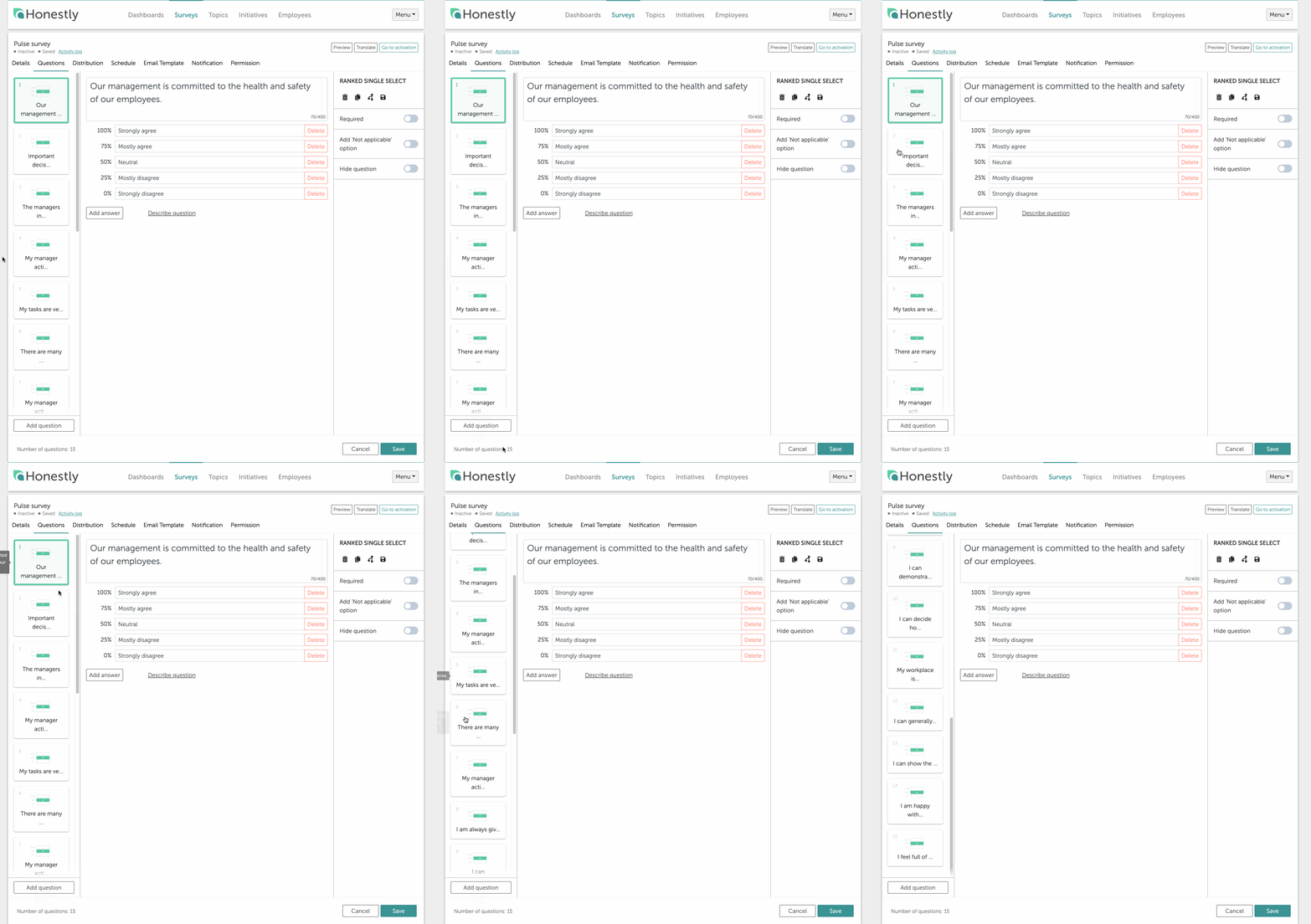
2021
2021
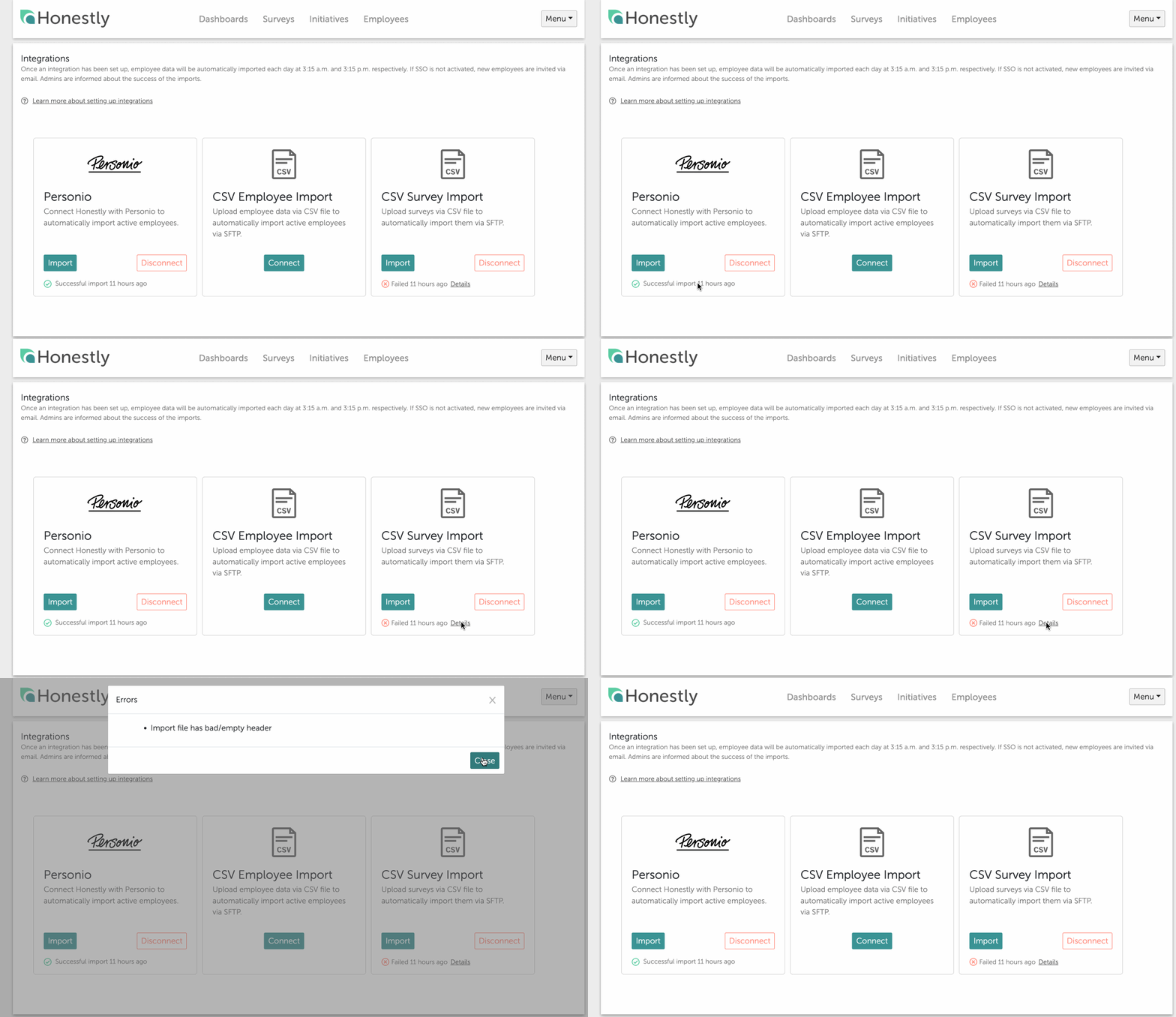
15 November 2021 — Surveys can now be duplicated or updated via a CSV fileWith the survey import surveys can be newly created, updated and recipients can be added and removed automatically.Find more details in this guide18 October 2021 — User rights are now managed on Employee pageWe got a lot of Feedback to have only one page to manage all employees. In the future you can manage all rights and roles under employees.Read this guide and save valuable time.13 October 2021 — New Integration page + Personio APIWe know what a hassle it is to keep multiple tools up to date, track status changes of your employees in your main HR-Management Solution and also keep them updated in the Honestly Application.We constantly add new integrations and we are super happy to receive feedback from you about the next solution we should integrate with.Read this guide and save valuable time.1 September 2021 — New SSO InterfaceNow it is possible for the role Admin to configure and change the SSO options on is`s own.Read this guide and save valuable time.13 August 2021 — Archive surveysYou may come to a point where you have a long list of surveys in your account, only a handful of which you are currently actively using. In order to tidy the space without losing any of the data you have collected, you can archive the surveys.Read this guide and save valuable time.8 July 2021 — New Role Report viewerReport viewer: Can only see isolated results and are not allowed to export any Data ( dashboard is assigned to them, they have permissions on the employee group)Read this guide and save valuable time.14 June 2021 — Dashboard TranslationWith the new dashboard and chart translation feature, you can now quickly and easily assign dashboard and chart titles and translate existing titles into other languages.
Read this guide and save valuable time.15 March 2021 — Hide Questions in a SurveyImagine the following scenario. You’ve set up a rather general recurring survey while also being in the process of enabling the workforce to work from home.Now, after having successfully completed the transition to remote work, you would like to keep the survey going, whereas the questions about working remotely have become irrelevant for the moment.Instead of creating a new survey omitting the irrelevant questions, you can now simply hide the questions you would like to exclude for the next survey cycle and keep everything else the same.Click here and check out how it works.15 March 2021 — Survey Details: Welcome and Goodbye MessageYou can now activate a welcome screen for custom surveys. Utilize the message displayed there to set the proper context for the survey and help your employees get in the right mindset to give relevant answers that yield the most insight.Further, you can adjust the message that is shown to respondents when they completed a survey. Personalize a thank you message for participating, and let ‘em know you mean it!We’ll get you started with this article.15 March 2021 — Customise Visibility of QuestionsAt times, a few questions in a globally sent out survey are only relevant to one or two groups of employees. In such cases, you can now define by employee group whether an individual question is shown to the employee or not.Find out how it’s done right here.15 March 2021 — Open Answer to Open Choice QuestionsIn single- or multi-select questions, sometimes the most-fitting answer is just not available. Now, you can enable an open answer option to those questions. This way, respondents can use their own words to give the answer they find most appropriate to a given question.Read this and allow open answers now.3 February 2021 — Digital OnboardingIt’s been a while since your last survey and you’d like to catch up on how to use Honestly properly? You aim to use Honestly in a more agile way, but are worried about the effort involved in onboarding more users?We’ve developed a digital guide that will help you (and your colleagues) send your first survey with ease. Click here to get to the onboarding.
Read this guide and save valuable time.15 March 2021 — Hide Questions in a SurveyImagine the following scenario. You’ve set up a rather general recurring survey while also being in the process of enabling the workforce to work from home.Now, after having successfully completed the transition to remote work, you would like to keep the survey going, whereas the questions about working remotely have become irrelevant for the moment.Instead of creating a new survey omitting the irrelevant questions, you can now simply hide the questions you would like to exclude for the next survey cycle and keep everything else the same.Click here and check out how it works.15 March 2021 — Survey Details: Welcome and Goodbye MessageYou can now activate a welcome screen for custom surveys. Utilize the message displayed there to set the proper context for the survey and help your employees get in the right mindset to give relevant answers that yield the most insight.Further, you can adjust the message that is shown to respondents when they completed a survey. Personalize a thank you message for participating, and let ‘em know you mean it!We’ll get you started with this article.15 March 2021 — Customise Visibility of QuestionsAt times, a few questions in a globally sent out survey are only relevant to one or two groups of employees. In such cases, you can now define by employee group whether an individual question is shown to the employee or not.Find out how it’s done right here.15 March 2021 — Open Answer to Open Choice QuestionsIn single- or multi-select questions, sometimes the most-fitting answer is just not available. Now, you can enable an open answer option to those questions. This way, respondents can use their own words to give the answer they find most appropriate to a given question.Read this and allow open answers now.3 February 2021 — Digital OnboardingIt’s been a while since your last survey and you’d like to catch up on how to use Honestly properly? You aim to use Honestly in a more agile way, but are worried about the effort involved in onboarding more users?We’ve developed a digital guide that will help you (and your colleagues) send your first survey with ease. Click here to get to the onboarding.
2020
2020
9 December 2020 — Roadmap 2021We have created a Roadmap ‘21 for you.Learn more in this presentation.1 December 2020 — Survey Participation RateYou can now create Graphs that display a survey’s participation rate.Check out the full article.25 November 2020 — New ExportsA dashboard of the Honestly Platform can now be exported into 3 different formats: Powerpoint (pptx), Excel (xlsx) and PDFFind out in the main article how easy it is.9 November 2020 — Honestly “Engage Everyone”Honestly offers several opportunities to participate in different surveys. Now we also offer employees without an e-mail address the possibility to participate in surveys using individual, but anonymized codes or information.Find out in the main article how you can survey all employees using QR code links.9 November 2020 — Internal BenchmarksGenerally, it can make sense to compare employees not only on a company level but also in a more granular way, for example on a location level.For this purpose, a new chart setting for heatmap and score charts is now available, allowing users to specify the internal comparison benchmark when configuring the chart. This is especially useful for accounts with many different users.Check out the main article here.9 November 2020 — Honestly’s AnonymityMaintaining the anonymity of the participating employees is essential to allow open feedback.Restrictions in the filter method and function, ensure that anonymity is maintained even with many and detailed filters.The anonymity limit is ensured by the functionality of the evaluation software, especially by the filters, and is not done manually. The anonymity limit for the evaluation is five answers per question and can only be viewed from this value.Check out the main article here.31 July 2020 — Auto Import of Your Employee Data Field usingCSV on SFTP now has a Health Check in place.Example:You have 3000 employees in your system. The threshold of your import is set to 10% when you are uploading a CSV with 1300 lines. As 1300 is smaller than 2700 (3000 - 10%), the import is not processed. Instead, an E-mail is sent to all admins, to support@ and to product@honestly.com.
You can change the file and reupload a new one with 3200 employees. This is normally triggered, as it is less than 10% larger than the previous.Once the upload is not within your range, you will receive the following E-mail:“Dear Honestly Customer,
you are receiving this E-mail because you are an Admin of (accountname’s) Honestly-System.
We hereby inform you, that the most recent import of the new employee base was not processed, as it failed the internal validation for integrity.
Your account right now holds (number employees) employees and the most recent file included number lines entries. This is an unexpectedly high difference which is why we stopped the import from processing.Please consult internally about this issue. If the file was correct from your side, please connect with your customer success agent to change the threshold of processing.
If the file was incorrect from your side, you can fix the issue and reupload. The automatic import Is still active and will process as normal.You will receive this E-mail again if the error persists.Thanks,
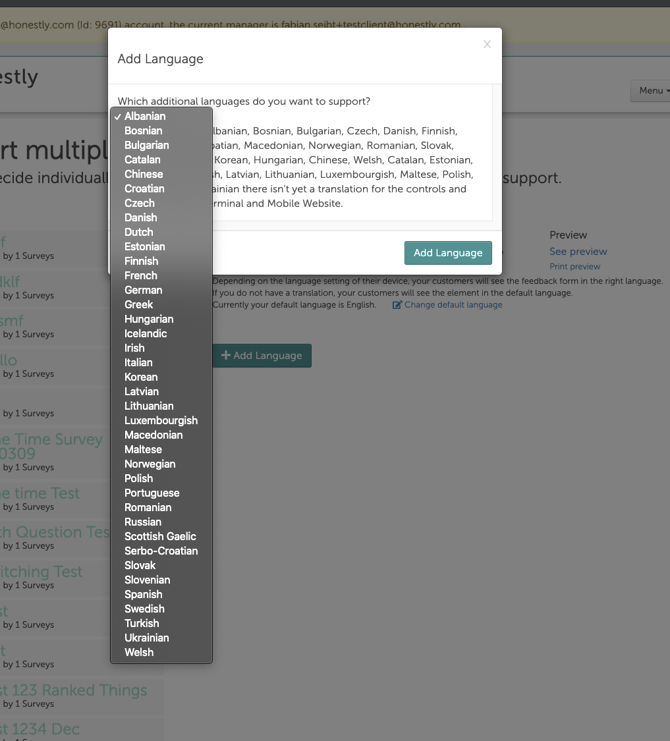
The Honestly Team”31 July 2020 — New LanguagesWe added 9 languages to our system:
You can change the file and reupload a new one with 3200 employees. This is normally triggered, as it is less than 10% larger than the previous.Once the upload is not within your range, you will receive the following E-mail:“Dear Honestly Customer,
you are receiving this E-mail because you are an Admin of (accountname’s) Honestly-System.
We hereby inform you, that the most recent import of the new employee base was not processed, as it failed the internal validation for integrity.
Your account right now holds (number employees) employees and the most recent file included number lines entries. This is an unexpectedly high difference which is why we stopped the import from processing.Please consult internally about this issue. If the file was correct from your side, please connect with your customer success agent to change the threshold of processing.
If the file was incorrect from your side, you can fix the issue and reupload. The automatic import Is still active and will process as normal.You will receive this E-mail again if the error persists.Thanks,
The Honestly Team”31 July 2020 — New LanguagesWe added 9 languages to our system:
- Scottish
- Polish
- Welsh
- Turkish
- Danish
- Chinese
- Estonia
- Latvian
-
Lithuanian