

Where to find the Activity log
1. In the drop-down menu on the right of the survey’s name in the “Survey” section: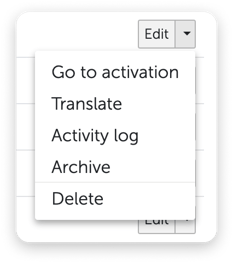

This feature has to be booked
The Activity log is a bookable feature. Your account needs Survey Activity Log for it. If it is not booked, Activity log either does not appear in the menu at all or — if a trial is available for your account — appears with a yellow trial icon. Clicking it then opens the trial information instead of the log.Who is allowed to see the Activity log
Only people who belong to the same account as the survey have access. There is no cross-account access to activity logs.There is no separate permission for the Activity log. Anyone who can access a survey can also read its Activity log. You set the Access to all employee data permission when editing a person under Employees. See Rights & roles for more.
These changes are logged
- Survey created — with its name and, where applicable, the survey template it was derived from
- Survey name changed, with the old and the new name
- Survey activated — now or on a scheduled date
- Survey deactivated — now or on a scheduled date
- Last survey period extended
- Survey archived
- Survey restored
- Survey recipient added or removed
- All employees added or removed as survey recipients
- All employees with a given attribute and attribute option added or removed as survey recipients
- Access granted to or removed from a person
- Option of a survey property added or removed
- Survey banner uploaded or deleted
And in the Activity log they look like this
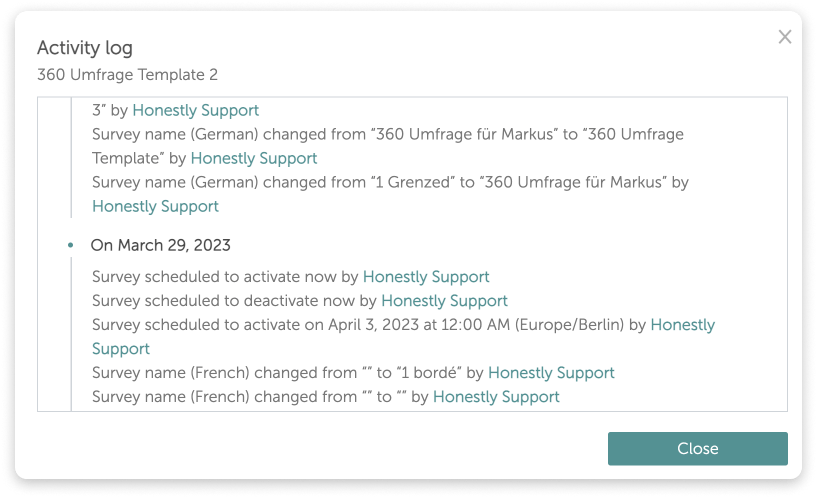
- The date of the change — deliberately without a time of day, for privacy reasons. The date follows the time zone of the person reading the log.
- The description of the change, including the names and values affected.
- The author. For employees in your account the name is an email link, so you can ask them directly.
- “Honestly Support” for any change made by the Honestly team
- “Integration” for changes coming from the CSV Survey Import via SFTP
- the name followed by “(external reviewer)” for external people reviewing survey translations
- “Deleted Employee” if the person has since been removed from your account
What is not logged
The Activity log records changes to the survey’s set-up. It is not an audit log for the whole account. It does not record:- changes to questions, answer options and texts in the survey editor
- changes to email templates and invitation texts
- logins and logouts in the webapp
- access to results and dashboards, or exports
- changes to employee data and to roles
- who took part in the survey and how they answered — that stays anonymous
How far the log goes back
- There is no automatic deletion period. Entries are not removed after a certain time.
- This feature was released on 16.03.22, so no changes from before this date are included.