How can I inform employees that a survey has ended and its data can be viewed?
You may wish to inform all those with access to the survey that it has ended and the data is now available. This can be done by the system automatically, all you have to do is activate the feature!
Go to Surveys ↗ · Opens the webapp — please log in firstIf you are either an admin or a manager, you can enable this feature in the survey editor. Just follow these steps:1. In the “Notifications” part of the survey editor, you will see the following toggle:2. Please activate it and save your changes too.
A dashboard displaying the data of this survey needs to be created so that once the users log in to view the results, there is actually something to see!
This will mean that if the survey closes within its cycle or expires, an email notification will automatically be sent to all users with access to its data. They can then log in and analyse the data.
The notification only reaches people who have access to the results. Anyone whose only role is Respondee, or who has no user account at all, does not receive the email, because there is no dashboard for them to open.
In the following cases, employees will receive the “Results available” notification:
If the employee has been given direct permission to a survey in the permission section of the survey editor or in the employee page.
If the option “All directly assigned survey recipients gain access to all results of the survey” is active (this is a toggle in the permission section of the survey editor) and
All currently assigned survey recipients (in the recipient list, but excluding respondees).
If the employees have access to a survey property used in this survey (they were given access to this property on the employee page).
Employees have been given access to all employee data on the employee page or are admins
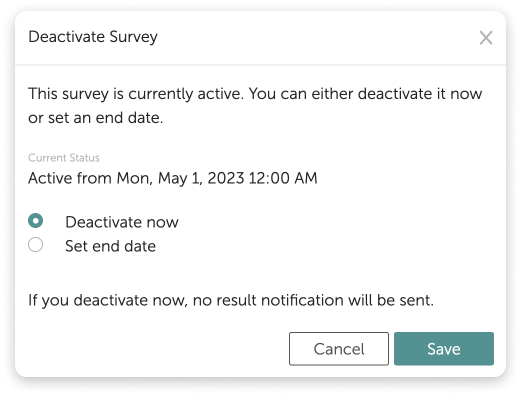
In the above situations, the email will always be sent, even if no results are visible. The email will be sent as soon as the survey ends (closes within its cycle, is deactivated, or expires), independent of how many responses have been given.If on the other handthe “reportsTo” structure is used in the account and employees only see the results of those reporting to themAs soon as just one response in these cases is received, an email will be sent.The activation window of the survey editor will remind you that the feature is active and maybe more importantly still, the deactivation window will inform you that the feature is active so if you deactivate the survey, you will trigger the emails to be sent.In case you need to make changes to the schedule section of the survey editor and need to temporarily deactivate the survey using the “deactivate now” function, this will not trigger the emails.The email which is sent will then look something like this:Even if various surveys have ended at this time, only one email notification (listing all of them) will be sent.



 Even if various surveys have ended at this time, only one email notification (listing all of them) will be sent.