

Let the system do it
In most cases you do not need to prepare anything. Add an Age Category column and a Seniority column to your employee file, each holding a four-digit year — the year of birth and the year the person joined — and Honestly derives the groups itself. The bands it creates are fixed:- Age Category — < 20, 20-29, 30-39, 40-49, 50-59, 60+
- Seniority — < 5, 05-09, 10-14, 15-19, 20-24, 25-29, 30-34, 35-39, 40-44, 45+
If you need bands of your own
The built-in bands cannot be changed. If you want different cut-offs — for example to separate the first year from the first three — prepare the groups yourself in Excel and import them as an ordinary attribute column. Once the file is set up, you only add new employees and it stays current. This example uses tenure with four bands of our own: under 1 year, 1-3 years, 4-10 years and more than 10 years. Keep the source data on a second sheet so the file stays readable. Sheet A holds all employee information, sheet B the working columns.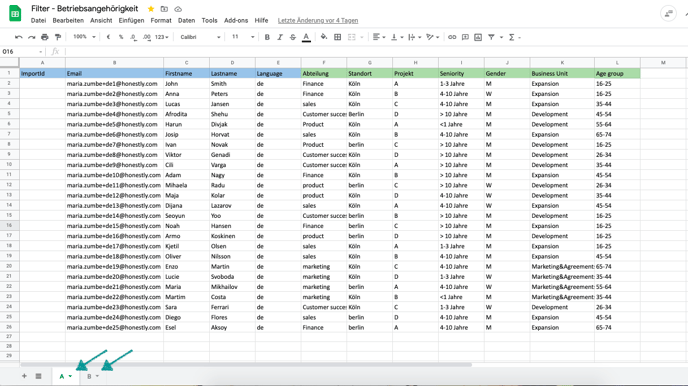
=INT((TODAY()-G2)/365)
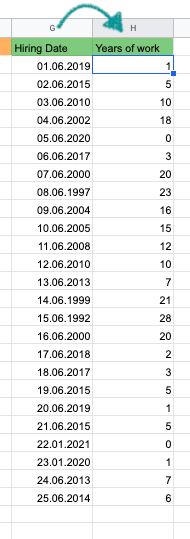
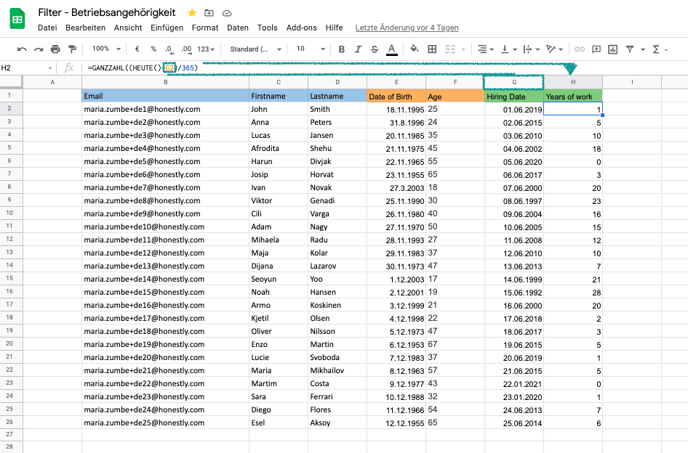
=IF(B!H2<1,"<1 year",IF(B!H2<3,"1-3 years",IF(B!H2<11,"4-10 years",IF(B!H2>10,"> 10 years"))))
- B is the sheet your working data is on
- H is the column holding the number of years on sheet B
- The text in quotation marks is what you will see as a filter value in the dashboard
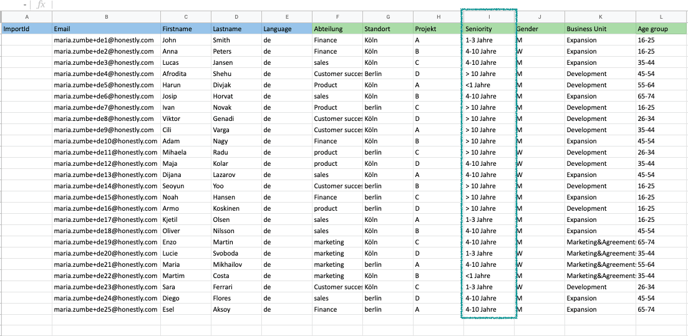
Excel function names and argument separators depend on the language your Excel runs in. In a German Excel the same formulas read
=GANZZAHL((HEUTE()-G2)/365) and =WENN(...;...;...) with semicolons.