With this article, you can create your own Company Templates so employees can use them when creating a new survey.
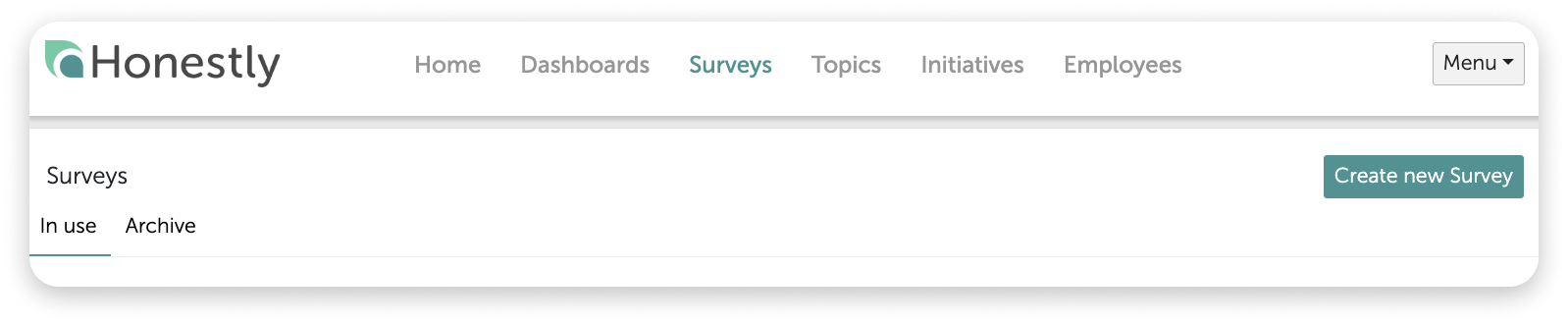
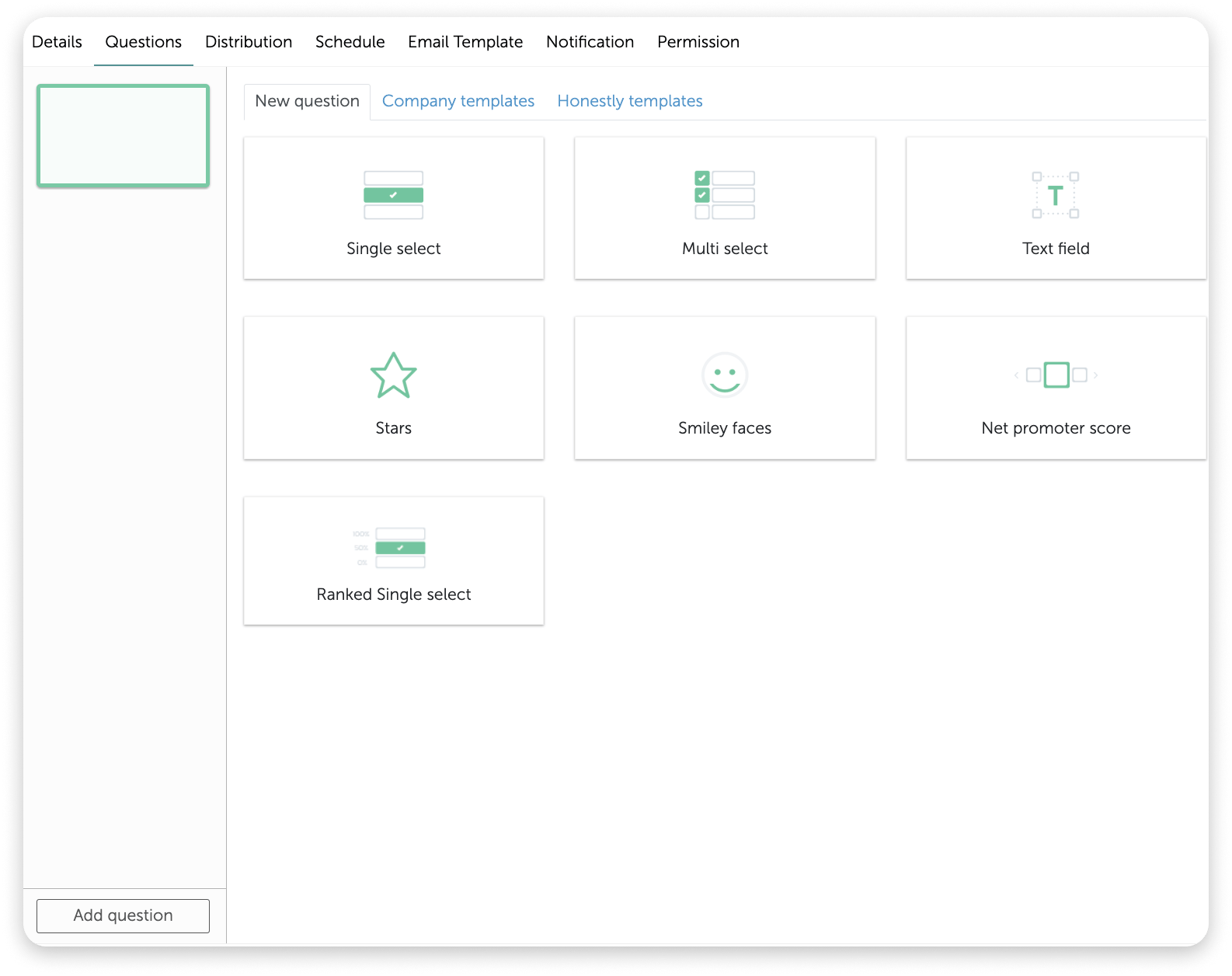
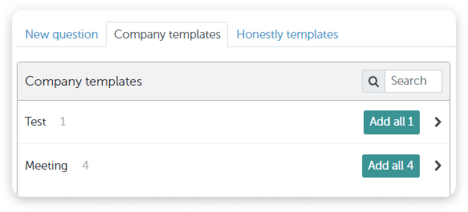
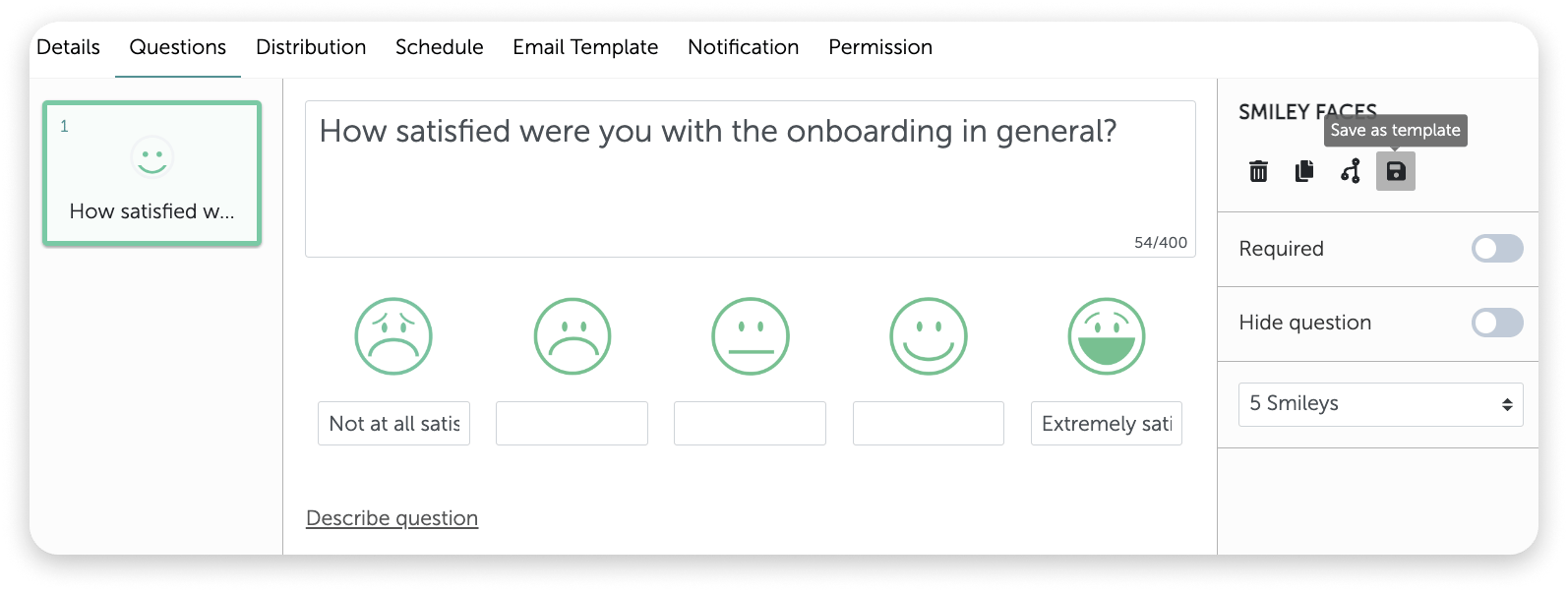
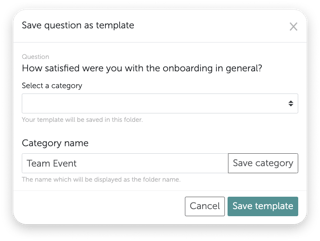
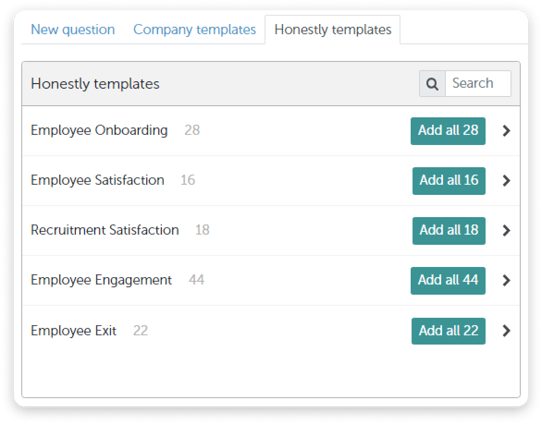
Go to Surveys ↗ · Opens the webapp — please log in firstOnly Admins and Managers can create company templates. Once saved, they apply account-wide: every admin and manager in the account can use them when creating a new survey.1. Firstly, go to “Surveys” and click on “Create new survey” :2. Once you have given your survey a name and a description (optional), you will move on to the “Questions” and you will have 3 possibilities:3. Create your own “New question ”4. Use “Company templates ”How to create Company templates:1. When you create a new question, you can save this as a company template.2. This window will open where you first need to enter a category (topic) for example “Team Events” :Caution:
First save the category and then the template!
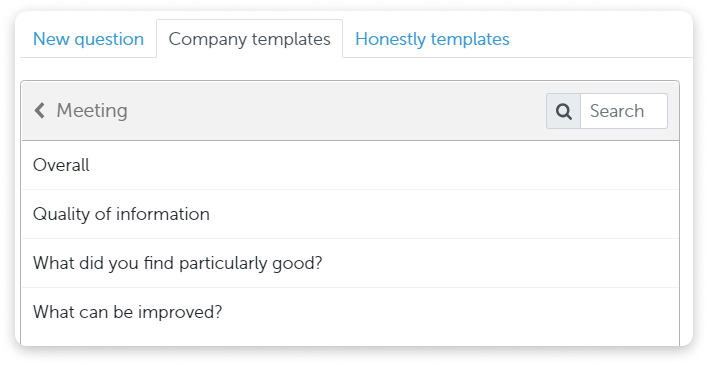
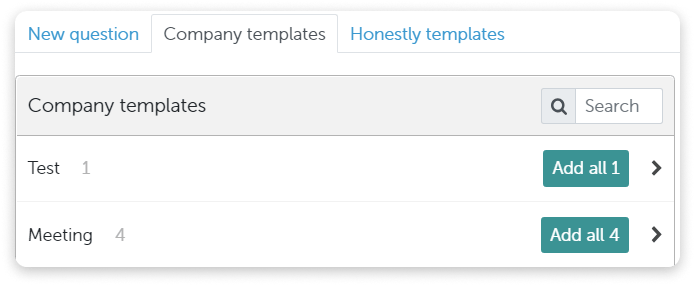
3. Once a question has been saved as a template, it can be chosen individually or a group of questions can be selected by clicking “Add all…” as below:4. Use our “Honestly templates ”5. Again you can either choose to use individual questions or whole questionnaires from the list.
{"docsConfig":{"theme":"mint","$schema":"https://mintlify.com/docs.json","name":"Honestly","colors":{"primary":"#2b7a73","light":"#5cb0a7","dark":"#1f5f59"},"logo":{"light":"https://mintcdn.com/honestly/BkkEjewk45IYUeOR/images/logo/honestly.svg?fit=max\u0026auto=format\u0026n=BkkEjewk45IYUeOR\u0026q=85\u0026s=fb54c4a490fa7945fcc35f39206832ce","dark":"https://mintcdn.com/honestly/BkkEjewk45IYUeOR/images/logo/honestly-white.svg?fit=max\u0026auto=format\u0026n=BkkEjewk45IYUeOR\u0026q=85\u0026s=6656c4b3a53579344ed0ef1d1ace7bca"},"favicon":"https://mintcdn.com/honestly/B-Ykoogmlc4ptiuo/favicon.svg?fit=max\u0026auto=format\u0026n=B-Ykoogmlc4ptiuo\u0026q=85\u0026s=fc4c58d62e70454736c56887117d27cd","footer":{"socials":{"website":"https://www.honestly.com"}},"fonts":{"heading":{"family":"Bricolage Grotesque"},"body":{"family":"Hanken Grotesk"}},"styling":{"latex":false},"navigation":{"languages":[{"language":"en","navbar":{"links":[{"href":"https://share.hsforms.com/1OdBSP16kRFmVS8Q-XaKEeA2b9g8","label":"Contact support"}],"primary":{"type":"button","label":"Go to Honestly","href":"https://webapp.honestly.de/"}},"href":""},{"language":"de","navbar":{"links":[{"href":"https://share.hsforms.com/1j0iwk_7BQt-obdHPoiqzcQ2b9g8","label":"Support kontaktieren"}],"primary":{"type":"button","label":"Zu Honestly","href":"https://webapp.honestly.de/"}},"href":"de"}]}},"deployment":{"deploymentMetadataValue":{"subdomain":"honestly","hasAudioNarration":false,"actualSubdomain":"honestly","customDomains":["help.honestly.com"],"gitSource":{"type":"github","owner":"honestly-com","repo":"docs","deployBranch":"main","contentDirectory":"","isPrivate":true,"mountPath":"","label":""},"chroma":{"collectionId":"b1905c30-b38b-43a2-b14c-1b1be854a6f1","liveDeploymentHistoryId":"6ad098f08af906685703d238","schemaVersion":"v3","latestBuiltDeploymentHistoryId":"6ad098f08af906685703d238"},"feedback":{"thumbs":true,"agentFeedback":false},"entitlements":{"AI_CHAT":{"status":"DISABLED"}},"buildId":"6ad098f08af906685703d238","clientVersion":"0.0.3894","searchFilterCounts":[{"language":"de","tag":"Using Honestly","count":156},{"language":"en","tag":"Using Honestly","count":155},{"language":"de","tag":"Feedback erfassen","count":53},{"language":"en","tag":"Collecting feedback","count":53},{"language":"de","tag":"Umfragen","count":44},{"language":"en","tag":"Surveys","count":44},{"language":"de","tag":"Auswerten \u0026 handeln","count":35},{"language":"en","tag":"Analyze \u0026 act","count":35},{"language":"de","tag":"Verwaltung","count":33},{"language":"en","tag":"Administration","count":33},{"language":"de","tag":"Dashboard","count":30},{"language":"en","tag":"Dashboard","count":30},{"language":"de","tag":"Grundlagen","count":18},{"language":"de","tag":"Mitarbeitende","count":18},{"language":"en","tag":"Employees","count":18},{"language":"de","tag":"Hilfe \u0026 Updates","count":17},{"language":"en","tag":"Getting started","count":17},{"language":"en","tag":"Help \u0026 updates","count":17},{"language":"de","tag":"FAQ","count":16},{"language":"default","tag":"Developers","count":16},{"language":"default","tag":"Developer docs","count":16},{"language":"en","tag":"FAQ","count":16},{"language":"default","tag":"API Reference","count":11},{"language":"default","tag":"Core Concepts","count":3},{"language":"default","tag":"Get Started","count":2}]},"assistantConfig":{"enableAskAiButton":false,"enableStarterQuestions":false,"enableContextualStarterQuestions":false,"enableAskAiSearchBar":true},"hasChatPermissions":false,"hasWebMcpPermissions":false,"toggles":[{"name":"kill-isr","enabled":true,"variant":{"name":"disabled","enabled":false,"feature_enabled":true},"impressionData":false},{"name":"agent-mintlify-slack","enabled":true,"variant":{"name":"disabled","enabled":false,"feature_enabled":true},"impressionData":false},{"name":"editor-v7-file-tree","enabled":true,"variant":{"name":"disabled","enabled":false,"feature_enabled":true},"impressionData":false},{"name":"agent-integrations-settings","enabled":true,"variant":{"name":"disabled","enabled":false,"feature_enabled":true},"impressionData":false},{"name":"automations-pr-grouping","enabled":true,"variant":{"name":"disabled","enabled":false,"feature_enabled":true},"impressionData":false},{"name":"custom-prefix","enabled":true,"variant":{"name":"disabled","enabled":false,"feature_enabled":true},"impressionData":false},{"name":"analytics-v7","enabled":true,"variant":{"name":"disabled","enabled":false,"feature_enabled":true},"impressionData":false},{"name":"user-flows-analytics","enabled":true,"variant":{"name":"disabled","enabled":false,"feature_enabled":true},"impressionData":false},{"name":"no-publish-flow","enabled":true,"variant":{"name":"disabled","enabled":false,"feature_enabled":true},"impressionData":false},{"name":"workos-onboarding","enabled":true,"variant":{"name":"disabled","enabled":false,"feature_enabled":true},"impressionData":false},{"name":"llms-txt-v2","enabled":true,"variant":{"name":"disabled","enabled":false,"feature_enabled":true},"impressionData":false},{"name":"pause-universal-search-reconcile","enabled":true,"variant":{"name":"disabled","enabled":false,"feature_enabled":true},"impressionData":false},{"name":"snapshot-serving-live","enabled":true,"variant":{"name":"disabled","enabled":false,"feature_enabled":true},"impressionData":false},{"name":"stripTemperatureMiddleware","enabled":true,"variant":{"name":"disabled","enabled":false,"feature_enabled":true},"impressionData":false},{"name":"per-site-search-delta","enabled":true,"variant":{"name":"disabled","enabled":false,"feature_enabled":true},"impressionData":false},{"name":"support-platform-pylon-zendesk","enabled":true,"variant":{"name":"disabled","enabled":false,"feature_enabled":true},"impressionData":false},{"name":"editor-branches-v2-autocommit","enabled":true,"variant":{"name":"disabled","enabled":false,"feature_enabled":true},"impressionData":false},{"name":"editor-branches-v2","enabled":true,"variant":{"name":"disabled","enabled":false,"feature_enabled":true},"impressionData":false},{"name":"snapshot-serving","enabled":true,"variant":{"name":"disabled","enabled":false,"feature_enabled":true},"impressionData":false},{"name":"instant-rollback","enabled":true,"variant":{"name":"disabled","enabled":false,"feature_enabled":true},"impressionData":false},{"name":"granular-notifications-server","enabled":true,"variant":{"name":"disabled","enabled":false,"feature_enabled":true},"impressionData":false},{"name":"granular-notifications","enabled":true,"variant":{"name":"disabled","enabled":false,"feature_enabled":true},"impressionData":false},{"name":"editor-private-page-search","enabled":true,"variant":{"name":"disabled","enabled":false,"feature_enabled":true},"impressionData":false},{"name":"automations-fable","enabled":true,"variant":{"name":"disabled","enabled":false,"feature_enabled":true},"impressionData":false},{"name":"fixed-ai-action-pricing","enabled":true,"variant":{"name":"disabled","enabled":false,"feature_enabled":true},"impressionData":false},{"name":"automation-resolve-merge-conflict","enabled":true,"variant":{"name":"disabled","enabled":false,"feature_enabled":true},"impressionData":false},{"name":"scoped-publishing","enabled":true,"variant":{"name":"disabled","enabled":false,"feature_enabled":true},"impressionData":false},{"name":"mintql","enabled":true,"variant":{"name":"disabled","enabled":false,"feature_enabled":true},"impressionData":false},{"name":"page-level-analytics","enabled":true,"variant":{"name":"disabled","enabled":false,"feature_enabled":true},"impressionData":false},{"name":"teamspace","enabled":true,"variant":{"name":"disabled","enabled":false,"feature_enabled":true},"impressionData":false},{"name":"editor-version-history-v2","enabled":true,"variant":{"name":"disabled","enabled":false,"feature_enabled":true},"impressionData":false},{"name":"vite-origin","enabled":true,"variant":{"name":"disabled","enabled":false,"feature_enabled":true},"impressionData":false},{"name":"editor-nav-generations","enabled":true,"variant":{"name":"disabled","enabled":false,"feature_enabled":true},"impressionData":false},{"name":"workspace-projects","enabled":true,"variant":{"name":"disabled","enabled":false,"feature_enabled":true},"impressionData":false},{"name":"assistant-v5","enabled":true,"variant":{"name":"disabled","enabled":false,"feature_enabled":true},"impressionData":false},{"name":"byok-sep-25","enabled":true,"variant":{"name":"disabled","enabled":false,"feature_enabled":true},"impressionData":false},{"name":"revalidation-jwt","enabled":true,"variant":{"name":"disabled","enabled":false,"feature_enabled":true},"impressionData":false},{"name":"editor-agent-model-picker","enabled":true,"variant":{"name":"disabled","enabled":false,"feature_enabled":true},"impressionData":false},{"name":"client-snapshot-docs-config","enabled":true,"variant":{"name":"disabled","enabled":false,"feature_enabled":true},"impressionData":false},{"name":"hobby-abuse-scan","enabled":true,"variant":{"name":"disabled","enabled":false,"feature_enabled":true},"impressionData":false}],"privacy":{"consentBanner":{"enabled":true}},"isAtlas":false,"googleFontsInlined":true},"customCss":[{"filePath":"style.css","content":".month-count,.update-meta{margin-top:-.5rem;font-size:.8125rem;color:inherit;opacity:.6}.month-count{margin-top:-2.1rem;text-align:right}html[data-current-path$=\"/whats-new/highlights\"] li.toc-item[data-depth]:not([data-depth=\"0\"]){display:none}html[data-current-path$=\"/whats-new/highlights\"] .card h4{position:relative;margin-top:0;margin-bottom:0}html[data-current-path$=\"/whats-new/highlights\"] .card h4>div{position:static;order:1;display:flex;align-items:center;align-self:center}html[data-current-path$=\"/whats-new/highlights\"] .card h4 a{margin-left:.4rem}html[data-current-path$=\"/whats-new/highlights\"] .anchor-copied{margin-left:.4rem;align-self:center;font-size:.75rem;font-weight:400;color:inherit;opacity:.6;white-space:nowrap}"}],"page":{"pagePath":"help/surveys/question-templates","slug":"/help/surveys/question-templates","pageMetadata":{"title":"How do I use/create question templates?","sidebarTitle":"Question templates","description":"With this article, you can create your own Company Templates so employees can use them when creating a new survey.","keywords":["Honestly templates","save as template","template category","reuse questions","questionnaire template","question library"],"href":"/help/surveys/question-templates"},"description":{"compiledSource":"\"use strict\";\nconst {jsx: _jsx} = arguments[0];\nconst {useMDXComponents: _provideComponents} = arguments[0];\nfunction _createMdxContent(props) {\n const _components = {\n p: \"p\",\n ..._provideComponents(),\n ...props.components\n };\n return _jsx(_components.p, {\n children: \"With this article, you can create your own Company Templates so employees can use them when creating a new survey.\"\n });\n}\nfunction MDXContent(props = {}) {\n const {wrapper: MDXLayout} = {\n ..._provideComponents(),\n ...props.components\n };\n return MDXLayout ? _jsx(MDXLayout, {\n ...props,\n children: _jsx(_createMdxContent, {\n ...props\n })\n }) : _createMdxContent(props);\n}\nreturn {\n default: MDXContent\n};\n","frontmatter":{},"scope":{}},"pageType":"default","mdx":{"mdxSource":{"compiledSource":"\"use strict\";const{Fragment:_Fragment,jsx:_jsx,jsxs:_jsxs}=arguments[0];const{useMDXComponents:_provideComponents}=arguments[0];function _createMdxContent(props){const _components={a:`a`,li:`li`,p:`p`,strong:`strong`,ul:`ul`,..._provideComponents(),...props.components},{Heading,OptimizedImage}=_components;if(!Heading)_missingMdxReference(`Heading`,true);if(!OptimizedImage)_missingMdxReference(`OptimizedImage`,true);return _jsxs(_Fragment,{children:[_jsxs(_components.p,{children:[_jsx(_components.a,{href:`https://webapp.honestly.de/app#/surveys`,children:`Go to Surveys ↗`}),` · Opens the webapp — please log in first`]}),`\n`,_jsxs(_components.p,{children:[`Only `,_jsx(_components.strong,{children:`Admins`}),` and `,_jsx(_components.strong,{children:`Managers`}),` can create company templates. Once saved, they apply account-wide: every admin and manager in the account can use them when creating a new survey.`]}),`\n`,_jsxs(_components.p,{children:[`1. Firstly, go to `,_jsx(_components.strong,{children:`“Surveys”`}),` and click on `,_jsx(_components.strong,{children:`“Create new survey”`}),` :`]}),`\n`,_jsx(OptimizedImage,{src:`https://mintcdn.com/honestly/v8QEGCLIran8sb1T/images/2558b0587fdd.png?fit=max\u0026auto=format\u0026n=v8QEGCLIran8sb1T\u0026q=85\u0026s=64bae4a4f160974dad249055871c2d6a`,alt:``,\"data-og-width\":`1598`,width:`1598`,\"data-og-height\":`330`,height:`330`,\"data-path\":`images/2558b0587fdd.png`,\"data-optimize\":`true`,\"data-opv\":`3`,srcset:`https://mintcdn.com/honestly/v8QEGCLIran8sb1T/images/2558b0587fdd.png?w=280\u0026fit=max\u0026auto=format\u0026n=v8QEGCLIran8sb1T\u0026q=85\u0026s=4e8d98563f4a251b0b81d9093ccc2ef1 280w, https://mintcdn.com/honestly/v8QEGCLIran8sb1T/images/2558b0587fdd.png?w=560\u0026fit=max\u0026auto=format\u0026n=v8QEGCLIran8sb1T\u0026q=85\u0026s=5b1279f5423c427aa353f653928ce9c1 560w, https://mintcdn.com/honestly/v8QEGCLIran8sb1T/images/2558b0587fdd.png?w=840\u0026fit=max\u0026auto=format\u0026n=v8QEGCLIran8sb1T\u0026q=85\u0026s=091081836971fa990570f797abcad37a 840w, https://mintcdn.com/honestly/v8QEGCLIran8sb1T/images/2558b0587fdd.png?w=1100\u0026fit=max\u0026auto=format\u0026n=v8QEGCLIran8sb1T\u0026q=85\u0026s=5639e66c810890bb8cccde92fba52cde 1100w, https://mintcdn.com/honestly/v8QEGCLIran8sb1T/images/2558b0587fdd.png?w=1650\u0026fit=max\u0026auto=format\u0026n=v8QEGCLIran8sb1T\u0026q=85\u0026s=807160f71ad56f87555efe2f0593cdc5 1650w, https://mintcdn.com/honestly/v8QEGCLIran8sb1T/images/2558b0587fdd.png?w=2500\u0026fit=max\u0026auto=format\u0026n=v8QEGCLIran8sb1T\u0026q=85\u0026s=95349983ee3230584f8ff4a788f6654d 2500w`}),`\n`,_jsxs(_components.p,{children:[`2. Once you have given your survey a name and a description (optional), you will move on to the `,_jsx(_components.strong,{children:`“Questions”`}),` and you will have 3 possibilities:`]}),`\n`,_jsxs(_components.p,{children:[`3. Create your own “`,_jsx(_components.strong,{children:`New question`}),` ”`]}),`\n`,_jsx(OptimizedImage,{src:`https://mintcdn.com/honestly/MJJuN9_M5LZfDZvk/images/aecaad5bf5c1.png?fit=max\u0026auto=format\u0026n=MJJuN9_M5LZfDZvk\u0026q=85\u0026s=3fcfbedbddb7272522c63bc7a0c07074`,alt:``,\"data-og-width\":`1586`,width:`1586`,\"data-og-height\":`1256`,height:`1256`,\"data-path\":`images/aecaad5bf5c1.png`,\"data-optimize\":`true`,\"data-opv\":`3`,srcset:`https://mintcdn.com/honestly/MJJuN9_M5LZfDZvk/images/aecaad5bf5c1.png?w=280\u0026fit=max\u0026auto=format\u0026n=MJJuN9_M5LZfDZvk\u0026q=85\u0026s=0e174d86f2f188dafce027e7bfcf563b 280w, https://mintcdn.com/honestly/MJJuN9_M5LZfDZvk/images/aecaad5bf5c1.png?w=560\u0026fit=max\u0026auto=format\u0026n=MJJuN9_M5LZfDZvk\u0026q=85\u0026s=153511edd3a7de08add4faa029c5532d 560w, https://mintcdn.com/honestly/MJJuN9_M5LZfDZvk/images/aecaad5bf5c1.png?w=840\u0026fit=max\u0026auto=format\u0026n=MJJuN9_M5LZfDZvk\u0026q=85\u0026s=99032ad2aef735bc07dc10d142742644 840w, https://mintcdn.com/honestly/MJJuN9_M5LZfDZvk/images/aecaad5bf5c1.png?w=1100\u0026fit=max\u0026auto=format\u0026n=MJJuN9_M5LZfDZvk\u0026q=85\u0026s=efaa52132d29a2198c88f52f9b91ce63 1100w, https://mintcdn.com/honestly/MJJuN9_M5LZfDZvk/images/aecaad5bf5c1.png?w=1650\u0026fit=max\u0026auto=format\u0026n=MJJuN9_M5LZfDZvk\u0026q=85\u0026s=9ccec6c59137307deb1c9a81ac98c230 1650w, https://mintcdn.com/honestly/MJJuN9_M5LZfDZvk/images/aecaad5bf5c1.png?w=2500\u0026fit=max\u0026auto=format\u0026n=MJJuN9_M5LZfDZvk\u0026q=85\u0026s=ed66434fc3278899419ad2f3c21e1734 2500w`}),`\n`,_jsxs(_components.p,{children:[`4. Use “`,_jsx(_components.strong,{children:`Company templates`}),` ”`]}),`\n`,_jsx(OptimizedImage,{src:`https://mintcdn.com/honestly/BkkEjewk45IYUeOR/images/f9765f2f55c1.png?fit=max\u0026auto=format\u0026n=BkkEjewk45IYUeOR\u0026q=85\u0026s=0905a5f9e84e7807610fe5252a3f1f42`,alt:``,\"data-og-width\":`468`,width:`468`,\"data-og-height\":`212`,height:`212`,\"data-path\":`images/f9765f2f55c1.png`,\"data-optimize\":`true`,\"data-opv\":`3`,srcset:`https://mintcdn.com/honestly/BkkEjewk45IYUeOR/images/f9765f2f55c1.png?w=280\u0026fit=max\u0026auto=format\u0026n=BkkEjewk45IYUeOR\u0026q=85\u0026s=ff74d94307427d1fbbf20101ede155b8 280w, https://mintcdn.com/honestly/BkkEjewk45IYUeOR/images/f9765f2f55c1.png?w=560\u0026fit=max\u0026auto=format\u0026n=BkkEjewk45IYUeOR\u0026q=85\u0026s=870ea36ffcb52b9f2061332b58a61218 560w, https://mintcdn.com/honestly/BkkEjewk45IYUeOR/images/f9765f2f55c1.png?w=840\u0026fit=max\u0026auto=format\u0026n=BkkEjewk45IYUeOR\u0026q=85\u0026s=b446113e3e8ec942d98016480c1fc182 840w, https://mintcdn.com/honestly/BkkEjewk45IYUeOR/images/f9765f2f55c1.png?w=1100\u0026fit=max\u0026auto=format\u0026n=BkkEjewk45IYUeOR\u0026q=85\u0026s=da1ce57dfc18a8fe44f522b2295fc569 1100w, https://mintcdn.com/honestly/BkkEjewk45IYUeOR/images/f9765f2f55c1.png?w=1650\u0026fit=max\u0026auto=format\u0026n=BkkEjewk45IYUeOR\u0026q=85\u0026s=be8836eaa69966eaae1d8b7bfd1dfa59 1650w, https://mintcdn.com/honestly/BkkEjewk45IYUeOR/images/f9765f2f55c1.png?w=2500\u0026fit=max\u0026auto=format\u0026n=BkkEjewk45IYUeOR\u0026q=85\u0026s=321c84339a081728c4c9c5ceb44ded78 2500w`}),`\n`,_jsx(_components.p,{children:_jsx(_components.strong,{children:`How to create Company templates:`})}),`\n`,_jsx(_components.p,{children:`1. When you create a new question, you can save this as a company template.`}),`\n`,_jsx(OptimizedImage,{src:`https://mintcdn.com/honestly/iyFkM6_8NJ4WWHPk/images/567e09105cfd.png?fit=max\u0026auto=format\u0026n=iyFkM6_8NJ4WWHPk\u0026q=85\u0026s=037bd5c568db9d717d08041d6e132f95`,alt:``,\"data-og-width\":`1594`,width:`1594`,\"data-og-height\":`602`,height:`602`,\"data-path\":`images/567e09105cfd.png`,\"data-optimize\":`true`,\"data-opv\":`3`,srcset:`https://mintcdn.com/honestly/iyFkM6_8NJ4WWHPk/images/567e09105cfd.png?w=280\u0026fit=max\u0026auto=format\u0026n=iyFkM6_8NJ4WWHPk\u0026q=85\u0026s=30a8994779562c465f27b4d50a139e8f 280w, https://mintcdn.com/honestly/iyFkM6_8NJ4WWHPk/images/567e09105cfd.png?w=560\u0026fit=max\u0026auto=format\u0026n=iyFkM6_8NJ4WWHPk\u0026q=85\u0026s=457fb5c3e7db341053353834ed702a9e 560w, https://mintcdn.com/honestly/iyFkM6_8NJ4WWHPk/images/567e09105cfd.png?w=840\u0026fit=max\u0026auto=format\u0026n=iyFkM6_8NJ4WWHPk\u0026q=85\u0026s=76e69531b729031566562b0d00b4da3a 840w, https://mintcdn.com/honestly/iyFkM6_8NJ4WWHPk/images/567e09105cfd.png?w=1100\u0026fit=max\u0026auto=format\u0026n=iyFkM6_8NJ4WWHPk\u0026q=85\u0026s=049be764bba3bd32df778af1482bf2d6 1100w, https://mintcdn.com/honestly/iyFkM6_8NJ4WWHPk/images/567e09105cfd.png?w=1650\u0026fit=max\u0026auto=format\u0026n=iyFkM6_8NJ4WWHPk\u0026q=85\u0026s=f378d2dc2a5df7d6db756862ae649868 1650w, https://mintcdn.com/honestly/iyFkM6_8NJ4WWHPk/images/567e09105cfd.png?w=2500\u0026fit=max\u0026auto=format\u0026n=iyFkM6_8NJ4WWHPk\u0026q=85\u0026s=227e8fe90bba3aaadc177ba521c3f64d 2500w`}),`\n`,_jsxs(_components.p,{children:[`2. This window will open where you first need to enter a category (topic) for example `,_jsx(_components.strong,{children:`“Team Events”`}),` :`]}),`\n`,_jsx(OptimizedImage,{src:`https://mintcdn.com/honestly/RC0S9r1e-n8nmUR8/images/937601345122.png?fit=max\u0026auto=format\u0026n=RC0S9r1e-n8nmUR8\u0026q=85\u0026s=9f92f340f640455fccf11df08d5e54b4`,alt:``,\"data-og-width\":`320`,width:`320`,\"data-og-height\":`241`,height:`241`,\"data-path\":`images/937601345122.png`,\"data-optimize\":`true`,\"data-opv\":`3`,srcset:`https://mintcdn.com/honestly/RC0S9r1e-n8nmUR8/images/937601345122.png?w=280\u0026fit=max\u0026auto=format\u0026n=RC0S9r1e-n8nmUR8\u0026q=85\u0026s=85889ffb384f3efec35dd5afd229ac48 280w, https://mintcdn.com/honestly/RC0S9r1e-n8nmUR8/images/937601345122.png?w=560\u0026fit=max\u0026auto=format\u0026n=RC0S9r1e-n8nmUR8\u0026q=85\u0026s=dcc6df78b2f1ce92fca842c12e78a1b4 560w, https://mintcdn.com/honestly/RC0S9r1e-n8nmUR8/images/937601345122.png?w=840\u0026fit=max\u0026auto=format\u0026n=RC0S9r1e-n8nmUR8\u0026q=85\u0026s=32c6ecb00045719e8fa6fe1d805c7884 840w, https://mintcdn.com/honestly/RC0S9r1e-n8nmUR8/images/937601345122.png?w=1100\u0026fit=max\u0026auto=format\u0026n=RC0S9r1e-n8nmUR8\u0026q=85\u0026s=2ec56cf05e3fd048839627a86368ea97 1100w, https://mintcdn.com/honestly/RC0S9r1e-n8nmUR8/images/937601345122.png?w=1650\u0026fit=max\u0026auto=format\u0026n=RC0S9r1e-n8nmUR8\u0026q=85\u0026s=1ff699320fed36386f92b25696d65ff5 1650w, https://mintcdn.com/honestly/RC0S9r1e-n8nmUR8/images/937601345122.png?w=2500\u0026fit=max\u0026auto=format\u0026n=RC0S9r1e-n8nmUR8\u0026q=85\u0026s=fd51d0cc236c1988fa3e74d829eccbfe 2500w`}),`\n`,_jsx(_components.p,{children:_jsx(_components.strong,{children:`Caution:`})}),`\n`,_jsxs(_components.ul,{children:[`\n`,_jsx(_components.li,{children:`First save the category and then the template!`}),`\n`]}),`\n`,_jsxs(_components.p,{children:[`3. Once a question has been saved as a template, it can be chosen individually or a group of questions can be selected by clicking `,_jsx(_components.strong,{children:`“Add all…”`}),` as below:`]}),`\n`,_jsx(OptimizedImage,{src:`https://mintcdn.com/honestly/pfDC0-M9Pz06l2cT/images/6f1ee7276f47.png?fit=max\u0026auto=format\u0026n=pfDC0-M9Pz06l2cT\u0026q=85\u0026s=3fb30b36f5e561634f8ada1023451aef`,alt:``,\"data-og-width\":`708`,width:`708`,\"data-og-height\":`365`,height:`365`,\"data-path\":`images/6f1ee7276f47.png`,\"data-optimize\":`true`,\"data-opv\":`3`,srcset:`https://mintcdn.com/honestly/pfDC0-M9Pz06l2cT/images/6f1ee7276f47.png?w=280\u0026fit=max\u0026auto=format\u0026n=pfDC0-M9Pz06l2cT\u0026q=85\u0026s=6d283eb57ebf32bf56eb3d34e9cf396b 280w, https://mintcdn.com/honestly/pfDC0-M9Pz06l2cT/images/6f1ee7276f47.png?w=560\u0026fit=max\u0026auto=format\u0026n=pfDC0-M9Pz06l2cT\u0026q=85\u0026s=bfbdc55f017a966a17f904da1abf2e3b 560w, https://mintcdn.com/honestly/pfDC0-M9Pz06l2cT/images/6f1ee7276f47.png?w=840\u0026fit=max\u0026auto=format\u0026n=pfDC0-M9Pz06l2cT\u0026q=85\u0026s=a773fc98c84d2912329effc3f3cbf49a 840w, https://mintcdn.com/honestly/pfDC0-M9Pz06l2cT/images/6f1ee7276f47.png?w=1100\u0026fit=max\u0026auto=format\u0026n=pfDC0-M9Pz06l2cT\u0026q=85\u0026s=61812980823e5211ccc8505b613216c6 1100w, https://mintcdn.com/honestly/pfDC0-M9Pz06l2cT/images/6f1ee7276f47.png?w=1650\u0026fit=max\u0026auto=format\u0026n=pfDC0-M9Pz06l2cT\u0026q=85\u0026s=e8cb8d36890a938a4d409c5f77c3d2f0 1650w, https://mintcdn.com/honestly/pfDC0-M9Pz06l2cT/images/6f1ee7276f47.png?w=2500\u0026fit=max\u0026auto=format\u0026n=pfDC0-M9Pz06l2cT\u0026q=85\u0026s=b302bcbfccc5a150e32433a8bd55fff5 2500w`}),`\n`,_jsx(OptimizedImage,{src:`https://mintcdn.com/honestly/iyFkM6_8NJ4WWHPk/images/6001c13c626a.png?fit=max\u0026auto=format\u0026n=iyFkM6_8NJ4WWHPk\u0026q=85\u0026s=7ef73e6c27a54fcc0052aa79e534885c`,alt:``,\"data-og-width\":`695`,width:`695`,\"data-og-height\":`286`,height:`286`,\"data-path\":`images/6001c13c626a.png`,\"data-optimize\":`true`,\"data-opv\":`3`,srcset:`https://mintcdn.com/honestly/iyFkM6_8NJ4WWHPk/images/6001c13c626a.png?w=280\u0026fit=max\u0026auto=format\u0026n=iyFkM6_8NJ4WWHPk\u0026q=85\u0026s=6c013c0c02206408833459516bafb85c 280w, https://mintcdn.com/honestly/iyFkM6_8NJ4WWHPk/images/6001c13c626a.png?w=560\u0026fit=max\u0026auto=format\u0026n=iyFkM6_8NJ4WWHPk\u0026q=85\u0026s=7e1bf119df292165c8d786953486ff8b 560w, https://mintcdn.com/honestly/iyFkM6_8NJ4WWHPk/images/6001c13c626a.png?w=840\u0026fit=max\u0026auto=format\u0026n=iyFkM6_8NJ4WWHPk\u0026q=85\u0026s=7c2957252247c66044bdef7bba90f92c 840w, https://mintcdn.com/honestly/iyFkM6_8NJ4WWHPk/images/6001c13c626a.png?w=1100\u0026fit=max\u0026auto=format\u0026n=iyFkM6_8NJ4WWHPk\u0026q=85\u0026s=7b80e20ed4b248b49583fa9082cffcb0 1100w, https://mintcdn.com/honestly/iyFkM6_8NJ4WWHPk/images/6001c13c626a.png?w=1650\u0026fit=max\u0026auto=format\u0026n=iyFkM6_8NJ4WWHPk\u0026q=85\u0026s=bc444e305dcc792b29d8c291be67267b 1650w, https://mintcdn.com/honestly/iyFkM6_8NJ4WWHPk/images/6001c13c626a.png?w=2500\u0026fit=max\u0026auto=format\u0026n=iyFkM6_8NJ4WWHPk\u0026q=85\u0026s=ae4400846b0ca900aa4d3c729814034a 2500w`}),`\n`,_jsxs(_components.p,{children:[`4. Use our “`,_jsx(_components.strong,{children:`Honestly templates`}),` ”`]}),`\n`,_jsx(OptimizedImage,{src:`https://mintcdn.com/honestly/VMRjyUj_k3T5egLO/images/c7fef11eb630.png?fit=max\u0026auto=format\u0026n=VMRjyUj_k3T5egLO\u0026q=85\u0026s=701febd5157072fb4da0dac4444eab20`,alt:``,\"data-og-width\":`542`,width:`542`,\"data-og-height\":`424`,height:`424`,\"data-path\":`images/c7fef11eb630.png`,\"data-optimize\":`true`,\"data-opv\":`3`,srcset:`https://mintcdn.com/honestly/VMRjyUj_k3T5egLO/images/c7fef11eb630.png?w=280\u0026fit=max\u0026auto=format\u0026n=VMRjyUj_k3T5egLO\u0026q=85\u0026s=4c84e9533a4acb30bfacf6c4c6a9f2f1 280w, https://mintcdn.com/honestly/VMRjyUj_k3T5egLO/images/c7fef11eb630.png?w=560\u0026fit=max\u0026auto=format\u0026n=VMRjyUj_k3T5egLO\u0026q=85\u0026s=26598da08ed22bf96d8d0d72e7913549 560w, https://mintcdn.com/honestly/VMRjyUj_k3T5egLO/images/c7fef11eb630.png?w=840\u0026fit=max\u0026auto=format\u0026n=VMRjyUj_k3T5egLO\u0026q=85\u0026s=b4d6cde9920e812d4514e30837582f42 840w, https://mintcdn.com/honestly/VMRjyUj_k3T5egLO/images/c7fef11eb630.png?w=1100\u0026fit=max\u0026auto=format\u0026n=VMRjyUj_k3T5egLO\u0026q=85\u0026s=45f2fcfff589a45ec572170779620d31 1100w, https://mintcdn.com/honestly/VMRjyUj_k3T5egLO/images/c7fef11eb630.png?w=1650\u0026fit=max\u0026auto=format\u0026n=VMRjyUj_k3T5egLO\u0026q=85\u0026s=a5a888a0646bf0dac432d5a42fecbc1e 1650w, https://mintcdn.com/honestly/VMRjyUj_k3T5egLO/images/c7fef11eb630.png?w=2500\u0026fit=max\u0026auto=format\u0026n=VMRjyUj_k3T5egLO\u0026q=85\u0026s=f871364a819c59c86e5fd5d5c69180e1 2500w`}),`\n`,_jsx(_components.p,{children:`5. Again you can either choose to use individual questions or whole questionnaires from the list.`}),`\n`,_jsx(Heading,{level:`3`,id:`related-articles`,children:`Related articles`}),`\n`,_jsxs(_components.ul,{children:[`\n`,_jsx(_components.li,{children:_jsx(_components.a,{href:`/help/surveys/create-new`,children:`How do I create a new survey?`})}),`\n`,_jsx(_components.li,{children:_jsx(_components.a,{href:`/help/surveys/custom-template`,children:`How do I create and use my own template?`})}),`\n`,_jsx(_components.li,{children:_jsx(_components.a,{href:`/help/surveys/group-by-dimensions`,children:`How to group questions by dimensions`})}),`\n`,_jsx(_components.li,{children:_jsx(_components.a,{href:`/help/faq/customize-survey`,children:`How to Customize Your Survey or Questionnaire Using Honestly Tool`})}),`\n`,_jsx(_components.li,{children:_jsx(_components.a,{href:`/help/engagement-concept/comparable-surveys`,children:`How Can I Create Comparable Surveys with the Honestly Engagement Survey™ or the Honestly Pulse Survey™?`})}),`\n`]})]})}function MDXContent(props={}){const{wrapper:MDXLayout}={..._provideComponents(),...props.components};return MDXLayout?_jsx(MDXLayout,{...props,children:_jsx(_createMdxContent,{...props})}):_createMdxContent(props)}return{default:MDXContent};function _missingMdxReference(id,component){throw new Error(`Expected `+(component?`component`:`object`)+\" `\"+id+\"` to be defined: you likely forgot to import, pass, or provide it.\")}","frontmatter":{},"scope":{"config":{},"pageMetadata":{"title":"How do I use/create question templates?","sidebarTitle":"Question templates","description":"With this article, you can create your own Company Templates so employees can use them when creating a new survey.","keywords":["Honestly templates","save as template","template category","reuse questions","questionnaire template","question library"],"href":"/help/surveys/question-templates"}}},"mdxSourceWithNoJs":null},"mdxExtracts":{"tableOfContents":[{"title":"Related articles","slug":"related-articles","depth":3,"children":[]}],"codeExamples":{}},"jsLinks":["/_mintlify/custom/honestly/2e40997da2022c0c/frank.js","/_mintlify/custom/honestly/828ee994b07ee804/language-redirect.js","/_mintlify/custom/honestly/a2c539a43086b1e9/highlight-anchor-copy.js"],"subdomain":"honestly","siteName":"Honestly","title":"How do I use/create question templates? - Honestly","navMaps":{"firstHrefInVersion":{},"firstHrefInLanguage":{"en":{"href":"/help/surveys/question-templates","matchLevel":0},"de":{"href":"/de/help/surveys/question-templates","matchLevel":1}}},"lastModified":"2026-09-23T16:00:50.414Z","originalFileLocation":"help/surveys/question-templates.mdx","locale":"en"},"headHtml":"\u003cmeta data-mint-head name=\"description\" content=\"With this article, you can create your own Company Templates so employees can use them when creating a new survey.\">\u003cmeta data-mint-head name=\"application-name\" content=\"Honestly\">\u003cmeta data-mint-head name=\"generator\" content=\"Mintlify\">\u003clink data-mint-head rel=\"icon\" type=\"image/png\" sizes=\"192x192\" href=\"/mintlify-assets/_mintlify/favicons/honestly/PsVfD-T-mbmayU-9/_generated/favicon/android-chrome-192x192.png\" media=\"(prefers-color-scheme: light)\">\u003clink data-mint-head rel=\"apple-touch-icon\" type=\"image/png\" sizes=\"180x180\" href=\"/mintlify-assets/_mintlify/favicons/honestly/PsVfD-T-mbmayU-9/_generated/favicon/apple-touch-icon.png\">\u003clink data-mint-head rel=\"icon\" type=\"image/png\" sizes=\"16x16\" href=\"/mintlify-assets/_mintlify/favicons/honestly/PsVfD-T-mbmayU-9/_generated/favicon/favicon-16x16.png\" media=\"(prefers-color-scheme: light)\">\u003clink data-mint-head rel=\"icon\" type=\"image/png\" sizes=\"32x32\" href=\"/mintlify-assets/_mintlify/favicons/honestly/PsVfD-T-mbmayU-9/_generated/favicon/favicon-32x32.png\" media=\"(prefers-color-scheme: light)\">\u003clink data-mint-head rel=\"shortcut icon\" type=\"image/x-icon\" href=\"/mintlify-assets/_mintlify/favicons/honestly/PsVfD-T-mbmayU-9/_generated/favicon/favicon.ico\" media=\"(prefers-color-scheme: light)\">\u003clink data-mint-head rel=\"icon\" type=\"image/png\" sizes=\"192x192\" href=\"/mintlify-assets/_mintlify/favicons/honestly/PsVfD-T-mbmayU-9/_generated/favicon-dark/android-chrome-192x192.png\" media=\"(prefers-color-scheme: dark)\">\u003clink data-mint-head rel=\"icon\" type=\"image/png\" sizes=\"16x16\" href=\"/mintlify-assets/_mintlify/favicons/honestly/PsVfD-T-mbmayU-9/_generated/favicon-dark/favicon-16x16.png\" media=\"(prefers-color-scheme: dark)\">\u003clink data-mint-head rel=\"icon\" type=\"image/png\" sizes=\"32x32\" href=\"/mintlify-assets/_mintlify/favicons/honestly/PsVfD-T-mbmayU-9/_generated/favicon-dark/favicon-32x32.png\" media=\"(prefers-color-scheme: dark)\">\u003clink data-mint-head rel=\"shortcut icon\" type=\"image/x-icon\" href=\"/mintlify-assets/_mintlify/favicons/honestly/PsVfD-T-mbmayU-9/_generated/favicon-dark/favicon.ico\" media=\"(prefers-color-scheme: dark)\">\u003cmeta data-mint-head property=\"og:title\" content=\"How do I use/create question templates? - Honestly\">\u003cmeta data-mint-head property=\"og:description\" content=\"With this article, you can create your own Company Templates so employees can use them when creating a new survey.\">\u003cmeta data-mint-head property=\"og:site_name\" content=\"Honestly\">\u003cmeta data-mint-head property=\"og:url\" content=\"https://help.honestly.com/help/surveys/question-templates\">\u003cmeta data-mint-head property=\"og:type\" content=\"website\">\u003cmeta data-mint-head name=\"twitter:card\" content=\"summary_large_image\">\u003cmeta data-mint-head name=\"twitter:title\" content=\"How do I use/create question templates? - Honestly\">\u003cmeta data-mint-head name=\"twitter:description\" content=\"With this article, you can create your own Company Templates so employees can use them when creating a new survey.\">\u003cmeta data-mint-head name=\"msapplication-config\" content=\"/mintlify-assets/_mintlify/favicons/honestly/PsVfD-T-mbmayU-9/_generated/favicon/browserconfig.xml\">\u003cmeta data-mint-head name=\"apple-mobile-web-app-title\" content=\"Honestly\">\u003cmeta data-mint-head name=\"msapplication-TileColor\" content=\"#2b7a73\">\u003clink data-mint-head rel=\"canonical\" href=\"https://help.honestly.com/help/surveys/question-templates\">\u003clink data-mint-head rel=\"alternate\" type=\"application/xml\" href=\"/sitemap.xml\">\u003clink data-mint-head rel=\"alternate\" type=\"text/markdown\" href=\"/help/surveys/question-templates.md\">\u003clink data-mint-head rel=\"alternate\" hreflang=\"en\" href=\"https://help.honestly.com/help/surveys/question-templates\">\u003clink data-mint-head rel=\"alternate\" hreflang=\"de\" href=\"https://help.honestly.com/de/help/surveys/question-templates\">\u003clink data-mint-head rel=\"alternate\" hreflang=\"x-default\" href=\"https://help.honestly.com/help/surveys/question-templates\">\u003cscript data-mint-head type=\"application/ld+json\">{\"@context\":\"https://schema.org\",\"@graph\":[{\"@type\":\"Organization\",\"@id\":\"https://help.honestly.com/#organization\",\"name\":\"Honestly\",\"url\":\"https://help.honestly.com\",\"logo\":{\"@type\":\"ImageObject\",\"url\":\"https://mintcdn.com/honestly/BkkEjewk45IYUeOR/images/logo/honestly.svg?fit=max\u0026auto=format\u0026n=BkkEjewk45IYUeOR\u0026q=85\u0026s=fb54c4a490fa7945fcc35f39206832ce\"}},{\"@type\":\"WebSite\",\"@id\":\"https://help.honestly.com#website\",\"name\":\"Honestly\",\"url\":\"https://help.honestly.com\",\"publisher\":{\"@id\":\"https://help.honestly.com/#organization\"}},{\"@type\":\"WebPage\",\"@id\":\"https://help.honestly.com/help/surveys/question-templates#webpage\",\"url\":\"https://help.honestly.com/help/surveys/question-templates\",\"name\":\"How do I use/create question templates?\",\"description\":\"With this article, you can create your own Company Templates so employees can use them when creating a new survey.\",\"dateModified\":\"2026-09-23T16:00:50.414Z\",\"isPartOf\":{\"@id\":\"https://help.honestly.com#website\"},\"breadcrumb\":{\"@id\":\"https://help.honestly.com/help/surveys/question-templates#breadcrumb\"}},{\"@type\":\"BreadcrumbList\",\"@id\":\"https://help.honestly.com/help/surveys/question-templates#breadcrumb\",\"itemListElement\":[{\"@type\":\"ListItem\",\"position\":1,\"name\":\"Collecting feedback\",\"item\":\"https://help.honestly.com/help/surveys/add-participant-names\"},{\"@type\":\"ListItem\",\"position\":2,\"name\":\"Surveys\",\"item\":\"https://help.honestly.com/help/surveys/add-participant-names\"},{\"@type\":\"ListItem\",\"position\":3,\"name\":\"How do I use/create question templates?\",\"item\":\"https://help.honestly.com/help/surveys/question-templates\"}]},{\"@type\":[\"Article\",\"TechArticle\"],\"@id\":\"https://help.honestly.com/help/surveys/question-templates#article\",\"headline\":\"How do I use/create question templates?\",\"name\":\"How do I use/create question templates?\",\"description\":\"With this article, you can create your own Company Templates so employees can use them when creating a new survey.\",\"url\":\"https://help.honestly.com/help/surveys/question-templates\",\"mainEntityOfPage\":{\"@id\":\"https://help.honestly.com/help/surveys/question-templates#webpage\"},\"dateModified\":\"2026-09-23T16:00:50.414Z\",\"keywords\":\"Honestly templates, save as template, template category, reuse questions, questionnaire template, question library\",\"publisher\":{\"@id\":\"https://help.honestly.com/#organization\"},\"isPartOf\":{\"@id\":\"https://help.honestly.com#website\"}}]}\u003c/script>\u003cscript data-mint-head type=\"application/ld+json\">{\"@context\":\"https://schema.org\",\"@type\":\"WebSite\",\"name\":\"Honestly\",\"creator\":{\"@type\":\"Organization\",\"name\":\"Mintlify\",\"url\":\"https://mintlify.com\"}}\u003c/script>","siteName":"Honestly","nav":{"global":null,"languages":[{"language":"en","navbar":{"links":[{"href":"https://share.hsforms.com/1OdBSP16kRFmVS8Q-XaKEeA2b9g8","label":"Contact support"}],"primary":{"type":"button","label":"Go to Honestly","href":"https://webapp.honestly.de/"}},"tabs":[{"tab":"Using Honestly","groups":[{"group":"Getting started","pages":[{"title":"Everything you need, in one place","sidebarTitle":"Overview","icon":"house","mode":"wide","href":""},{"group":"Before you begin","icon":"flag","expanded":false,"pages":[{"title":"Why hasn’t my employee received a login email?","sidebarTitle":"Missing login email","href":"/help/before-you-begin/missing-login-email"},{"title":"Can the employees also take part in a survey via a link or QR code?","sidebarTitle":"Link or QR code","href":"/help/before-you-begin/link-or-qr-code"},{"title":"How can my employees without email address participate in the survey?","sidebarTitle":"Participate without email","href":"/help/before-you-begin/participate-without-email"},{"title":"How do employees participate in the surveys via email?","sidebarTitle":"Participate via email","href":"/help/before-you-begin/participate-via-email"},{"title":"How does the Home Screen view work?","sidebarTitle":"Home Screen view","href":"/help/before-you-begin/home-screen-view"},{"title":"How is the anonymity at Honestly ensured?","sidebarTitle":"Anonymity ensured","href":"/help/before-you-begin/anonymity-ensured"},{"title":"What are the options for participation in a survey?","sidebarTitle":"Participation options","href":"/help/before-you-begin/participation-options"},{"title":"What do surveys with Honestly look like?","sidebarTitle":"Survey preview","href":"/help/before-you-begin/survey-preview"},{"title":"What is the Engage App?","sidebarTitle":"Engage App","href":"/help/before-you-begin/engage-app"},{"title":"Communication (when sending the survey)","sidebarTitle":"Communication","href":"/help/before-you-begin/communication-survey-dispatch"},{"title":"First steps with Honestly! (Individual Survey)","sidebarTitle":"First steps","href":"/help/before-you-begin/first-steps"},{"title":"How do I Inform my managers to enter the system after the survey?","sidebarTitle":"Brief your managers","href":"/help/before-you-begin/brief-your-managers"},{"title":"How do I inform my employees about an upcoming survey?","sidebarTitle":"Announce a survey","href":"/help/before-you-begin/announce-a-survey"},{"title":"What can I prepare and adapt for my first survey?","sidebarTitle":"Prepare first survey","href":"/help/before-you-begin/prepare-first-survey"}]},{"group":"Engagement concept","icon":"lightbulb","expanded":false,"pages":[{"title":"Factors and Sub-Factors of the Validated Honestly Engagement Questionnaire","sidebarTitle":"Engagement factors","href":"/help/engagement-concept/questionnaire-factors"},{"title":"How Can I Create Comparable Surveys with the Honestly Engagement Survey™ or the Honestly Pulse Survey™?","sidebarTitle":"Comparable surveys","href":"/help/engagement-concept/comparable-surveys"}]}]},{"group":"Collecting feedback","pages":[{"group":"Surveys","icon":"clipboard-list","expanded":false,"pages":[{"title":"How can I add participants’ names to a non-anonymous survey?","sidebarTitle":"Add participant names","href":"/help/surveys/add-participant-names"},{"title":"How can I reactivate a survey I have used before?","sidebarTitle":"Reactivate a survey","href":"/help/surveys/reactivate"},{"title":"Can I compare the results of different surveys?","sidebarTitle":"Compare surveys","href":"/help/surveys/compare-surveys"},{"title":"How do I add individual people to a survey?","sidebarTitle":"Add individual people","href":"/help/surveys/add-individuals"},{"title":"How do I create a survey for analysts or report viewers?","sidebarTitle":"Analyst survey","href":"/help/surveys/survey-for-analysts"},{"title":"What happens when I delete a question?","sidebarTitle":"Delete a question","href":"/help/surveys/delete-question-effects"},{"title":"How can I group my employees into age or tenure bands?","sidebarTitle":"Group by age or tenure","href":"/help/surveys/filter-employee-groups"},{"title":"How can I adjust the anonymity of my surveys?","sidebarTitle":"Adjust anonymity","href":"/help/surveys/adjust-anonymity"},{"title":"How can I archive surveys which are no longer/not currently in use?","sidebarTitle":"Archive surveys","href":"/help/surveys/archive"},{"title":"How do I activate, deactivate or archive several surveys at once?","sidebarTitle":"Bulk actions","href":"/help/surveys/bulk-actions"},{"title":"How can I inform employees that a survey has ended and its data can be viewed?","sidebarTitle":"Announce survey end","href":"/help/surveys/notify-survey-ended"},{"title":"How can I manage my existing surveys and what information can I see?","sidebarTitle":"Manage surveys","href":"/help/surveys/manage-existing"},{"title":"How do I extend a running survey or end it earlier?","sidebarTitle":"Extend a survey","href":"/help/surveys/edit-survey-period"},{"title":"How can I reopen a survey?","sidebarTitle":"Reopen a survey","href":"/help/surveys/resend-survey"},{"title":"How can I search for a particular survey?","sidebarTitle":"Search for a survey","href":"/help/surveys/search"},{"title":"How can I see which changes have been made to the survey?","sidebarTitle":"View survey changes","href":"/help/surveys/view-changes"},{"title":"How do I (de)activate a survey?","sidebarTitle":"Activate a survey","href":"/help/surveys/activate-deactivate"},{"title":"How do I create a new survey?","sidebarTitle":"Create a survey","href":"/help/surveys/create-new"},{"title":"How do I delete a survey?","sidebarTitle":"Delete a survey","description":"Go to the \"Survey\" section.","href":"/help/surveys/delete-survey"},{"title":"How do I use/create question templates?","sidebarTitle":"Question templates","href":"/help/surveys/question-templates"},{"title":"What are survey properties, and how do I use them?","sidebarTitle":"Survey properties","description":"You may want to label your surveys, in order to group them. This article explains how this is done.","href":"/help/surveys/survey-properties"},{"title":"External Benchmark Data","sidebarTitle":"External benchmarks","href":"/help/surveys/external-benchmark"},{"title":"How can I add a banner to my survey?","sidebarTitle":"Add a banner","href":"/help/surveys/add-banner"},{"title":"How can I create an additional text within my survey?","sidebarTitle":"Add survey text","href":"/help/surveys/additional-text"},{"title":"How can I test my survey?","sidebarTitle":"Test a survey","href":"/help/surveys/test-survey"},{"title":"Which formatting is available in my survey?","sidebarTitle":"Formatting in a survey","href":"/help/surveys/welcome-closing-text"},{"title":"How can I structure surveys with sections?","sidebarTitle":"Structure with sections","href":"/help/surveys/structure-with-sections"},{"title":"How do I create and use my own template?","sidebarTitle":"Create own template","href":"/help/surveys/custom-template"},{"title":"How do I customize the invitation E-Mail for my employees?","sidebarTitle":"Customize invite email","href":"/help/surveys/customize-invitation-email"},{"title":"How do I inform my employees about surveys? (Push notifications and our E-Mail function)","sidebarTitle":"Notify about surveys","href":"/help/surveys/notify-about-surveys"},{"title":"What are survey properties, and how can they help me?","sidebarTitle":"Survey properties guide","href":"/help/surveys/survey-properties-benefits"},{"title":"Branching of questions","sidebarTitle":"Question branching","href":"/help/surveys/question-branching"},{"title":"How can I add a description to my question?","sidebarTitle":"Add question description","href":"/help/surveys/question-description"},{"title":"How can I add branches to my survey questions?","sidebarTitle":"Add survey branches","href":"/help/surveys/add-branching"},{"title":"How can I create a question which only 1 particular group of employees can see?","sidebarTitle":"Group-specific question","href":"/help/surveys/group-specific-question"},{"title":"How can I give my employees the chance to add their own answer to a single/multi select question?","sidebarTitle":"Allow custom answers","href":"/help/surveys/custom-answer-option"},{"title":"How can I hide a question in my survey if I no longer need it/don't need it at the moment?","sidebarTitle":"Hide a question","href":"/help/surveys/hide-question"},{"title":"How to group questions by dimensions","sidebarTitle":"Group by dimensions","href":"/help/surveys/group-by-dimensions"},{"title":"Is it possible to display several questions on one page in a survey?","sidebarTitle":"Questions per page","href":"/help/surveys/multiple-questions-per-page"},{"title":"How do I plan and set up monthly surveys?","sidebarTitle":"Plan monthly surveys","href":"/help/surveys/monthly-surveys"},{"title":"How often can one person answer my survey?","sidebarTitle":"Participation frequency","href":"/help/surveys/participation-frequency"},{"title":"How to Prevent Duplicate Monthly Emails: Adjusting Reminder Timing","sidebarTitle":"Fix duplicate emails","href":"/help/surveys/prevent-duplicate-emails"},{"title":"How do I translate an email?","sidebarTitle":"Translate an email","href":"/help/surveys/translate-email"},{"title":"How do I translate my survey and which languages are supported?","sidebarTitle":"Translate a survey","href":"/help/surveys/translate-survey"}]},{"group":"360° Feedback","icon":"users","expanded":false,"pages":[{"title":"How are 360° feedback scores calculated?","sidebarTitle":"360 score calculation","href":"/help/360-feedback/score-calculation"},{"title":"How do I configure notification emails for a 360° feedback run?","sidebarTitle":"360 notification emails","href":"/help/360-feedback/notification-emails"},{"title":"How do I create and set up a 360° feedback run?","sidebarTitle":"Set up a 360 run","href":"/help/360-feedback/set-up-a-run"},{"title":"How do I translate a 360° feedback run into other languages?","sidebarTitle":"Translate a 360 run","href":"/help/360-feedback/translate-a-run"},{"title":"How do I read my 360° feedback results dashboard?","sidebarTitle":"Read 360 dashboard","href":"/help/360-feedback/results-dashboard"},{"title":"How do I schedule a run and what can I still change once it is active?","sidebarTitle":"Schedule a run","href":"/help/360-feedback/schedule-a-run"},{"title":"How does anonymity work in 360° Feedback?","sidebarTitle":"360 anonymity","href":"/help/360-feedback/anonymity"},{"title":"What is 360° Feedback and how does it work?","sidebarTitle":"What is 360 Feedback","href":"/help/360-feedback/overview"},{"title":"Who can see the results of a 360° feedback run?","sidebarTitle":"360 result visibility","href":"/help/360-feedback/result-visibility"}]}]},{"group":"Analyze \u0026 act","pages":[{"group":"Dashboard","icon":"chart-line","expanded":false,"pages":[{"title":"Share dashboards with leaders","href":"/help/dashboard/share-dashboards-with-leaders"},{"title":"How Is Participation Rate Calculated When Survey Participants Are Added or Removed?","sidebarTitle":"Participation calc","href":"/help/dashboard/participation-rate-calc"},{"title":"How can I customise anonymity for open text fields?","sidebarTitle":"Open-text anonymity","href":"/help/dashboard/open-text-anonymity"},{"title":"Why don’t new attributes appear in past surveys?","sidebarTitle":"Attributes in past surveys","href":"/help/dashboard/attributes-past-surveys"},{"title":"Display Means in Dashboards","sidebarTitle":"Display means","href":"/help/dashboard/display-means"},{"title":"How can I assign a dashboard to a particular user?","sidebarTitle":"Assign a dashboard","href":"/help/dashboard/assign-permissions"},{"title":"Which data do report viewers, analysts and managers see in a dashboard?","sidebarTitle":"Dashboard access by role","href":"/help/dashboard/dashboard-and-data-permissions"},{"title":"How can I ensure that report viewers don't see any survey results until after the current survey period ends?","sidebarTitle":"Delay viewer access","href":"/help/dashboard/delay-viewer-access"},{"title":"How do I edit an existing dashboard?","sidebarTitle":"Edit a dashboard","href":"/help/dashboard/edit-dashboard"},{"title":"Which chart type should I use in a dashboard?","sidebarTitle":"Chart types overview","href":"/help/dashboard/chart-types-overview"},{"title":"How do I filter my dashboard?","sidebarTitle":"Filter dashboard","href":"/help/dashboard/filter-dashboard"},{"title":"How do I translate my dashboard into different languages?","sidebarTitle":"Translate dashboard","href":"/help/dashboard/translate-dashboard"},{"title":"Is My Dashboard Data Always Up-to-Date?","sidebarTitle":"Data up-to-date","href":"/help/dashboard/data-up-to-date"},{"title":"What is a dashboard and how do I create a new one?","sidebarTitle":"Create a dashboard","href":"/help/dashboard/create-dashboard"},{"title":"How Do I Compare Survey Results with External Benchmarks in Heatmaps?","sidebarTitle":"Benchmarks in heatmaps","href":"/help/dashboard/benchmarks-in-heatmaps"},{"title":"How are the Honestly Charts calculated?","sidebarTitle":"How charts calculate","href":"/help/dashboard/charts-calculation"},{"title":"How are scores and heatmap colors calculated?","sidebarTitle":"Scores \u0026 heatmap colors","href":"/help/dashboard/score-and-heatmap-colors"},{"title":"How can I compare the results of different employee groups in my dashboard?","sidebarTitle":"Compare groups","href":"/help/dashboard/compare-groups"},{"title":"How can the response rate be displayed for individual surveys?","sidebarTitle":"Response rate display","href":"/help/dashboard/response-rate"},{"title":"How do I compare employees on heatmap and score charts?","sidebarTitle":"Compare on heatmaps","href":"/help/dashboard/compare-on-heatmaps"},{"title":"How do I create a heatmap?","sidebarTitle":"Create a heatmap","href":"/help/dashboard/create-heatmap"},{"title":"How do I create a trend chart?","sidebarTitle":"Create a trend chart","href":"/help/dashboard/create-trend-chart"},{"title":"How to Calculate Barometer Results: Top 2 vs. Average","sidebarTitle":"Barometer calculation","href":"/help/dashboard/barometer-results"},{"title":"What is the Bubble Chart?","sidebarTitle":"Bubble Chart","href":"/help/dashboard/bubble-chart"},{"title":"What is the Topic Trend Chart?","sidebarTitle":"Topic Trend Chart","href":"/help/dashboard/topic-trend-chart"},{"title":"📊 What is the Impact Prediction Chart?","sidebarTitle":"Impact Prediction Chart","href":"/help/dashboard/impact-prediction-chart"},{"title":"Which survey data export gives me what – PDF, PowerPoint or Excel?","sidebarTitle":"Survey data exports","href":"/help/dashboard/export-formats-overview"},{"title":"How can I export data/charts from the dashboard?","sidebarTitle":"Export charts","href":"/help/dashboard/export-charts"},{"title":"How can I export my raw data?","sidebarTitle":"Export raw data","href":"/help/dashboard/export-raw-data"},{"title":"How should I interpret the exported data?","sidebarTitle":"Interpret exports","href":"/help/dashboard/interpret-exports"},{"title":"Topics: How can I get more information out of my open text fields?","sidebarTitle":"Topics","href":"/help/dashboard/analyze-open-text"}]},{"group":"Initiatives","icon":"rocket","expanded":false,"pages":[{"title":"How can I create an initiative based on my surveys and use AI-powered recommendations?","sidebarTitle":"Create an initiative","href":"/help/initiatives/create-from-surveys"},{"title":"How can I respond to open text feedback?","sidebarTitle":"Respond to feedback","href":"/help/initiatives/respond-to-feedback"},{"title":"What is the Initiatives feature and how can it help me?","sidebarTitle":"Initiatives feature","href":"/help/initiatives/overview"},{"title":"Who Can See Initiatives and How Private Visibility Works","sidebarTitle":"Initiative visibility","href":"/help/initiatives/visibility"},{"title":"Why Defining Clear Actions from Employee Surveys is Crucial","sidebarTitle":"Why define actions","href":"/help/initiatives/why-clear-actions"}]}]},{"group":"Administration","pages":[{"group":"Employees","icon":"address-book","expanded":false,"pages":[{"title":"How can I check the source of my imported employees?","sidebarTitle":"Check import source","href":"/help/employees/check-import-source"},{"title":"How do I backdate employee data?","sidebarTitle":"Backdate employee data","href":"/help/employees/backdate-data"},{"title":"How do I import or update my employees via Excel?","sidebarTitle":"Import via Excel","href":"/help/employees/import-via-excel"},{"title":"What's in the employee export, and how do I assign roles safely?","sidebarTitle":"Export employees","href":"/help/employees/export-employees"},{"title":"What is the Distribution List, and what happens if I remove it?","sidebarTitle":"Distribution List","href":"/help/employees/distribution-list"},{"title":"Which guidelines should I follow for a successful Excel import?","sidebarTitle":"Excel import rules","href":"/help/employees/excel-import-rules"},{"title":"How can I edit a user that has already been created?","sidebarTitle":"Edit a user","href":"/help/employees/edit-user"},{"title":"How do I create a user?","sidebarTitle":"Create a user","href":"/help/employees/create-user"},{"title":"How do I delete an employee from the account?","sidebarTitle":"Delete an employee","href":"/help/employees/delete-employee"},{"title":"How to add employees without an email to the system?","sidebarTitle":"Add employees no email","href":"/help/employees/add-without-email"},{"title":"What are attributes and how are they used?","sidebarTitle":"Attributes explained","href":"/help/employees/attributes"},{"title":"What are the different rights / roles in the Honestly account?","sidebarTitle":"Rights \u0026 roles","href":"/help/employees/rights-and-roles"},{"title":"How do I add different types of access to people?","sidebarTitle":"Types of access","href":"/help/employees/access-types"},{"title":"How does Auto-Assignment work, and are admins protected?","sidebarTitle":"Auto-Assignment","href":"/help/employees/auto-assignment"},{"title":"What is View as employee (Proxy View) and how do I use it?","sidebarTitle":"View as employee (Proxy View)","href":"/help/employees/proxy-view"},{"title":"How can I rename attributes, and what are my options?","sidebarTitle":"Rename attributes","href":"/help/employees/rename-attributes"},{"title":"How do I synchronize my employee data with my HR system?","sidebarTitle":"Sync with HR system","href":"/help/employees/sync-hr-data"},{"title":"How Do Reporting Structures and Data Permissions Work in Honestly?","sidebarTitle":"Reporting structures","href":"/help/employees/reporting-structures"}]},{"group":"Integrations","icon":"plug","expanded":false,"pages":[{"title":"Employee import ISO 639-1 language codes","sidebarTitle":"Language codes","href":"/help/integrations/language-codes"},{"title":"How can I integrate with Microsoft Teams?","sidebarTitle":"Integrate MS Teams","href":"/help/integrations/microsoft-teams"},{"title":"How can I integrate with Slack?","sidebarTitle":"Integrate Slack","href":"/help/integrations/slack"},{"title":"Which employee import connections are available, and which package do I need?","sidebarTitle":"Compare import connections","href":"/help/integrations/employee-import-options"},{"title":"Integrating Personio Employee Upload into Honestly","sidebarTitle":"Personio upload","href":"/help/integrations/personio-employee-upload"},{"title":"How do I connect an HCM integration via Kombo?","sidebarTitle":"HCM via Kombo","href":"/help/integrations/hcm-via-kombo"},{"title":"How do I import employees via the REST API?","sidebarTitle":"REST API employee import","href":"/help/integrations/rest-api-employee-import"},{"title":"How can I register with Honestly via SSO?","sidebarTitle":"Sign in via SSO","href":"/help/integrations/sign-in-via-sso"},{"title":"SSO Guide with Entra ID (formerly Azure AD)","sidebarTitle":"SSO with Entra ID","href":"/help/integrations/sso-entra-id"},{"title":"How can i duplicate or update surveys via CSV file?","sidebarTitle":"Surveys via CSV","href":"/help/integrations/surveys-via-csv"}]},{"title":"How do I set our logo and brand colours in the account?","sidebarTitle":"Corporate identity","href":"/help/settings/corporate-identity"},{"title":"How do I import data from a previous survey tool?","sidebarTitle":"Import raw data","href":"/help/settings/import-previous-tool"},{"title":"What is data masking and how do I turn it on?","sidebarTitle":"Data masking","href":"/help/data-security/data-masking"},{"title":"What does the GDPR confirmation for new employees say?","sidebarTitle":"Privacy confirmation","href":"/help/data-security/privacy-consent"},{"title":"FAQ - IT Security \u0026 Data Protection","sidebarTitle":"Data \u0026 security","href":"/help/data-security/it-security-faq"}]},{"group":"Help \u0026 updates","pages":[{"group":"FAQ","icon":"circle-question","expanded":false,"pages":[{"title":"Heatmaps and Dimensions: What are the best practices at the different attribute levels?","sidebarTitle":"Heatmap best practices","href":"/help/faq/heatmap-best-practices"},{"title":"How can I reset my password on Honestly?","sidebarTitle":"Reset password","href":"/help/faq/reset-password"},{"title":"How can I send ideas for improvement or a feature request to Honestly?","sidebarTitle":"Send feature ideas","href":"/help/faq/send-feature-request"},{"title":"IT Onboarding at Honestly: Technical Requirements \u0026 Best Practices","sidebarTitle":"IT onboarding","href":"/help/faq/it-onboarding"},{"title":"Overview of Feedback Channels at Honestly: Survey Types and Participation Methods","sidebarTitle":"Feedback channels","href":"/help/faq/feedback-channels"},{"title":"30-Day Feature Trial","sidebarTitle":"30-day feature trial","href":"/help/faq/feature-trial"},{"title":"How do I improve participation rates?","sidebarTitle":"Boost participation","href":"/help/faq/improve-participation-rates"},{"title":"How is AI used in our software?","sidebarTitle":"AI in the software","href":"/help/faq/ai-in-software"},{"title":"How to Customize Your Survey or Questionnaire Using Honestly Tool","sidebarTitle":"Customize a survey","href":"/help/faq/customize-survey"},{"title":"Time zone visibility in dashboard periods: Why periods differ by user location","sidebarTitle":"Time zone periods","href":"/help/faq/time-zone-dashboard-periods"},{"title":"Understanding Score Values and Percentages in Survey Results","sidebarTitle":"Scores \u0026 percentages","href":"/help/faq/scores-and-percentages"},{"title":"What is NPS?","sidebarTitle":"What is NPS","href":"/help/faq/nps"},{"title":"Which browsers are supported by Honestly?","sidebarTitle":"Supported browsers","href":"/help/faq/supported-browsers"},{"title":"How do I convince my company to move from an annual employee survey to pulse surveys?","sidebarTitle":"Move to pulse surveys","href":"/help/faq/switch-to-pulse-surveys"},{"title":"Why is my employee unable to participate in the survey?","sidebarTitle":"Can't participate","href":"/help/faq/employee-cannot-participate"},{"title":"How do I build a dashboard that shows the top and bottom results of a survey?","sidebarTitle":"Surface top results","href":"/help/faq/surface-top-bottom-results"}]},{"title":"Honestly Highlights","sidebarTitle":"What's new","href":"/help/whats-new/highlights"}]}]},{"tab":"Developers","pages":[{"title":"Developers","href":"/developers/introduction"}]}]},{"language":"de","navbar":{"links":[{"href":"https://share.hsforms.com/1j0iwk_7BQt-obdHPoiqzcQ2b9g8","label":"Support kontaktieren"}],"primary":{"type":"button","label":"Zu Honestly","href":"https://webapp.honestly.de/"}},"pages":[{"title":"de","href":"/de/help/surveys/question-templates"}]}]},"title":"How do I use/create question templates? - Honestly","buildId":"dpl_8LJVMfxYNq6LJkohTrn2iyWT8umj","deploymentId":"dpl_8LJVMfxYNq6LJkohTrn2iyWT8umj","dynamics":["a74be98ba7"],"chunks":["zoom-image-lightbox-D9lJgLSo.js","PlusIcon-C1lem43w.js","lightbox-handle-r17bVUz3.js"]}