

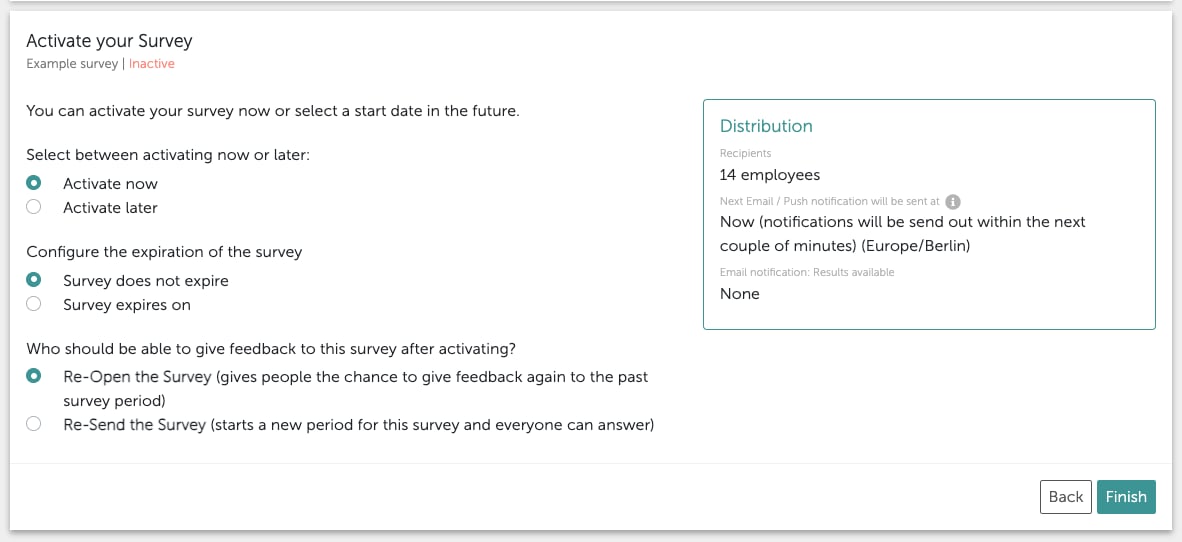
1. Reopening the survey : if you need more time for the current survey.
2. Resending survey : if you would like to create a second survey period with the same survey. Depending on which setting you choose, invitation emails will either only be sent to people who have not yet taken part in the survey (1) or to all participants (2). The second option creates a new survey cycle, which will then be visible as such in the dashboard you created for the original survey. You can then create charts (the trend chart is particularly useful in this case) which compare the periods, or just filter by each period in the date range of the dashboard. If a survey is reactivated under “Activate” with “Extend survey period /Reopen survey ” after being deactivated, the scheduling of the weekly invitation email is based on the new activation date. Example:
- Initial activation on Monday
- Deactivation
- Reactivation with extension on Wednesday