Translate the subject and body of the invitation email into every language of your survey, and find out which language each employee receives it in.
Go to Surveys ↗ · Opens the webapp — please log in firstYou translate the invitation email language by language: each language of the survey gets its own Subject and body. Where you do this depends on whether your account has the Translate tab.
The Translate tab is available if Multilingual Surveys and Dashboards is enabled for your account. In that case the Email Template tab no longer has a language dropdown. It shows a Manage translations button instead, which takes you straight to the Translate tab.
Open the survey and go to the Translate tab.
Click the row of the language you want to translate into.
Open the Emails section. The source text of Subject and Body sits on the left, your translation on the right.
Type your translation. Suggest translation generates a suggestion for one field, Suggest all missing translations fills every empty field of that language in one go.
Click Save.
Suggestions are only placed into the form, not saved. Check them before you save.If the source text contains the survey name placeholder, your translation needs it too. When it is missing, the editor warns you: “The survey name placeholder is missing from this translation.”The source language cannot be edited in the Translate tab — its fields are marked “Source language, maintained in the survey.” You edit the source email in the Email Template tab.
The Email Template tab always shows the email in your profile language, if the survey has that language — otherwise in the survey’s first language. If your profile language is one of the target languages, you are editing that translation there, not the source text.
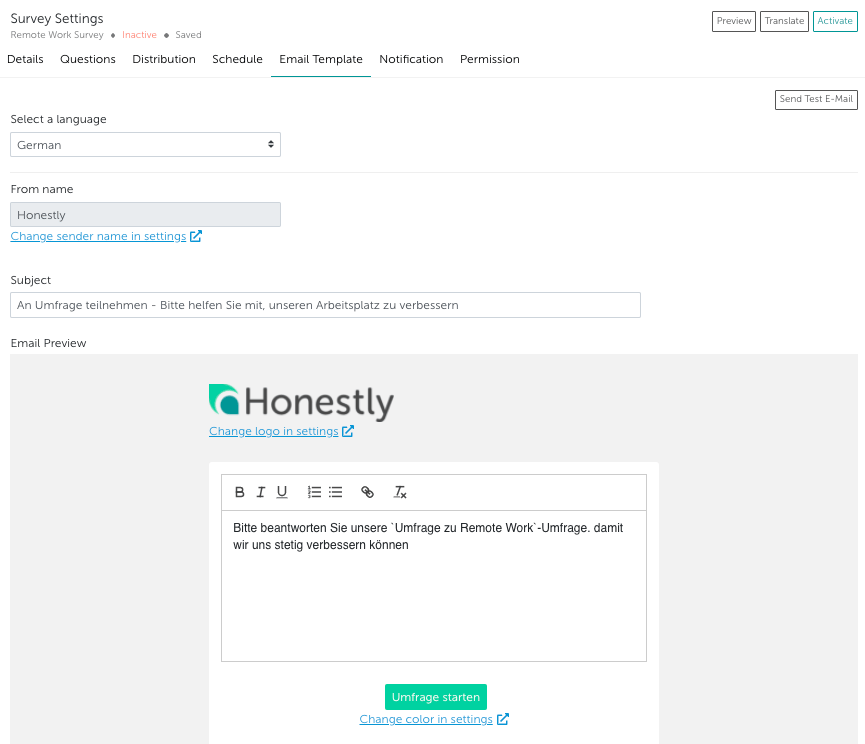
Without the Translate tab, you maintain every language directly in the Email Template tab. As soon as the survey has more than one language, a Select a language dropdown appears there.
Open the survey and go to the Email Template tab.
Select the language under Select a language.
Enter the Subject and the email text in that language.
Each employee receives the email in the language set in their employee profile. If none is set, the account language is used.If the survey does not include that language, the employee receives the email in the survey’s source language.
Translate both the subject and the body of every language. If either one is empty, employees in that language do not receive your text from the source language — they receive Honestly’s standard invitation text in their language.
That standard text is also what the Email Template tab shows for a language that has no text of its own yet.
Send Test E-Mail in the Email Template tab sends the email in the language currently shown there, as it was last saved.For everything else about the invitation email — sender, logo and button color — see How do I customize the invitation E-Mail for my employees?
{"docsConfig":{"theme":"mint","$schema":"https://mintlify.com/docs.json","name":"Honestly","colors":{"primary":"#2b7a73","light":"#5cb0a7","dark":"#1f5f59"},"logo":{"light":"https://mintcdn.com/honestly/BkkEjewk45IYUeOR/images/logo/honestly.svg?fit=max\u0026auto=format\u0026n=BkkEjewk45IYUeOR\u0026q=85\u0026s=fb54c4a490fa7945fcc35f39206832ce","dark":"https://mintcdn.com/honestly/BkkEjewk45IYUeOR/images/logo/honestly-white.svg?fit=max\u0026auto=format\u0026n=BkkEjewk45IYUeOR\u0026q=85\u0026s=6656c4b3a53579344ed0ef1d1ace7bca"},"favicon":"https://mintcdn.com/honestly/B-Ykoogmlc4ptiuo/favicon.svg?fit=max\u0026auto=format\u0026n=B-Ykoogmlc4ptiuo\u0026q=85\u0026s=fc4c58d62e70454736c56887117d27cd","footer":{"socials":{"website":"https://www.honestly.com"}},"fonts":{"heading":{"family":"Bricolage Grotesque"},"body":{"family":"Hanken Grotesk"}},"styling":{"latex":false},"navigation":{"languages":[{"language":"en","navbar":{"links":[{"href":"https://share.hsforms.com/1OdBSP16kRFmVS8Q-XaKEeA2b9g8","label":"Contact support"}],"primary":{"type":"button","label":"Go to Honestly","href":"https://webapp.honestly.de/"}},"href":""},{"language":"de","navbar":{"links":[{"href":"https://share.hsforms.com/1j0iwk_7BQt-obdHPoiqzcQ2b9g8","label":"Support kontaktieren"}],"primary":{"type":"button","label":"Zu Honestly","href":"https://webapp.honestly.de/"}},"href":"de"}]}},"deployment":{"deploymentMetadataValue":{"subdomain":"honestly","hasAudioNarration":false,"actualSubdomain":"honestly","customDomains":["help.honestly.com"],"gitSource":{"type":"github","owner":"honestly-com","repo":"docs","deployBranch":"main","contentDirectory":"","isPrivate":true,"mountPath":"","label":""},"chroma":{"collectionId":"b1905c30-b38b-43a2-b14c-1b1be854a6f1","liveDeploymentHistoryId":"6ad098f08af906685703d238","schemaVersion":"v3","latestBuiltDeploymentHistoryId":"6ad098f08af906685703d238"},"feedback":{"thumbs":true,"agentFeedback":false},"entitlements":{"AI_CHAT":{"status":"DISABLED"}},"buildId":"6ad098f08af906685703d238","clientVersion":"0.0.3894","searchFilterCounts":[{"language":"de","tag":"Using Honestly","count":156},{"language":"en","tag":"Using Honestly","count":155},{"language":"de","tag":"Feedback erfassen","count":53},{"language":"en","tag":"Collecting feedback","count":53},{"language":"de","tag":"Umfragen","count":44},{"language":"en","tag":"Surveys","count":44},{"language":"de","tag":"Auswerten \u0026 handeln","count":35},{"language":"en","tag":"Analyze \u0026 act","count":35},{"language":"de","tag":"Verwaltung","count":33},{"language":"en","tag":"Administration","count":33},{"language":"de","tag":"Dashboard","count":30},{"language":"en","tag":"Dashboard","count":30},{"language":"de","tag":"Grundlagen","count":18},{"language":"de","tag":"Mitarbeitende","count":18},{"language":"en","tag":"Employees","count":18},{"language":"de","tag":"Hilfe \u0026 Updates","count":17},{"language":"en","tag":"Getting started","count":17},{"language":"en","tag":"Help \u0026 updates","count":17},{"language":"de","tag":"FAQ","count":16},{"language":"default","tag":"Developers","count":16},{"language":"default","tag":"Developer docs","count":16},{"language":"en","tag":"FAQ","count":16},{"language":"default","tag":"API Reference","count":11},{"language":"default","tag":"Core Concepts","count":3},{"language":"default","tag":"Get Started","count":2}]},"assistantConfig":{"enableAskAiButton":false,"enableStarterQuestions":false,"enableContextualStarterQuestions":false,"enableAskAiSearchBar":true},"hasChatPermissions":false,"hasWebMcpPermissions":false,"toggles":[],"privacy":{"consentBanner":{"enabled":true}},"isAtlas":false,"googleFontsInlined":true},"customCss":[{"filePath":"style.css","content":".month-count,.update-meta{margin-top:-.5rem;font-size:.8125rem;color:inherit;opacity:.6}.month-count{margin-top:-2.1rem;text-align:right}html[data-current-path$=\"/whats-new/highlights\"] li.toc-item[data-depth]:not([data-depth=\"0\"]){display:none}html[data-current-path$=\"/whats-new/highlights\"] .card h4{position:relative;margin-top:0;margin-bottom:0}html[data-current-path$=\"/whats-new/highlights\"] .card h4>div{position:static;order:1;display:flex;align-items:center;align-self:center}html[data-current-path$=\"/whats-new/highlights\"] .card h4 a{margin-left:.4rem}html[data-current-path$=\"/whats-new/highlights\"] .anchor-copied{margin-left:.4rem;align-self:center;font-size:.75rem;font-weight:400;color:inherit;opacity:.6;white-space:nowrap}"}],"page":{"pagePath":"help/surveys/translate-email","slug":"/help/surveys/translate-email","pageMetadata":{"title":"How do I translate an email?","sidebarTitle":"Translate an email","description":"Translate the subject and body of the invitation email into every language of your survey, and find out which language each employee receives it in.","keywords":["multilingual email","invitation email language","email in wrong language","email settings","language dropdown","employee language"],"href":"/help/surveys/translate-email"},"description":{"compiledSource":"\"use strict\";\nconst {jsx: _jsx} = arguments[0];\nconst {useMDXComponents: _provideComponents} = arguments[0];\nfunction _createMdxContent(props) {\n const _components = {\n p: \"p\",\n ..._provideComponents(),\n ...props.components\n };\n return _jsx(_components.p, {\n children: \"Translate the subject and body of the invitation email into every language of your survey, and find out which language each employee receives it in.\"\n });\n}\nfunction MDXContent(props = {}) {\n const {wrapper: MDXLayout} = {\n ..._provideComponents(),\n ...props.components\n };\n return MDXLayout ? _jsx(MDXLayout, {\n ...props,\n children: _jsx(_createMdxContent, {\n ...props\n })\n }) : _createMdxContent(props);\n}\nreturn {\n default: MDXContent\n};\n","frontmatter":{},"scope":{}},"pageType":"default","mdx":{"mdxSource":{"compiledSource":"\"use strict\";const{Fragment:_Fragment,jsx:_jsx,jsxs:_jsxs}=arguments[0];const{useMDXComponents:_provideComponents}=arguments[0];function _createMdxContent(props){const _components={a:`a`,li:`li`,ol:`ol`,p:`p`,strong:`strong`,ul:`ul`,..._provideComponents(),...props.components},{Heading,Note,OptimizedImage,Warning}=_components;if(!Heading)_missingMdxReference(`Heading`,true);if(!Note)_missingMdxReference(`Note`,true);if(!OptimizedImage)_missingMdxReference(`OptimizedImage`,true);if(!Warning)_missingMdxReference(`Warning`,true);return _jsxs(_Fragment,{children:[_jsxs(_components.p,{children:[_jsx(_components.a,{href:`https://webapp.honestly.de/app#/surveys`,children:`Go to Surveys ↗`}),` · Opens the webapp — please log in first`]}),`\n`,_jsxs(_components.p,{children:[`You translate the invitation email language by language: each language of the survey gets its own `,_jsx(_components.strong,{children:`Subject`}),` and body. Where you do this depends on whether your account has the `,_jsx(_components.strong,{children:`Translate`}),` tab.`]}),`\n`,_jsx(Heading,{level:`3`,id:`before-you-start`,children:`Before you start`}),`\n`,_jsxs(_components.p,{children:[`The email can only be translated into languages the survey already has. Add the languages to the survey first: `,_jsx(_components.a,{href:`/help/surveys/translate-survey`,children:`Translate a survey`}),`.`]}),`\n`,_jsx(Heading,{level:`3`,id:`translating-in-the-translate-tab`,children:`Translating in the Translate tab`}),`\n`,_jsxs(_components.p,{children:[`The `,_jsx(_components.strong,{children:`Translate`}),` tab is available if `,_jsx(_components.strong,{children:`Multilingual Surveys and Dashboards`}),` is enabled for your account. In that case the `,_jsx(_components.strong,{children:`Email Template`}),` tab no longer has a language dropdown. It shows a `,_jsx(_components.strong,{children:`Manage translations`}),` button instead, which takes you straight to the `,_jsx(_components.strong,{children:`Translate`}),` tab.`]}),`\n`,_jsxs(_components.ol,{children:[`\n`,_jsxs(_components.li,{children:[`Open the survey and go to the `,_jsx(_components.strong,{children:`Translate`}),` tab.`]}),`\n`,_jsx(_components.li,{children:`Click the row of the language you want to translate into.`}),`\n`,_jsxs(_components.li,{children:[`Open the `,_jsx(_components.strong,{children:`Emails`}),` section. The source text of `,_jsx(_components.strong,{children:`Subject`}),` and `,_jsx(_components.strong,{children:`Body`}),` sits on the left, your translation on the right.`]}),`\n`,_jsxs(_components.li,{children:[`Type your translation. `,_jsx(_components.strong,{children:`Suggest translation`}),` generates a suggestion for one field, `,_jsx(_components.strong,{children:`Suggest all missing translations`}),` fills every empty field of that language in one go.`]}),`\n`,_jsxs(_components.li,{children:[`Click `,_jsx(_components.strong,{children:`Save`}),`.`]}),`\n`]}),`\n`,_jsx(_components.p,{children:`Suggestions are only placed into the form, not saved. Check them before you save.`}),`\n`,_jsx(_components.p,{children:`If the source text contains the survey name placeholder, your translation needs it too. When it is missing, the editor warns you: “The survey name placeholder is missing from this translation.”`}),`\n`,_jsxs(_components.p,{children:[`The source language cannot be edited in the `,_jsx(_components.strong,{children:`Translate`}),` tab — its fields are marked “Source language, maintained in the survey.” You edit the source email in the `,_jsx(_components.strong,{children:`Email Template`}),` tab.`]}),`\n`,_jsx(Note,{children:_jsxs(_components.p,{children:[`The `,_jsx(_components.strong,{children:`Email Template`}),` tab always shows the email in your profile language, if the survey has that language — otherwise in the survey’s first language. If your profile language is one of the target languages, you are editing that translation there, not the source text.`]})}),`\n`,_jsx(Heading,{level:`3`,id:`translating-in-the-email-template-tab`,children:`Translating in the Email Template tab`}),`\n`,_jsxs(_components.p,{children:[`Without the `,_jsx(_components.strong,{children:`Translate`}),` tab, you maintain every language directly in the `,_jsx(_components.strong,{children:`Email Template`}),` tab. As soon as the survey has more than one language, a `,_jsx(_components.strong,{children:`Select a language`}),` dropdown appears there.`]}),`\n`,_jsxs(_components.ol,{children:[`\n`,_jsxs(_components.li,{children:[`Open the survey and go to the `,_jsx(_components.strong,{children:`Email Template`}),` tab.`]}),`\n`,_jsxs(_components.li,{children:[`Select the language under `,_jsx(_components.strong,{children:`Select a language`}),`.`]}),`\n`,_jsxs(_components.li,{children:[`Enter the `,_jsx(_components.strong,{children:`Subject`}),` and the email text in that language.`]}),`\n`,_jsx(_components.li,{children:`Repeat for every other language of the survey.`}),`\n`]}),`\n`,_jsx(OptimizedImage,{src:`https://mintcdn.com/honestly/RC0S9r1e-n8nmUR8/images/a5be004f01fa.png?fit=max\u0026auto=format\u0026n=RC0S9r1e-n8nmUR8\u0026q=85\u0026s=02eec03af94630aa8ec5fcf06254f900`,alt:``,\"data-og-width\":`867`,width:`867`,\"data-og-height\":`725`,height:`725`,\"data-path\":`images/a5be004f01fa.png`,\"data-optimize\":`true`,\"data-opv\":`3`,srcset:`https://mintcdn.com/honestly/RC0S9r1e-n8nmUR8/images/a5be004f01fa.png?w=280\u0026fit=max\u0026auto=format\u0026n=RC0S9r1e-n8nmUR8\u0026q=85\u0026s=d9804816d14d9b3cd873d530f2c4b2e4 280w, https://mintcdn.com/honestly/RC0S9r1e-n8nmUR8/images/a5be004f01fa.png?w=560\u0026fit=max\u0026auto=format\u0026n=RC0S9r1e-n8nmUR8\u0026q=85\u0026s=82a7ab6fec283cf551594b49b12bf6a5 560w, https://mintcdn.com/honestly/RC0S9r1e-n8nmUR8/images/a5be004f01fa.png?w=840\u0026fit=max\u0026auto=format\u0026n=RC0S9r1e-n8nmUR8\u0026q=85\u0026s=12c1546bcb165e47a83cd74d3c4d1813 840w, https://mintcdn.com/honestly/RC0S9r1e-n8nmUR8/images/a5be004f01fa.png?w=1100\u0026fit=max\u0026auto=format\u0026n=RC0S9r1e-n8nmUR8\u0026q=85\u0026s=be24362b9ee9b0ae85fa38696710743c 1100w, https://mintcdn.com/honestly/RC0S9r1e-n8nmUR8/images/a5be004f01fa.png?w=1650\u0026fit=max\u0026auto=format\u0026n=RC0S9r1e-n8nmUR8\u0026q=85\u0026s=743b7deb8e1637ffd13f81f693b900e8 1650w, https://mintcdn.com/honestly/RC0S9r1e-n8nmUR8/images/a5be004f01fa.png?w=2500\u0026fit=max\u0026auto=format\u0026n=RC0S9r1e-n8nmUR8\u0026q=85\u0026s=4e2b4a38f5f0ef3e9dc2d485e902de9c 2500w`}),`\n`,_jsx(_components.p,{children:`Example: switching to German`}),`\n`,_jsx(OptimizedImage,{src:`https://mintcdn.com/honestly/pfDC0-M9Pz06l2cT/images/69cb2ff2e47b.png?fit=max\u0026auto=format\u0026n=pfDC0-M9Pz06l2cT\u0026q=85\u0026s=f1b1a6abfc12cd015c5829f8edd88d5f`,alt:``,\"data-og-width\":`865`,width:`865`,\"data-og-height\":`744`,height:`744`,\"data-path\":`images/69cb2ff2e47b.png`,\"data-optimize\":`true`,\"data-opv\":`3`,srcset:`https://mintcdn.com/honestly/pfDC0-M9Pz06l2cT/images/69cb2ff2e47b.png?w=280\u0026fit=max\u0026auto=format\u0026n=pfDC0-M9Pz06l2cT\u0026q=85\u0026s=fe13dab1d13613ee5b4a0edc644538e6 280w, https://mintcdn.com/honestly/pfDC0-M9Pz06l2cT/images/69cb2ff2e47b.png?w=560\u0026fit=max\u0026auto=format\u0026n=pfDC0-M9Pz06l2cT\u0026q=85\u0026s=15d4aa5c32b1a2e8aee9ea8cbcb58047 560w, https://mintcdn.com/honestly/pfDC0-M9Pz06l2cT/images/69cb2ff2e47b.png?w=840\u0026fit=max\u0026auto=format\u0026n=pfDC0-M9Pz06l2cT\u0026q=85\u0026s=f8632a29e6389ff97ff5964240ce3c46 840w, https://mintcdn.com/honestly/pfDC0-M9Pz06l2cT/images/69cb2ff2e47b.png?w=1100\u0026fit=max\u0026auto=format\u0026n=pfDC0-M9Pz06l2cT\u0026q=85\u0026s=093dbdc12f88d8f5937eece676c81611 1100w, https://mintcdn.com/honestly/pfDC0-M9Pz06l2cT/images/69cb2ff2e47b.png?w=1650\u0026fit=max\u0026auto=format\u0026n=pfDC0-M9Pz06l2cT\u0026q=85\u0026s=622963c182177db7b2abe4db7c0f0fb5 1650w, https://mintcdn.com/honestly/pfDC0-M9Pz06l2cT/images/69cb2ff2e47b.png?w=2500\u0026fit=max\u0026auto=format\u0026n=pfDC0-M9Pz06l2cT\u0026q=85\u0026s=d1fafbf65833e4fcd609326225b4ade8 2500w`}),`\n`,_jsx(Heading,{level:`3`,id:`which-language-your-employees-receive`,children:`Which language your employees receive`}),`\n`,_jsx(_components.p,{children:`Each employee receives the email in the language set in their employee profile. If none is set, the account language is used.`}),`\n`,_jsx(_components.p,{children:`If the survey does not include that language, the employee receives the email in the survey’s source language.`}),`\n`,_jsx(Warning,{children:_jsxs(_components.p,{children:[`Translate `,_jsx(_components.strong,{children:`both`}),` the subject and the body of every language. If either one is empty, employees in that language do not receive your text from the source language — they receive Honestly’s standard invitation text in their language.`]})}),`\n`,_jsxs(_components.p,{children:[`That standard text is also what the `,_jsx(_components.strong,{children:`Email Template`}),` tab shows for a language that has no text of its own yet.`]}),`\n`,_jsx(Heading,{level:`3`,id:`checking-the-result`,children:`Checking the result`}),`\n`,_jsxs(_components.p,{children:[_jsx(_components.strong,{children:`Send Test E-Mail`}),` in the `,_jsx(_components.strong,{children:`Email Template`}),` tab sends the email in the language currently shown there, as it was last saved.`]}),`\n`,_jsxs(_components.p,{children:[`For everything else about the invitation email — sender, logo and button color — see `,_jsx(_components.a,{href:`/help/surveys/customize-invitation-email`,children:`How do I customize the invitation E-Mail for my employees?`})]}),`\n`,_jsx(Heading,{level:`3`,id:`related-articles`,children:`Related articles`}),`\n`,_jsxs(_components.ul,{children:[`\n`,_jsx(_components.li,{children:_jsx(_components.a,{href:`/help/surveys/translate-survey`,children:`How do I translate my survey?`})}),`\n`,_jsx(_components.li,{children:_jsx(_components.a,{href:`/help/surveys/customize-invitation-email`,children:`How do I customize the invitation E-Mail for my employees?`})}),`\n`,_jsx(_components.li,{children:_jsx(_components.a,{href:`/help/integrations/language-codes`,children:`Employee import ISO 639-1 language codes`})}),`\n`,_jsx(_components.li,{children:_jsx(_components.a,{href:`/help/dashboard/translate-dashboard`,children:`How do I translate my dashboard into different languages?`})}),`\n`]})]})}function MDXContent(props={}){const{wrapper:MDXLayout}={..._provideComponents(),...props.components};return MDXLayout?_jsx(MDXLayout,{...props,children:_jsx(_createMdxContent,{...props})}):_createMdxContent(props)}return{default:MDXContent};function _missingMdxReference(id,component){throw new Error(`Expected `+(component?`component`:`object`)+\" `\"+id+\"` to be defined: you likely forgot to import, pass, or provide it.\")}","frontmatter":{},"scope":{"config":{},"pageMetadata":{"title":"How do I translate an email?","sidebarTitle":"Translate an email","description":"Translate the subject and body of the invitation email into every language of your survey, and find out which language each employee receives it in.","keywords":["multilingual email","invitation email language","email in wrong language","email settings","language dropdown","employee language"],"href":"/help/surveys/translate-email"}}},"mdxSourceWithNoJs":null},"mdxExtracts":{"tableOfContents":[{"title":"Before you start","slug":"before-you-start","depth":3,"children":[]},{"title":"Translating in the Translate tab","slug":"translating-in-the-translate-tab","depth":3,"children":[]},{"title":"Translating in the Email Template tab","slug":"translating-in-the-email-template-tab","depth":3,"children":[]},{"title":"Which language your employees receive","slug":"which-language-your-employees-receive","depth":3,"children":[]},{"title":"Checking the result","slug":"checking-the-result","depth":3,"children":[]},{"title":"Related articles","slug":"related-articles","depth":3,"children":[]}],"codeExamples":{}},"jsLinks":["/_mintlify/custom/honestly/2e40997da2022c0c/frank.js","/_mintlify/custom/honestly/828ee994b07ee804/language-redirect.js","/_mintlify/custom/honestly/a2c539a43086b1e9/highlight-anchor-copy.js"],"subdomain":"honestly","siteName":"Honestly","title":"How do I translate an email? - Honestly","navMaps":{"firstHrefInVersion":{},"firstHrefInLanguage":{"en":{"href":"/help/surveys/translate-email","matchLevel":0},"de":{"href":"/de/help/surveys/translate-email","matchLevel":1}}},"lastModified":"2026-09-23T17:52:07.683Z","originalFileLocation":"help/surveys/translate-email.mdx","locale":"en"},"headHtml":"\u003cmeta data-mint-head name=\"description\" content=\"Translate the subject and body of the invitation email into every language of your survey, and find out which language each employee receives it in.\">\u003cmeta data-mint-head name=\"application-name\" content=\"Honestly\">\u003cmeta data-mint-head name=\"generator\" content=\"Mintlify\">\u003clink data-mint-head rel=\"icon\" type=\"image/png\" sizes=\"192x192\" href=\"/mintlify-assets/_mintlify/favicons/honestly/PsVfD-T-mbmayU-9/_generated/favicon/android-chrome-192x192.png\" media=\"(prefers-color-scheme: light)\">\u003clink data-mint-head rel=\"apple-touch-icon\" type=\"image/png\" sizes=\"180x180\" href=\"/mintlify-assets/_mintlify/favicons/honestly/PsVfD-T-mbmayU-9/_generated/favicon/apple-touch-icon.png\">\u003clink data-mint-head rel=\"icon\" type=\"image/png\" sizes=\"16x16\" href=\"/mintlify-assets/_mintlify/favicons/honestly/PsVfD-T-mbmayU-9/_generated/favicon/favicon-16x16.png\" media=\"(prefers-color-scheme: light)\">\u003clink data-mint-head rel=\"icon\" type=\"image/png\" sizes=\"32x32\" href=\"/mintlify-assets/_mintlify/favicons/honestly/PsVfD-T-mbmayU-9/_generated/favicon/favicon-32x32.png\" media=\"(prefers-color-scheme: light)\">\u003clink data-mint-head rel=\"shortcut icon\" type=\"image/x-icon\" href=\"/mintlify-assets/_mintlify/favicons/honestly/PsVfD-T-mbmayU-9/_generated/favicon/favicon.ico\" media=\"(prefers-color-scheme: light)\">\u003clink data-mint-head rel=\"icon\" type=\"image/png\" sizes=\"192x192\" href=\"/mintlify-assets/_mintlify/favicons/honestly/PsVfD-T-mbmayU-9/_generated/favicon-dark/android-chrome-192x192.png\" media=\"(prefers-color-scheme: dark)\">\u003clink data-mint-head rel=\"icon\" type=\"image/png\" sizes=\"16x16\" href=\"/mintlify-assets/_mintlify/favicons/honestly/PsVfD-T-mbmayU-9/_generated/favicon-dark/favicon-16x16.png\" media=\"(prefers-color-scheme: dark)\">\u003clink data-mint-head rel=\"icon\" type=\"image/png\" sizes=\"32x32\" href=\"/mintlify-assets/_mintlify/favicons/honestly/PsVfD-T-mbmayU-9/_generated/favicon-dark/favicon-32x32.png\" media=\"(prefers-color-scheme: dark)\">\u003clink data-mint-head rel=\"shortcut icon\" type=\"image/x-icon\" href=\"/mintlify-assets/_mintlify/favicons/honestly/PsVfD-T-mbmayU-9/_generated/favicon-dark/favicon.ico\" media=\"(prefers-color-scheme: dark)\">\u003cmeta data-mint-head property=\"og:title\" content=\"How do I translate an email? - Honestly\">\u003cmeta data-mint-head property=\"og:description\" content=\"Translate the subject and body of the invitation email into every language of your survey, and find out which language each employee receives it in.\">\u003cmeta data-mint-head property=\"og:site_name\" content=\"Honestly\">\u003cmeta data-mint-head property=\"og:url\" content=\"https://help.honestly.com/help/surveys/translate-email\">\u003cmeta data-mint-head property=\"og:type\" content=\"website\">\u003cmeta data-mint-head name=\"twitter:card\" content=\"summary_large_image\">\u003cmeta data-mint-head name=\"twitter:title\" content=\"How do I translate an email? - Honestly\">\u003cmeta data-mint-head name=\"twitter:description\" content=\"Translate the subject and body of the invitation email into every language of your survey, and find out which language each employee receives it in.\">\u003cmeta data-mint-head name=\"msapplication-config\" content=\"/mintlify-assets/_mintlify/favicons/honestly/PsVfD-T-mbmayU-9/_generated/favicon/browserconfig.xml\">\u003cmeta data-mint-head name=\"apple-mobile-web-app-title\" content=\"Honestly\">\u003cmeta data-mint-head name=\"msapplication-TileColor\" content=\"#2b7a73\">\u003clink data-mint-head rel=\"canonical\" href=\"https://help.honestly.com/help/surveys/translate-email\">\u003clink data-mint-head rel=\"alternate\" type=\"application/xml\" href=\"/sitemap.xml\">\u003clink data-mint-head rel=\"alternate\" type=\"text/markdown\" href=\"/help/surveys/translate-email.md\">\u003clink data-mint-head rel=\"alternate\" hreflang=\"en\" href=\"https://help.honestly.com/help/surveys/translate-email\">\u003clink data-mint-head rel=\"alternate\" hreflang=\"de\" href=\"https://help.honestly.com/de/help/surveys/translate-email\">\u003clink data-mint-head rel=\"alternate\" hreflang=\"x-default\" href=\"https://help.honestly.com/help/surveys/translate-email\">\u003cscript data-mint-head type=\"application/ld+json\">{\"@context\":\"https://schema.org\",\"@graph\":[{\"@type\":\"Organization\",\"@id\":\"https://help.honestly.com/#organization\",\"name\":\"Honestly\",\"url\":\"https://help.honestly.com\",\"logo\":{\"@type\":\"ImageObject\",\"url\":\"https://mintcdn.com/honestly/BkkEjewk45IYUeOR/images/logo/honestly.svg?fit=max\u0026auto=format\u0026n=BkkEjewk45IYUeOR\u0026q=85\u0026s=fb54c4a490fa7945fcc35f39206832ce\"}},{\"@type\":\"WebSite\",\"@id\":\"https://help.honestly.com#website\",\"name\":\"Honestly\",\"url\":\"https://help.honestly.com\",\"publisher\":{\"@id\":\"https://help.honestly.com/#organization\"}},{\"@type\":\"WebPage\",\"@id\":\"https://help.honestly.com/help/surveys/translate-email#webpage\",\"url\":\"https://help.honestly.com/help/surveys/translate-email\",\"name\":\"How do I translate an email?\",\"description\":\"Translate the subject and body of the invitation email into every language of your survey, and find out which language each employee receives it in.\",\"dateModified\":\"2026-09-23T17:52:07.683Z\",\"isPartOf\":{\"@id\":\"https://help.honestly.com#website\"},\"breadcrumb\":{\"@id\":\"https://help.honestly.com/help/surveys/translate-email#breadcrumb\"}},{\"@type\":\"BreadcrumbList\",\"@id\":\"https://help.honestly.com/help/surveys/translate-email#breadcrumb\",\"itemListElement\":[{\"@type\":\"ListItem\",\"position\":1,\"name\":\"Collecting feedback\",\"item\":\"https://help.honestly.com/help/surveys/add-participant-names\"},{\"@type\":\"ListItem\",\"position\":2,\"name\":\"Surveys\",\"item\":\"https://help.honestly.com/help/surveys/add-participant-names\"},{\"@type\":\"ListItem\",\"position\":3,\"name\":\"How do I translate an email?\",\"item\":\"https://help.honestly.com/help/surveys/translate-email\"}]},{\"@type\":[\"Article\",\"TechArticle\"],\"@id\":\"https://help.honestly.com/help/surveys/translate-email#article\",\"headline\":\"How do I translate an email?\",\"name\":\"How do I translate an email?\",\"description\":\"Translate the subject and body of the invitation email into every language of your survey, and find out which language each employee receives it in.\",\"url\":\"https://help.honestly.com/help/surveys/translate-email\",\"mainEntityOfPage\":{\"@id\":\"https://help.honestly.com/help/surveys/translate-email#webpage\"},\"dateModified\":\"2026-09-23T17:52:07.683Z\",\"keywords\":\"multilingual email, invitation email language, email in wrong language, email settings, language dropdown, employee language\",\"publisher\":{\"@id\":\"https://help.honestly.com/#organization\"},\"isPartOf\":{\"@id\":\"https://help.honestly.com#website\"}}]}\u003c/script>\u003cscript data-mint-head type=\"application/ld+json\">{\"@context\":\"https://schema.org\",\"@type\":\"WebSite\",\"name\":\"Honestly\",\"creator\":{\"@type\":\"Organization\",\"name\":\"Mintlify\",\"url\":\"https://mintlify.com\"}}\u003c/script>","siteName":"Honestly","nav":{"global":null,"languages":[{"language":"en","navbar":{"links":[{"href":"https://share.hsforms.com/1OdBSP16kRFmVS8Q-XaKEeA2b9g8","label":"Contact support"}],"primary":{"type":"button","label":"Go to Honestly","href":"https://webapp.honestly.de/"}},"tabs":[{"tab":"Using Honestly","groups":[{"group":"Getting started","pages":[{"title":"Everything you need, in one place","sidebarTitle":"Overview","icon":"house","mode":"wide","href":""},{"group":"Before you begin","icon":"flag","expanded":false,"pages":[{"title":"Why hasn’t my employee received a login email?","sidebarTitle":"Missing login email","href":"/help/before-you-begin/missing-login-email"},{"title":"Can the employees also take part in a survey via a link or QR code?","sidebarTitle":"Link or QR code","href":"/help/before-you-begin/link-or-qr-code"},{"title":"How can my employees without email address participate in the survey?","sidebarTitle":"Participate without email","href":"/help/before-you-begin/participate-without-email"},{"title":"How do employees participate in the surveys via email?","sidebarTitle":"Participate via email","href":"/help/before-you-begin/participate-via-email"},{"title":"How does the Home Screen view work?","sidebarTitle":"Home Screen view","href":"/help/before-you-begin/home-screen-view"},{"title":"How is the anonymity at Honestly ensured?","sidebarTitle":"Anonymity ensured","href":"/help/before-you-begin/anonymity-ensured"},{"title":"What are the options for participation in a survey?","sidebarTitle":"Participation options","href":"/help/before-you-begin/participation-options"},{"title":"What do surveys with Honestly look like?","sidebarTitle":"Survey preview","href":"/help/before-you-begin/survey-preview"},{"title":"What is the Engage App?","sidebarTitle":"Engage App","href":"/help/before-you-begin/engage-app"},{"title":"Communication (when sending the survey)","sidebarTitle":"Communication","href":"/help/before-you-begin/communication-survey-dispatch"},{"title":"First steps with Honestly! (Individual Survey)","sidebarTitle":"First steps","href":"/help/before-you-begin/first-steps"},{"title":"How do I Inform my managers to enter the system after the survey?","sidebarTitle":"Brief your managers","href":"/help/before-you-begin/brief-your-managers"},{"title":"How do I inform my employees about an upcoming survey?","sidebarTitle":"Announce a survey","href":"/help/before-you-begin/announce-a-survey"},{"title":"What can I prepare and adapt for my first survey?","sidebarTitle":"Prepare first survey","href":"/help/before-you-begin/prepare-first-survey"}]},{"group":"Engagement concept","icon":"lightbulb","expanded":false,"pages":[{"title":"Factors and Sub-Factors of the Validated Honestly Engagement Questionnaire","sidebarTitle":"Engagement factors","href":"/help/engagement-concept/questionnaire-factors"},{"title":"How Can I Create Comparable Surveys with the Honestly Engagement Survey™ or the Honestly Pulse Survey™?","sidebarTitle":"Comparable surveys","href":"/help/engagement-concept/comparable-surveys"}]}]},{"group":"Collecting feedback","pages":[{"group":"Surveys","icon":"clipboard-list","expanded":false,"pages":[{"title":"How can I add participants’ names to a non-anonymous survey?","sidebarTitle":"Add participant names","href":"/help/surveys/add-participant-names"},{"title":"How can I reactivate a survey I have used before?","sidebarTitle":"Reactivate a survey","href":"/help/surveys/reactivate"},{"title":"Can I compare the results of different surveys?","sidebarTitle":"Compare surveys","href":"/help/surveys/compare-surveys"},{"title":"How do I add individual people to a survey?","sidebarTitle":"Add individual people","href":"/help/surveys/add-individuals"},{"title":"How do I create a survey for analysts or report viewers?","sidebarTitle":"Analyst survey","href":"/help/surveys/survey-for-analysts"},{"title":"What happens when I delete a question?","sidebarTitle":"Delete a question","href":"/help/surveys/delete-question-effects"},{"title":"How can I group my employees into age or tenure bands?","sidebarTitle":"Group by age or tenure","href":"/help/surveys/filter-employee-groups"},{"title":"How can I adjust the anonymity of my surveys?","sidebarTitle":"Adjust anonymity","href":"/help/surveys/adjust-anonymity"},{"title":"How can I archive surveys which are no longer/not currently in use?","sidebarTitle":"Archive surveys","href":"/help/surveys/archive"},{"title":"How do I activate, deactivate or archive several surveys at once?","sidebarTitle":"Bulk actions","href":"/help/surveys/bulk-actions"},{"title":"How can I inform employees that a survey has ended and its data can be viewed?","sidebarTitle":"Announce survey end","href":"/help/surveys/notify-survey-ended"},{"title":"How can I manage my existing surveys and what information can I see?","sidebarTitle":"Manage surveys","href":"/help/surveys/manage-existing"},{"title":"How do I extend a running survey or end it earlier?","sidebarTitle":"Extend a survey","href":"/help/surveys/edit-survey-period"},{"title":"How can I reopen a survey?","sidebarTitle":"Reopen a survey","href":"/help/surveys/resend-survey"},{"title":"How can I search for a particular survey?","sidebarTitle":"Search for a survey","href":"/help/surveys/search"},{"title":"How can I see which changes have been made to the survey?","sidebarTitle":"View survey changes","href":"/help/surveys/view-changes"},{"title":"How do I (de)activate a survey?","sidebarTitle":"Activate a survey","href":"/help/surveys/activate-deactivate"},{"title":"How do I create a new survey?","sidebarTitle":"Create a survey","href":"/help/surveys/create-new"},{"title":"How do I delete a survey?","sidebarTitle":"Delete a survey","href":"/help/surveys/delete-survey"},{"title":"How do I use/create question templates?","sidebarTitle":"Question templates","href":"/help/surveys/question-templates"},{"title":"What are survey properties, and how do I use them?","sidebarTitle":"Survey properties","href":"/help/surveys/survey-properties"},{"title":"External Benchmark Data","sidebarTitle":"External benchmarks","href":"/help/surveys/external-benchmark"},{"title":"How can I add a banner to my survey?","sidebarTitle":"Add a banner","href":"/help/surveys/add-banner"},{"title":"How can I create an additional text within my survey?","sidebarTitle":"Add survey text","href":"/help/surveys/additional-text"},{"title":"How can I test my survey?","sidebarTitle":"Test a survey","href":"/help/surveys/test-survey"},{"title":"Which formatting is available in my survey?","sidebarTitle":"Formatting in a survey","href":"/help/surveys/welcome-closing-text"},{"title":"How can I structure surveys with sections?","sidebarTitle":"Structure with sections","href":"/help/surveys/structure-with-sections"},{"title":"How do I create and use my own template?","sidebarTitle":"Create own template","href":"/help/surveys/custom-template"},{"title":"How do I customize the invitation E-Mail for my employees?","sidebarTitle":"Customize invite email","href":"/help/surveys/customize-invitation-email"},{"title":"How do I inform my employees about surveys? (Push notifications and our E-Mail function)","sidebarTitle":"Notify about surveys","href":"/help/surveys/notify-about-surveys"},{"title":"What are survey properties, and how can they help me?","sidebarTitle":"Survey properties guide","href":"/help/surveys/survey-properties-benefits"},{"title":"Branching of questions","sidebarTitle":"Question branching","href":"/help/surveys/question-branching"},{"title":"How can I add a description to my question?","sidebarTitle":"Add question description","href":"/help/surveys/question-description"},{"title":"How can I add branches to my survey questions?","sidebarTitle":"Add survey branches","href":"/help/surveys/add-branching"},{"title":"How can I create a question which only 1 particular group of employees can see?","sidebarTitle":"Group-specific question","href":"/help/surveys/group-specific-question"},{"title":"How can I give my employees the chance to add their own answer to a single/multi select question?","sidebarTitle":"Allow custom answers","href":"/help/surveys/custom-answer-option"},{"title":"How can I hide a question in my survey if I no longer need it/don't need it at the moment?","sidebarTitle":"Hide a question","href":"/help/surveys/hide-question"},{"title":"How to group questions by dimensions","sidebarTitle":"Group by dimensions","href":"/help/surveys/group-by-dimensions"},{"title":"Is it possible to display several questions on one page in a survey?","sidebarTitle":"Questions per page","href":"/help/surveys/multiple-questions-per-page"},{"title":"How do I plan and set up monthly surveys?","sidebarTitle":"Plan monthly surveys","href":"/help/surveys/monthly-surveys"},{"title":"How often can one person answer my survey?","sidebarTitle":"Participation frequency","href":"/help/surveys/participation-frequency"},{"title":"How to Prevent Duplicate Monthly Emails: Adjusting Reminder Timing","sidebarTitle":"Fix duplicate emails","description":"Resolve duplicate monthly emails by adjusting weekly reminder timings. Follow these steps to ensure recipients receive only one email.","href":"/help/surveys/prevent-duplicate-emails"},{"title":"How do I translate an email?","sidebarTitle":"Translate an email","href":"/help/surveys/translate-email"},{"title":"How do I translate my survey and which languages are supported?","sidebarTitle":"Translate a survey","description":"Use the Translate tab to add languages, translate questions, survey texts and emails, and track how far each language has come.","href":"/help/surveys/translate-survey"}]},{"group":"360° Feedback","icon":"users","expanded":false,"pages":[{"title":"How are 360° feedback scores calculated?","sidebarTitle":"360 score calculation","href":"/help/360-feedback/score-calculation"},{"title":"How do I configure notification emails for a 360° feedback run?","sidebarTitle":"360 notification emails","href":"/help/360-feedback/notification-emails"},{"title":"How do I create and set up a 360° feedback run?","sidebarTitle":"Set up a 360 run","href":"/help/360-feedback/set-up-a-run"},{"title":"How do I translate a 360° feedback run into other languages?","sidebarTitle":"Translate a 360 run","href":"/help/360-feedback/translate-a-run"},{"title":"How do I read my 360° feedback results dashboard?","sidebarTitle":"Read 360 dashboard","href":"/help/360-feedback/results-dashboard"},{"title":"How do I schedule a run and what can I still change once it is active?","sidebarTitle":"Schedule a run","href":"/help/360-feedback/schedule-a-run"},{"title":"How does anonymity work in 360° Feedback?","sidebarTitle":"360 anonymity","href":"/help/360-feedback/anonymity"},{"title":"What is 360° Feedback and how does it work?","sidebarTitle":"What is 360 Feedback","href":"/help/360-feedback/overview"},{"title":"Who can see the results of a 360° feedback run?","sidebarTitle":"360 result visibility","href":"/help/360-feedback/result-visibility"}]}]},{"group":"Analyze \u0026 act","pages":[{"group":"Dashboard","icon":"chart-line","expanded":false,"pages":[{"title":"Share dashboards with leaders","href":"/help/dashboard/share-dashboards-with-leaders"},{"title":"How Is Participation Rate Calculated When Survey Participants Are Added or Removed?","sidebarTitle":"Participation calc","href":"/help/dashboard/participation-rate-calc"},{"title":"How can I customise anonymity for open text fields?","sidebarTitle":"Open-text anonymity","href":"/help/dashboard/open-text-anonymity"},{"title":"Why don’t new attributes appear in past surveys?","sidebarTitle":"Attributes in past surveys","href":"/help/dashboard/attributes-past-surveys"},{"title":"Display Means in Dashboards","sidebarTitle":"Display means","href":"/help/dashboard/display-means"},{"title":"How can I assign a dashboard to a particular user?","sidebarTitle":"Assign a dashboard","href":"/help/dashboard/assign-permissions"},{"title":"Which data do report viewers, analysts and managers see in a dashboard?","sidebarTitle":"Dashboard access by role","href":"/help/dashboard/dashboard-and-data-permissions"},{"title":"How can I ensure that report viewers don't see any survey results until after the current survey period ends?","sidebarTitle":"Delay viewer access","href":"/help/dashboard/delay-viewer-access"},{"title":"How do I edit an existing dashboard?","sidebarTitle":"Edit a dashboard","href":"/help/dashboard/edit-dashboard"},{"title":"Which chart type should I use in a dashboard?","sidebarTitle":"Chart types overview","href":"/help/dashboard/chart-types-overview"},{"title":"How do I filter my dashboard?","sidebarTitle":"Filter dashboard","href":"/help/dashboard/filter-dashboard"},{"title":"How do I translate my dashboard into different languages?","sidebarTitle":"Translate dashboard","href":"/help/dashboard/translate-dashboard"},{"title":"Is My Dashboard Data Always Up-to-Date?","sidebarTitle":"Data up-to-date","href":"/help/dashboard/data-up-to-date"},{"title":"What is a dashboard and how do I create a new one?","sidebarTitle":"Create a dashboard","href":"/help/dashboard/create-dashboard"},{"title":"How Do I Compare Survey Results with External Benchmarks in Heatmaps?","sidebarTitle":"Benchmarks in heatmaps","href":"/help/dashboard/benchmarks-in-heatmaps"},{"title":"How are the Honestly Charts calculated?","sidebarTitle":"How charts calculate","href":"/help/dashboard/charts-calculation"},{"title":"How are scores and heatmap colors calculated?","sidebarTitle":"Scores \u0026 heatmap colors","href":"/help/dashboard/score-and-heatmap-colors"},{"title":"How can I compare the results of different employee groups in my dashboard?","sidebarTitle":"Compare groups","href":"/help/dashboard/compare-groups"},{"title":"How can the response rate be displayed for individual surveys?","sidebarTitle":"Response rate display","href":"/help/dashboard/response-rate"},{"title":"How do I compare employees on heatmap and score charts?","sidebarTitle":"Compare on heatmaps","href":"/help/dashboard/compare-on-heatmaps"},{"title":"How do I create a heatmap?","sidebarTitle":"Create a heatmap","href":"/help/dashboard/create-heatmap"},{"title":"How do I create a trend chart?","sidebarTitle":"Create a trend chart","href":"/help/dashboard/create-trend-chart"},{"title":"How to Calculate Barometer Results: Top 2 vs. Average","sidebarTitle":"Barometer calculation","href":"/help/dashboard/barometer-results"},{"title":"What is the Bubble Chart?","sidebarTitle":"Bubble Chart","href":"/help/dashboard/bubble-chart"},{"title":"What is the Topic Trend Chart?","sidebarTitle":"Topic Trend Chart","href":"/help/dashboard/topic-trend-chart"},{"title":"📊 What is the Impact Prediction Chart?","sidebarTitle":"Impact Prediction Chart","href":"/help/dashboard/impact-prediction-chart"},{"title":"Which survey data export gives me what – PDF, PowerPoint or Excel?","sidebarTitle":"Survey data exports","href":"/help/dashboard/export-formats-overview"},{"title":"How can I export data/charts from the dashboard?","sidebarTitle":"Export charts","href":"/help/dashboard/export-charts"},{"title":"How can I export my raw data?","sidebarTitle":"Export raw data","href":"/help/dashboard/export-raw-data"},{"title":"How should I interpret the exported data?","sidebarTitle":"Interpret exports","href":"/help/dashboard/interpret-exports"},{"title":"Topics: How can I get more information out of my open text fields?","sidebarTitle":"Topics","href":"/help/dashboard/analyze-open-text"}]},{"group":"Initiatives","icon":"rocket","expanded":false,"pages":[{"title":"How can I create an initiative based on my surveys and use AI-powered recommendations?","sidebarTitle":"Create an initiative","href":"/help/initiatives/create-from-surveys"},{"title":"How can I respond to open text feedback?","sidebarTitle":"Respond to feedback","href":"/help/initiatives/respond-to-feedback"},{"title":"What is the Initiatives feature and how can it help me?","sidebarTitle":"Initiatives feature","href":"/help/initiatives/overview"},{"title":"Who Can See Initiatives and How Private Visibility Works","sidebarTitle":"Initiative visibility","href":"/help/initiatives/visibility"},{"title":"Why Defining Clear Actions from Employee Surveys is Crucial","sidebarTitle":"Why define actions","href":"/help/initiatives/why-clear-actions"}]}]},{"group":"Administration","pages":[{"group":"Employees","icon":"address-book","expanded":false,"pages":[{"title":"How can I check the source of my imported employees?","sidebarTitle":"Check import source","href":"/help/employees/check-import-source"},{"title":"How do I backdate employee data?","sidebarTitle":"Backdate employee data","href":"/help/employees/backdate-data"},{"title":"How do I import or update my employees via Excel?","sidebarTitle":"Import via Excel","href":"/help/employees/import-via-excel"},{"title":"What's in the employee export, and how do I assign roles safely?","sidebarTitle":"Export employees","href":"/help/employees/export-employees"},{"title":"What is the Distribution List, and what happens if I remove it?","sidebarTitle":"Distribution List","href":"/help/employees/distribution-list"},{"title":"Which guidelines should I follow for a successful Excel import?","sidebarTitle":"Excel import rules","href":"/help/employees/excel-import-rules"},{"title":"How can I edit a user that has already been created?","sidebarTitle":"Edit a user","href":"/help/employees/edit-user"},{"title":"How do I create a user?","sidebarTitle":"Create a user","href":"/help/employees/create-user"},{"title":"How do I delete an employee from the account?","sidebarTitle":"Delete an employee","href":"/help/employees/delete-employee"},{"title":"How to add employees without an email to the system?","sidebarTitle":"Add employees no email","href":"/help/employees/add-without-email"},{"title":"What are attributes and how are they used?","sidebarTitle":"Attributes explained","href":"/help/employees/attributes"},{"title":"What are the different rights / roles in the Honestly account?","sidebarTitle":"Rights \u0026 roles","href":"/help/employees/rights-and-roles"},{"title":"How do I add different types of access to people?","sidebarTitle":"Types of access","href":"/help/employees/access-types"},{"title":"How does Auto-Assignment work, and are admins protected?","sidebarTitle":"Auto-Assignment","href":"/help/employees/auto-assignment"},{"title":"What is View as employee (Proxy View) and how do I use it?","sidebarTitle":"View as employee (Proxy View)","href":"/help/employees/proxy-view"},{"title":"How can I rename attributes, and what are my options?","sidebarTitle":"Rename attributes","href":"/help/employees/rename-attributes"},{"title":"How do I synchronize my employee data with my HR system?","sidebarTitle":"Sync with HR system","href":"/help/employees/sync-hr-data"},{"title":"How Do Reporting Structures and Data Permissions Work in Honestly?","sidebarTitle":"Reporting structures","href":"/help/employees/reporting-structures"}]},{"group":"Integrations","icon":"plug","expanded":false,"pages":[{"title":"Employee import ISO 639-1 language codes","sidebarTitle":"Language codes","href":"/help/integrations/language-codes"},{"title":"How can I integrate with Microsoft Teams?","sidebarTitle":"Integrate MS Teams","href":"/help/integrations/microsoft-teams"},{"title":"How can I integrate with Slack?","sidebarTitle":"Integrate Slack","href":"/help/integrations/slack"},{"title":"Which employee import connections are available, and which package do I need?","sidebarTitle":"Compare import connections","href":"/help/integrations/employee-import-options"},{"title":"Integrating Personio Employee Upload into Honestly","sidebarTitle":"Personio upload","href":"/help/integrations/personio-employee-upload"},{"title":"How do I connect an HCM integration via Kombo?","sidebarTitle":"HCM via Kombo","href":"/help/integrations/hcm-via-kombo"},{"title":"How do I import employees via the REST API?","sidebarTitle":"REST API employee import","href":"/help/integrations/rest-api-employee-import"},{"title":"How can I register with Honestly via SSO?","sidebarTitle":"Sign in via SSO","href":"/help/integrations/sign-in-via-sso"},{"title":"SSO Guide with Entra ID (formerly Azure AD)","sidebarTitle":"SSO with Entra ID","href":"/help/integrations/sso-entra-id"},{"title":"How can i duplicate or update surveys via CSV file?","sidebarTitle":"Surveys via CSV","href":"/help/integrations/surveys-via-csv"}]},{"title":"How do I set our logo and brand colours in the account?","sidebarTitle":"Corporate identity","href":"/help/settings/corporate-identity"},{"title":"How do I import data from a previous survey tool?","sidebarTitle":"Import raw data","href":"/help/settings/import-previous-tool"},{"title":"What is data masking and how do I turn it on?","sidebarTitle":"Data masking","href":"/help/data-security/data-masking"},{"title":"What does the GDPR confirmation for new employees say?","sidebarTitle":"Privacy confirmation","href":"/help/data-security/privacy-consent"},{"title":"FAQ - IT Security \u0026 Data Protection","sidebarTitle":"Data \u0026 security","href":"/help/data-security/it-security-faq"}]},{"group":"Help \u0026 updates","pages":[{"group":"FAQ","icon":"circle-question","expanded":false,"pages":[{"title":"Heatmaps and Dimensions: What are the best practices at the different attribute levels?","sidebarTitle":"Heatmap best practices","href":"/help/faq/heatmap-best-practices"},{"title":"How can I reset my password on Honestly?","sidebarTitle":"Reset password","href":"/help/faq/reset-password"},{"title":"How can I send ideas for improvement or a feature request to Honestly?","sidebarTitle":"Send feature ideas","href":"/help/faq/send-feature-request"},{"title":"IT Onboarding at Honestly: Technical Requirements \u0026 Best Practices","sidebarTitle":"IT onboarding","href":"/help/faq/it-onboarding"},{"title":"Overview of Feedback Channels at Honestly: Survey Types and Participation Methods","sidebarTitle":"Feedback channels","href":"/help/faq/feedback-channels"},{"title":"30-Day Feature Trial","sidebarTitle":"30-day feature trial","href":"/help/faq/feature-trial"},{"title":"How do I improve participation rates?","sidebarTitle":"Boost participation","href":"/help/faq/improve-participation-rates"},{"title":"How is AI used in our software?","sidebarTitle":"AI in the software","href":"/help/faq/ai-in-software"},{"title":"How to Customize Your Survey or Questionnaire Using Honestly Tool","sidebarTitle":"Customize a survey","href":"/help/faq/customize-survey"},{"title":"Time zone visibility in dashboard periods: Why periods differ by user location","sidebarTitle":"Time zone periods","href":"/help/faq/time-zone-dashboard-periods"},{"title":"Understanding Score Values and Percentages in Survey Results","sidebarTitle":"Scores \u0026 percentages","href":"/help/faq/scores-and-percentages"},{"title":"What is NPS?","sidebarTitle":"What is NPS","href":"/help/faq/nps"},{"title":"Which browsers are supported by Honestly?","sidebarTitle":"Supported browsers","href":"/help/faq/supported-browsers"},{"title":"How do I convince my company to move from an annual employee survey to pulse surveys?","sidebarTitle":"Move to pulse surveys","href":"/help/faq/switch-to-pulse-surveys"},{"title":"Why is my employee unable to participate in the survey?","sidebarTitle":"Can't participate","href":"/help/faq/employee-cannot-participate"},{"title":"How do I build a dashboard that shows the top and bottom results of a survey?","sidebarTitle":"Surface top results","href":"/help/faq/surface-top-bottom-results"}]},{"title":"Honestly Highlights","sidebarTitle":"What's new","href":"/help/whats-new/highlights"}]}]},{"tab":"Developers","pages":[{"title":"Developers","href":"/developers/introduction"}]}]},{"language":"de","navbar":{"links":[{"href":"https://share.hsforms.com/1j0iwk_7BQt-obdHPoiqzcQ2b9g8","label":"Support kontaktieren"}],"primary":{"type":"button","label":"Zu Honestly","href":"https://webapp.honestly.de/"}},"pages":[{"title":"de","href":"/de/help/surveys/translate-email"}]}]},"title":"How do I translate an email? - Honestly","buildId":"dpl_8LJVMfxYNq6LJkohTrn2iyWT8umj","deploymentId":"dpl_8LJVMfxYNq6LJkohTrn2iyWT8umj","dynamics":["a74be98ba7"],"chunks":["zoom-image-lightbox-D9lJgLSo.js","PlusIcon-C1lem43w.js","lightbox-handle-r17bVUz3.js"]}