How do I translate my dashboard into different languages?
Translate the dashboard title and all chart titles so that every manager sees the dashboard in the language set in their own profile.
Go to Dashboards ↗ · Opens the webapp — please log in firstA dashboard can hold its title and all of its chart titles in several languages. Which one a manager sees is decided by the Language in their own profile — there is no language switch on the dashboard itself.
Translate dashboard appears once the Multilingual Surveys and Dashboards feature is enabled for your account.
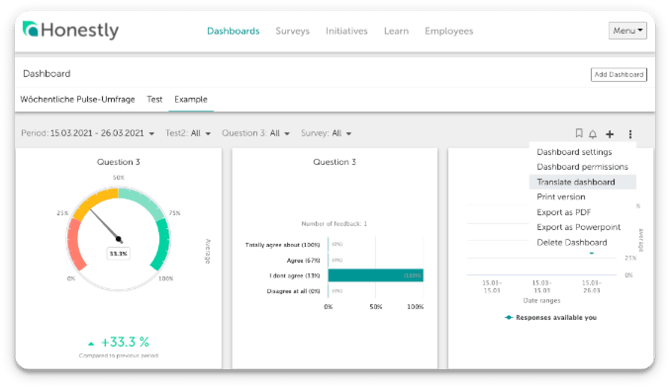
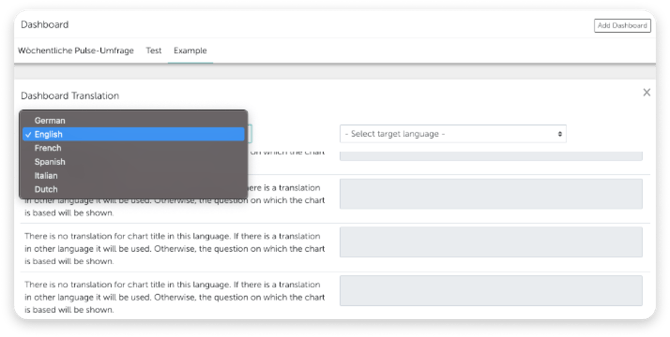
Open the dashboard, click the three dots at the top right and choose Translate dashboard.The Dashboard Translation screen opens. On the left, pick the language you want to translate from; on the right, pick the one you want to fill in under - Select target language -.Now translate the dashboard title and every chart title from the left column into the field on the right.Tip: If you have already translated the survey, the translations of the individual questions are used for the chart titles.Finally, click Save Translations at the bottom right. You need a dashboard title in at least one language before you can save.
Honestly knows 42 languages. Which of them you can choose as a source or target language depends on your account.These nine are available in every account:
Dutch
English
French
German
Italian
Portuguese
Russian
Spanish
Turkish
With the Comprehensive Multilingualism feature the remaining 33 languages become selectable as well — among them Polish, Czech, Swedish, Japanese and Chinese — so all 42 are available. Talk to your Customer Success Manager if a language you need is missing from the selection.The same list sits behind every language field in Honestly: the source and target language of a dashboard, the languages of a survey, the language in an employee’s profile, and the Language in your own profile.
Why a survey can offer more languages than your dashboard
The dashboard translation screen and the Translations tab of a survey both draw on that one account list, so the choice is the same in each. What differs is who reads the result.A survey is read by participants, and it keeps the languages it was set up with. If it was created from a template or set up at an earlier point, it can carry languages that are not in your account’s current selection — which is why a survey sometimes lists a language the dashboard screen does not offer you.A dashboard translation is only ever shown to managers, and always through the Language in their profile. That field offers the same nine languages. So without Comprehensive Multilingualism, a Polish dashboard title could not reach anyone: no manager would be able to set Polish as their profile language to begin with.For translating the questionnaire itself, see Translate survey.