

- Respondee
- Report viewer
- Analyst
- Manager
- Admin
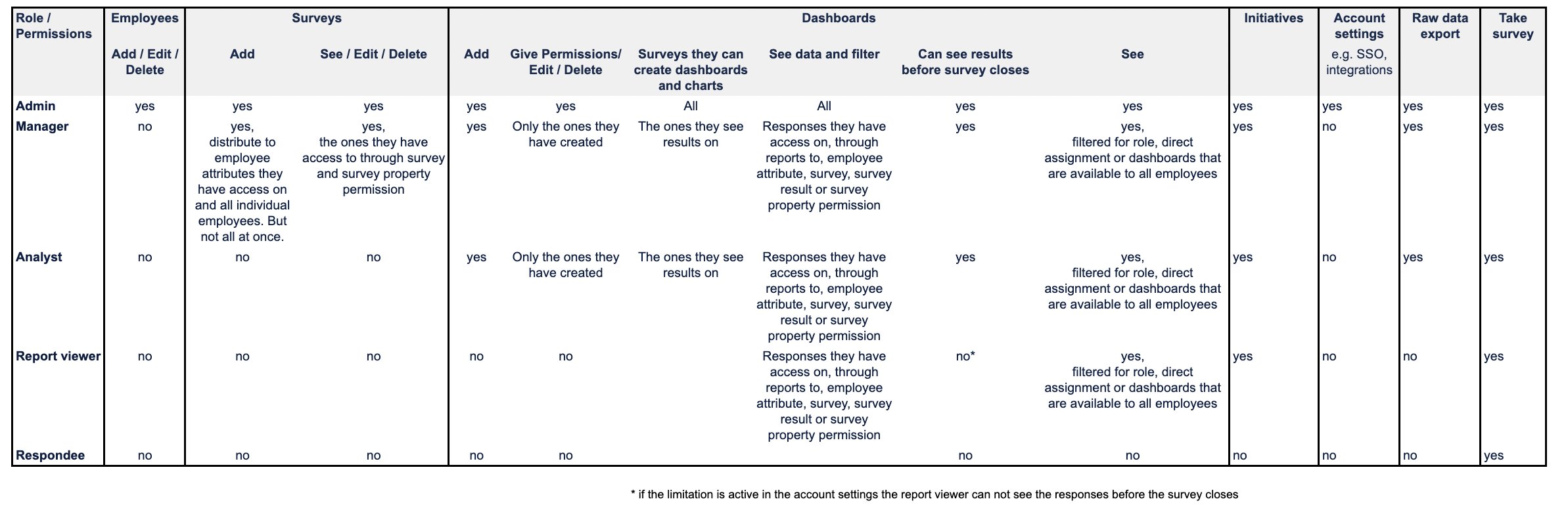
- View dashboards in these two cases:
- They were directly assigned to one
- The assigned roles match their role
- The dashboard is accessible to all employees
- Access all response data from surveys they have access to and employees they have access to
- View / Create / Edit own initiatives
- Take part in surveys
- Create dashboards
- Edit / delete own dashboards
-
View dashboards in these cases
- They were directly assigned to one
- The assigned roles match their role
- They created it themselves
- The dashboard is accessible to all employees
- View / create / edit their own initiatives
- Create and download their own exports
- Take part in surveys
-
Add surveys
- Distribute those surveys to all employees individually or based on attribute values they have access to
- View/ edit/ delete own surveys
- View & edit surveys created by others as long as they’ve been given access to them
- Create and use company question templates — these apply account-wide to every admin and manager in the account
- Create a survey from a template and reuse an existing survey as a template
- Change the template of a survey they have access to
- Add dashboards
- Edit / delete own dashboards
- Create & download own exports
-
View dashboards in these cases
- They were directly assigned to one
- The assigned roles match their role
- They created it themselves
- The dashboard is accessible to all employees
- See / Create / Edit own initiatives
- Create and download own exports
- Take part in the survey
- See/ add/ edit/ delete employees and change their permissions
- See/ add/ edit/ delete all surveys
- Distribute surveys to employees individually, based on attribute values or all at once
- Create and use company templates, and change the template of any survey in the account
- Create 360° questionnaire templates (admins only)
- See / Add / Edit / Delete all dashboards in the account
- Grant access to dashboards
- Access all response data from all employees
- See / Create / Edit own initiatives
- Change Account Settings
- Create and download own exports
- Take part in the survey