What is the Initiatives feature and how can it help me?
The Initiatives feature allows you to take action based on survey results. Once you’ve completed your survey and analysed the data, you can create and manage initiatives to address key issues identified in the responses.
This video explains the feature:
There are 2 ways to create initiatives in the Honestly Account. Either you can do so from a chart in a dashboard or otherwise in the Initiatives section.To create an initiative from a dashboard chart:
Identify key issues which have scored lower than other areas of the survey, for example this:Once you have an idea of how to go about improving this result, click on ”+ Initiative” underneath any chart apart from a heatmap:To create an initiative using AI-generated recommendations, follow these steps.You will then need to complete at least the mandatory fields (marked with an asterisk) of this new window:To create an initiative in the section itself, just click go to the Initiatives section at the top of your screen:and click on “Create new initiative” to get to the same window:To define your initiative:
Enter a title, describing what your plan is. Remember to keep it clear and actionable to ensure they can be implemented effectively.
Select relevant survey questions that contribute to the issue.
The advantage of creating the initiative from a chart is that the survey and question that this initiative is based upon, are automatically filled in. You can add more questions or remove the questions altogether, basing it solely on the general survey, that’s up to you:
Set a due date for completion.
You then have the option of adding a reminder, which can be sent 3 days before the due date and/or on the due date itself:It is also possible to make an initiative “private”. This means that it is only visible like this to everyone but the creator, the assignee and the admins:An initiative could then look something like this:You can save the initiative as a draft at first and still edit it in the Initiatives section.Once the initiative has been discussed and decided on, you can either change its status from “Draft” to “Defined” by clicking on it:Or you can use drag and drop to move it along the Kanban-style board:
Initiatives moved to “Completed” can no longer be moved, edited or deleted. They serve as a record of all the initiatives you successfully implemented.
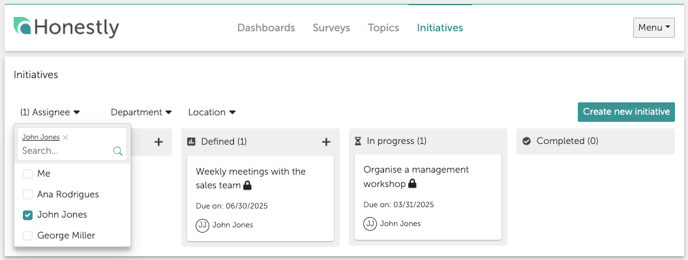
Use the filters such as “Assignee” to see all initiatives assigned to one person, or otherwise filter by attribute such as “Department”. In this way, you can track all the activities and monitor their progress: