
In the Surveys section of your account, you can see a list of all surveys. If you want to archive a survey that has been deactivated for a long time but may be needed again in the future, follow these steps.
Do not delete the survey, as this will permanently remove all data associated with it.
1. On the Surveys page, you can find all surveys. By default, archived surveys are hidden. Only active, scheduled, and inactive surveys are visible.
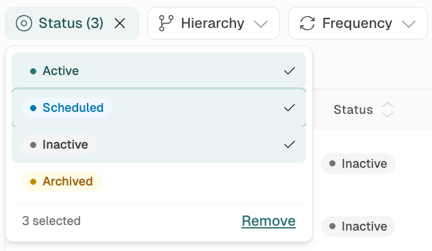
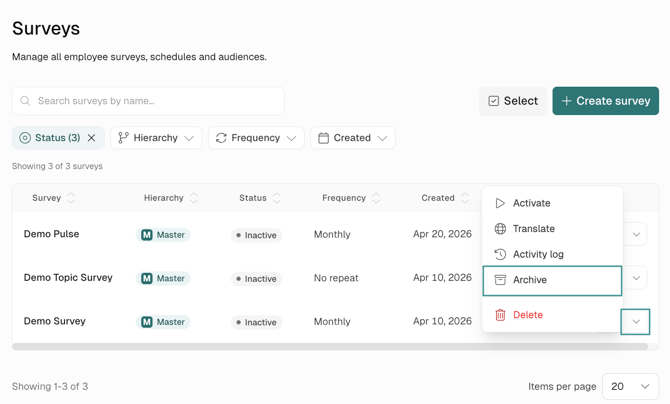
2. Any surveys that are inactive and no longer in use can be easily archived.
3. To do this, just choose the "Archive" option from the drop down list on the right of the survey in question.
4. You will be asked to confirm this action. No need to worry! This will NOT delete the survey nor will you lose any data relating to the survey.
-png.png?width=524&height=202&name=Frame%201%20(3)-png.png)
5. The archive can now be viewed by selecting "Archived" in the "Status" filter.
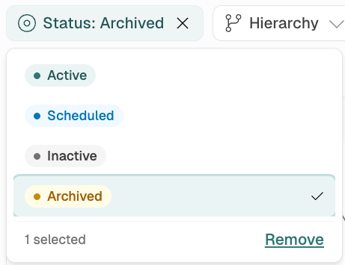
Surveys can be restored easily by following these steps:
1. Select "Archived" in the "Status" filter, then choose "Restore" from the dropdown menu to the right of the relevant archived survey.
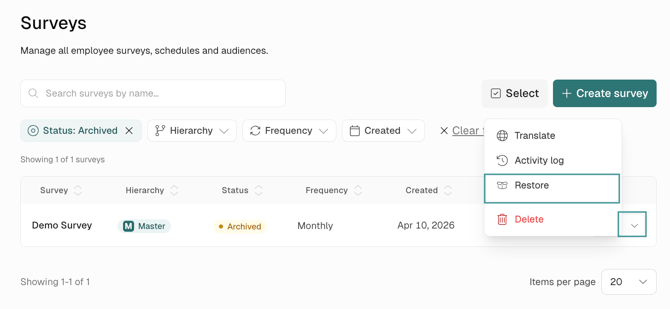
2. The survey will then appear again as "Inactive".