
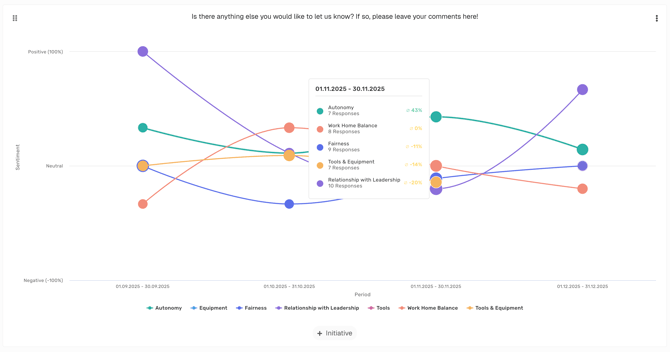
Trend analysis with topic drilldown und sentiment
What does the Topic Trend Analysis show?
The Topic Trend Analysis is an interactive visualization that helps you see how sentiment for different topics changes over time—based on open-ended comments in surveys.
-
Bubble size → number of responses for the topic
-
Bubble position (vertical) → sentiment (top = positive, middle = neutral, bottom = negative)
-
Bubble progression over time → sentiment trend for each topic
This lets you quickly identify which topics receive a lot of feedback—and what the sentiment was or is for those topics.
The topics shown are based on the Topics management in Honestly.
Note: At most, the 10 topics with the most comments within the selected time range are displayed.
How can I create this chart?
Creation (Admin/Manager/Analyst)
- In the side menu
 , first create your categories as explained here.
 - Go back to your dashboard
 and click on + (“Add new chart”).
- Select Topic Trend Analysis
- Now choose your questions – in this case, the open text fields that should be visualized as a Topic Trend Analysis.
- Click “Save”.

The chart will now appear at the very bottom of your dashboard.
After creation and for dashboard users (Admin/Manager/Analyst/Report Viewer)
-
Open the Topic Trend Analysis in your dashboard.
-
Hover over bubbles to see quick statistics.
-
Click on a bubble to drill down into individual employee responses.
-
All available responses for that topic are shown.
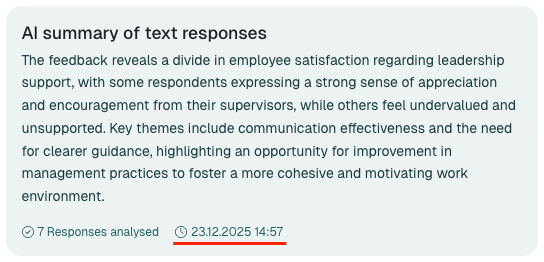
- An AI-Summary is shown.
-
Responses are displayed according to user permissions and survey anonymity settings.
-
-
Read the AI-generated summary atop the drilldown for a quick overview of the feedback included.
Note:
Each AI-generated summary remains available for 8 weeks from the moment you first open it. If new responses are added during this period, the summary will be refreshed automatically.
The summary is personalized and can differ from user to user based on their permissions and survey settings.
A note at the bottom of the AI summary shows the date and time when it was generated.
Why is this useful?
-
Identify trends: See at a glance whether sentiment for a topic is improving or declining.
-
Prioritize action areas: Focus on topics with a negative trend or a high volume of feedback.
-
Understand feedback: Use the detail view to dive into individual responses.
Permissions & Anonymity
-
Anonymity protection: The strictest anonymity rule of the included surveys applies to the entire chart.
-
Permissions: Only responses that you are permitted to see will be displayed.
-
Filters: You can filter the underlying data by time period, surveys, and employee attributes.
Example use cases
-
Evaluate changes: How did sentiment for “Communication” shift after introducing new meeting routines?
-
Analyze topic development: Is the topic “Compensation” becoming more negative over time?
-
Act early: Identify critical developments before they escalate.
💡 Tip: Use the Topic Trend Analysis together with the Initiatives feature to make the impact of changes visible.