> ## Documentation Index
> Fetch the complete documentation index at: https://help.honestly.com/llms.txt
> Use this file to discover all available pages before exploring further.
# How can I structure surveys with sections?
> Sections are subheadings that split a survey into themed blocks, making longer questionnaires easier to follow.
Sections are subheadings that divide your survey into themed blocks. They appear as clearly highlighted headings in the survey and can carry an additional explanatory text.
This short tutorial walks through inserting them:
### Why use sections
* Questions that belong together are grouped visibly
* The survey reads as a clear structure rather than one long list
* You can place context or instructions between blocks of questions
* Long surveys are broken into digestible parts, which is particularly worthwhile above 20–30 questions
You can also have a **Continue** button appear at the end of a section.
### How to add a section
Sections are added the same way questions are.
#### 1. Create or open a survey
Select **Create New Survey**, or open the survey you want to add sections to in edit mode.
 #### 2. Choose where the section goes
Click the question that should be the last one of the preceding block. The new element is inserted after it.
#### 3. Add the section
Click **Add question** in the left sidebar.
#### 2. Choose where the section goes
Click the question that should be the last one of the preceding block. The new element is inserted after it.
#### 3. Add the section
Click **Add question** in the left sidebar.
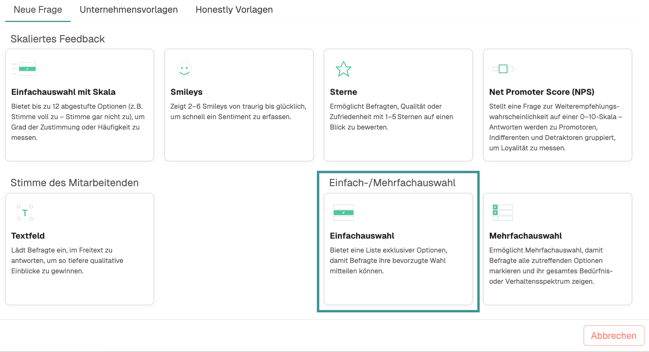
 Choose **Single Select** from the menu that appears.
 #### 4. Write the section
Enter a short, meaningful title. Optionally add a description explaining what this part of the survey is about.
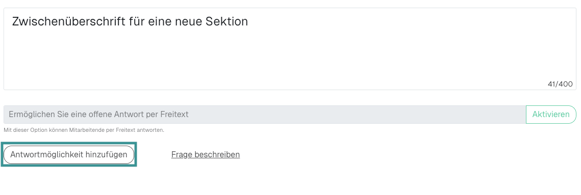
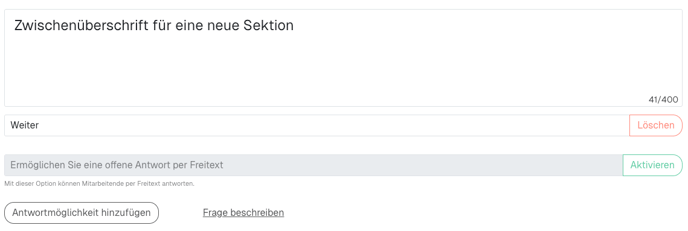
If you want a **Continue** button at the end of the section, use **Add answer** in the question settings.
#### 4. Write the section
Enter a short, meaningful title. Optionally add a description explaining what this part of the survey is about.
If you want a **Continue** button at the end of the section, use **Add answer** in the question settings.
 This helps respondents take in the section as a unit, particularly if they do not use the navigation controls at the bottom of the survey.
 #### 5. Check the result
Use **Preview** to see how the sections will appear in the finished survey.
### Getting the most out of sections
* Use short but informative headings that name what the following block is about
* Keep the format of all sections in a survey consistent
* Use the description under a section heading to tell respondents why these questions matter
* As a rule of thumb, one section per 5–10 related questions
### Frequently asked questions
* **Can I edit or move a section afterwards?** Yes. Click an existing section to edit its title or description, and drag and drop it to move it.
* **How many sections can I use?** There is no fixed limit. Keep the survey readable rather than maximising sections.
* **Can respondents jump between sections?** No, the survey follows a linear order by default.
* **Are sections included in results and analyses?** Sections are there to structure the survey. In analyses and reports, questions are evaluated independently of the section they sit in. You can still use the structure in dashboards if you leave the section headings in place as questions.
### An example of a well-structured survey
Survey: Employee satisfaction
* **Section: Overall satisfaction**
* How satisfied are you overall with your work here?
* How likely are you to recommend us as an employer?
* **Section: Working environment and resources**
* Do you have all the tools and resources you need for your work?
* How do you rate your physical working environment?
* How well does the IT infrastructure support your daily tasks?
* **Section: Team and collaboration**
* How do you rate the collaboration within your immediate team?
* Do you feel supported by your team members?
* How effective is communication between departments?
* **Section: Personal development**
* Do you see development opportunities for yourself in the company?
* Do you get enough feedback on your work?
* How satisfied are you with the training on offer?
#### 5. Check the result
Use **Preview** to see how the sections will appear in the finished survey.
### Getting the most out of sections
* Use short but informative headings that name what the following block is about
* Keep the format of all sections in a survey consistent
* Use the description under a section heading to tell respondents why these questions matter
* As a rule of thumb, one section per 5–10 related questions
### Frequently asked questions
* **Can I edit or move a section afterwards?** Yes. Click an existing section to edit its title or description, and drag and drop it to move it.
* **How many sections can I use?** There is no fixed limit. Keep the survey readable rather than maximising sections.
* **Can respondents jump between sections?** No, the survey follows a linear order by default.
* **Are sections included in results and analyses?** Sections are there to structure the survey. In analyses and reports, questions are evaluated independently of the section they sit in. You can still use the structure in dashboards if you leave the section headings in place as questions.
### An example of a well-structured survey
Survey: Employee satisfaction
* **Section: Overall satisfaction**
* How satisfied are you overall with your work here?
* How likely are you to recommend us as an employer?
* **Section: Working environment and resources**
* Do you have all the tools and resources you need for your work?
* How do you rate your physical working environment?
* How well does the IT infrastructure support your daily tasks?
* **Section: Team and collaboration**
* How do you rate the collaboration within your immediate team?
* Do you feel supported by your team members?
* How effective is communication between departments?
* **Section: Personal development**
* Do you see development opportunities for yourself in the company?
* Do you get enough feedback on your work?
* How satisfied are you with the training on offer?