> ## Documentation Index
> Fetch the complete documentation index at: https://help.honestly.com/llms.txt
> Use this file to discover all available pages before exploring further.
# How to group questions by dimensions
> Create custom dimensions
#### **What you can do with dimensions**
1. **Use default dimensions**
* Every account now includes our [JDR sub‑factor dimensions](/help/engagement-concept/questionnaire-factors) as fixed default dimensions which you can assign questions to right away. These dimensions are not editable.
* When using [JDR-based survey or question templates](/help/engagement-concept/comparable-surveys), default dimensions will automatically be assigned.
**Create custom dimensions**
As an admin, go to **Settings → Account → Dimensions** to:
* Add custom dimensions (e.g., “Work–Life Balance,” “Team Collaboration”)
* Edit existing custom dimensions (rename or delete)
1. **Assign questions to a dimension**
In the survey editor, you can select **one dimension per question** from a dropdown. This ties that individual question to a broader concept for grouping.
** **
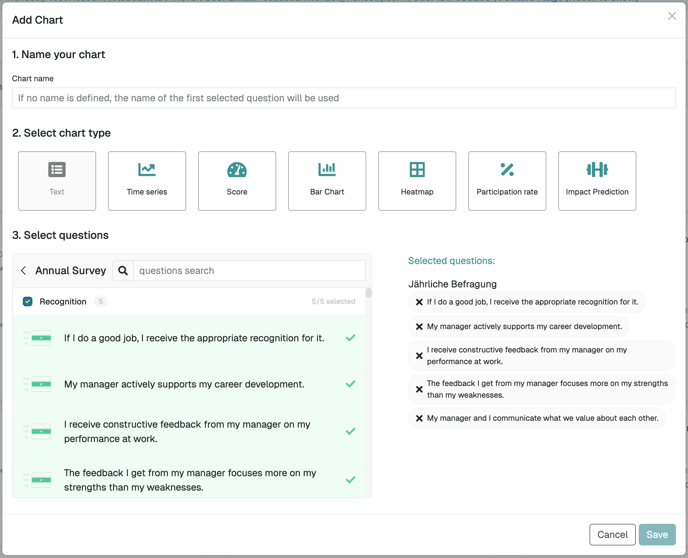
2\. **Visualize by dimension**\
On a dashboard, you can then create dimension charts by bulk‑selecting questions by dimension.
**
2\. **Visualize by dimension**\
On a dashboard, you can then create dimension charts by bulk‑selecting questions by dimension.
 ### **Why use dimensions?**
* **Top‑level insights** : See how key parts of your survey (e.g., “Engagement” vs. “Support”) are performing.
* **Easier customization** : Tailor reports and dashboards around themes, not just individual questions.
* **Scalable organization** : As your survey grows, you can quickly assign themes to maintain clarity across questions.
### \*\*🛠 How it works
| **Action** | **Where/How** |
| -------------------------- | --------------------------------------------------- |
| **Add/Edit dimensions** | Settings → Account → Dimensions (admins only) |
| **Assign to question** | Survey Editor → select dimension in question editor |
| **Bulk‑select for charts** | Dashboards → create chart by dimension |
###
### **Why use dimensions?**
* **Top‑level insights** : See how key parts of your survey (e.g., “Engagement” vs. “Support”) are performing.
* **Easier customization** : Tailor reports and dashboards around themes, not just individual questions.
* **Scalable organization** : As your survey grows, you can quickly assign themes to maintain clarity across questions.
### \*\*🛠 How it works
| **Action** | **Where/How** |
| -------------------------- | --------------------------------------------------- |
| **Add/Edit dimensions** | Settings → Account → Dimensions (admins only) |
| **Assign to question** | Survey Editor → select dimension in question editor |
| **Bulk‑select for charts** | Dashboards → create chart by dimension |
###