> ## Documentation Index
> Fetch the complete documentation index at: https://help.honestly.com/llms.txt
> Use this file to discover all available pages before exploring further.
# How can I edit or end the survey period of an active survey?
> If a survey is already running and you only want to change when it closes, you can adjust the end date afterwards without editing the survey itself.
If you have already activated a survey and only want to change its end date, you can do that at any time while it is running. You do not have to edit the survey itself, and the responses collected so far are not affected.
### Open the deactivation settings
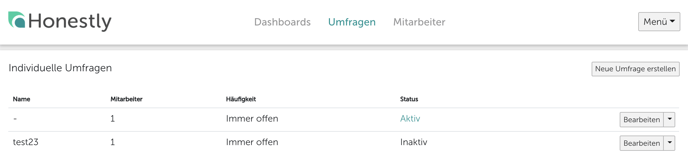
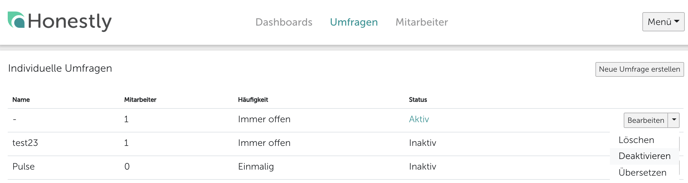
Find the active survey in the **Surveys** section and select **Go to deactivation**.
 ### Set or change the end date
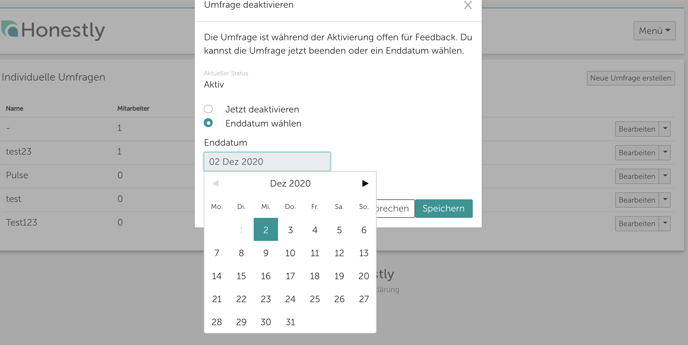
If no end date has been set yet, choose **Set end date** and pick the date on which the survey should close.
### Set or change the end date
If no end date has been set yet, choose **Set end date** and pick the date on which the survey should close.
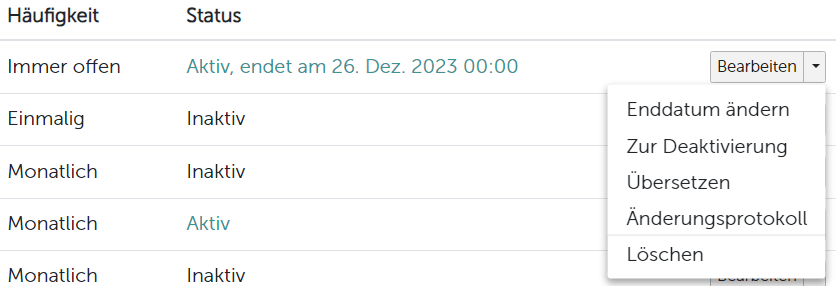
 If the survey already has an end date, use **Change Expiration Date** instead.
 The survey ends at the end of the day you select, so responses submitted on that date are still counted.
**Deactivate now** closes the survey immediately. If the result notification is switched on for this survey, deactivating now does **not** send it — use an end date if you want employees to be notified that the results are available. See [How can I inform employees that a survey has ended and its data can be viewed?](/help/surveys/notify-survey-ended)
The survey ends at the end of the day you select, so responses submitted on that date are still counted.
**Deactivate now** closes the survey immediately. If the result notification is switched on for this survey, deactivating now does **not** send it — use an end date if you want employees to be notified that the results are available. See [How can I inform employees that a survey has ended and its data can be viewed?](/help/surveys/notify-survey-ended)