> ## Documentation Index
> Fetch the complete documentation index at: https://help.honestly.com/llms.txt
> Use this file to discover all available pages before exploring further.
# How can I respond to open text feedback?
> Honestly allows you to initiate a confidential, anonymous chat with an employee based on their open text response. This makes it easy to follow up on feedback directly and securely.
### **Using the Chat to Engage with Open Text Feedback**
The **Chat** feature allows Admins, Managers, and Analysts to engage in a two-way conversation with employees who submitted open text responses in surveys. It helps build trust, gain deeper insights, and show appreciation — all while preserving employee anonymity.
### **What Is the Chat For?**
The Chat enables users to:
* Thank employees for their feedback.
* Ask for further clarification or input.
* Start a meaningful exchange to act on valuable insights.
### **Who Can Use the Chat?**
* **Admins:** Can initiate and participate in any chat.
* **Managers & Analysts:** Can initiate and participate in chats on responses they have permission to view.
* **Employees:** Receive a notification via email and can choose to **respond anonymously**.
🔐 Employees remain anonymous throughout the conversation. However, employees themselves can see the names of the managers who participate in the chat.
### **How Does It Work?**
#### **For Users (Admins, Managers, Analysts):**
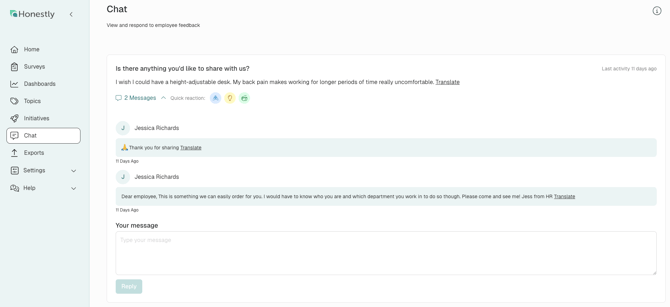
1. Go to the **Chat** section via the main navigation in the Honestly web app.
2. Select a feedback response you’d like to follow up on.
3. Click on a **quick reaction** (see below) or click on **“0 Messages”** to open the chat thread.
4. Type your message in the input field and click **“Reply”**.

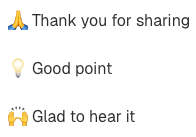 📌 Multiple authorized users can reply within the same chat thread.
#### **
📌 Multiple authorized users can reply within the same chat thread.
#### ** **
#### **For Employees:**
1. You'll receive an email notification (no login required) with a subject line such as this: "Response to your feedback from the survey "Test 1".
2. The email contains a secure link to an **anonymous chat interface**.
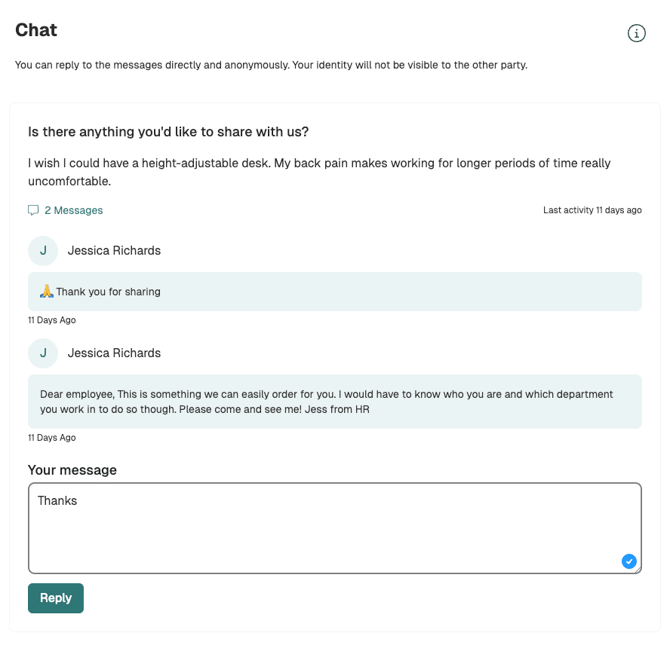
3. Employees can respond freely and continue the conversation if they choose.
**
#### **For Employees:**
1. You'll receive an email notification (no login required) with a subject line such as this: "Response to your feedback from the survey "Test 1".
2. The email contains a secure link to an **anonymous chat interface**.
3. Employees can respond freely and continue the conversation if they choose.
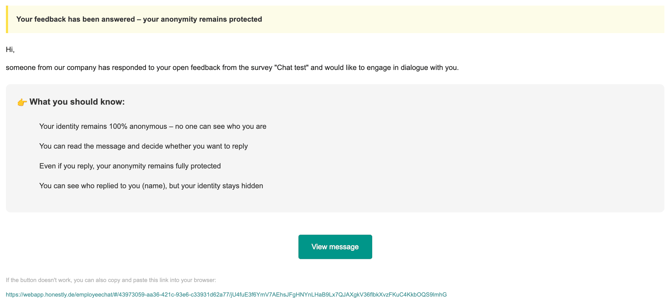 If the employee chooses to read the message and possibly respond, they can click on "View message" and would see the following:
 ### **How Is Anonymity Protected?**
* The employee’s identity remains **completely hidden** throughout the conversation.
* They access the chat through a secure tokenized link (no user access to the Honestly app required).
* The users (Admins/Managers/Analysts) **cannot see** who responded — only that there was a reply.
* **No data** that is tied to an employee is available in the chat.
### **Things to Keep in Mind**
* There are **no character limits** or time restrictions.
* The chat remains **open-ended** — messages can be sent back and forth anytime.
* Chats **cannot be exported** or tracked beyond what is visible in the thread.
### **Best Practices for Writing Messages**
* Start with appreciation: \_“Thanks for your feedback!”
* Ask open-ended questions: \_“Could you tell us more about what would have helped in that situation?”
* Be clear and respectful: \_“We’re working on improving X — your input is valuable.”
### **How Is Anonymity Protected?**
* The employee’s identity remains **completely hidden** throughout the conversation.
* They access the chat through a secure tokenized link (no user access to the Honestly app required).
* The users (Admins/Managers/Analysts) **cannot see** who responded — only that there was a reply.
* **No data** that is tied to an employee is available in the chat.
### **Things to Keep in Mind**
* There are **no character limits** or time restrictions.
* The chat remains **open-ended** — messages can be sent back and forth anytime.
* Chats **cannot be exported** or tracked beyond what is visible in the thread.
### **Best Practices for Writing Messages**
* Start with appreciation: \_“Thanks for your feedback!”
* Ask open-ended questions: \_“Could you tell us more about what would have helped in that situation?”
* Be clear and respectful: \_“We’re working on improving X — your input is valuable.”