> ## Documentation Index
> Fetch the complete documentation index at: https://help.honestly.com/llms.txt
> Use this file to discover all available pages before exploring further.
# Heatmaps and Dimensions: What are the best practices at the different attribute levels?
> The focus is on dashboards and best practices for analyzing employee survey results.
### Display Options: Questions & Dimensions
* **Individual Questions in the Heatmap:** The heatmap always displays individual questions to provide detailed insights. A mode in which dimensions can be expanded and the subordinate questions become visible only upon clicking (drill-down) is not available.
* **Evaluating Dimensions (Clusters):** It is currently not possible in Honestly heatmaps to display only the dimensions (i.e., clusters) without the individual questions.
For very large catalogs (e.g., 60–80 questions), this can quickly lead to a lack of clarity in the display.
***
### Best Practices for Improved Clarity
* **Cluster questions clearly:** Questions should be clearly and meaningfully assigned to [dimensions](/help/surveys/group-by-dimensions) and named unambiguously.
* **Segmented analysis:** Heatmaps or analyses should be specifically conducted per attribute (e.g., team, location, etc.) or time period.
* **Use filters purposefully:** The data base can be selectively reduced through filtering and segmentation functions (see below).
* **Separate analyses per dimension:** It is often clearer to create a dedicated heatmap or analysis for each dimension.
***
### Benchmarks and Comparison at the Attribute Level
* **Internal Benchmark:** The comparison values (“Internal Benchmark”) refer to data from across the entire organization.
 * **Compare with:** Data restricted due to access permissions can nonetheless be displayed as a comparison value at the attribute level. Even with limited access (e.g., just one unit), benchmarks are calculated according to a user’s own assignment.
* **Comparison at higher levels:** A benchmark for areas above one’s own unit can only be displayed if access rights to that area also exist.
**More information:** For further details, see the Honestly article: [How do I compare employees on heatmap and score charts?](/help/dashboard/compare-on-heatmaps)
***
### Filters, Permissions, and Attribute Visibility
* **Flexible filters:** Any number of approved attributes can be combined and filtered for heatmap analysis.
* **Permissions** : The availability of filters and visibility is determined by the permissions assigned in the Honestly account.
Tip: How does attribute configuration work?
Go to "Employees" in the "Settings" section ...
* **Compare with:** Data restricted due to access permissions can nonetheless be displayed as a comparison value at the attribute level. Even with limited access (e.g., just one unit), benchmarks are calculated according to a user’s own assignment.
* **Comparison at higher levels:** A benchmark for areas above one’s own unit can only be displayed if access rights to that area also exist.
**More information:** For further details, see the Honestly article: [How do I compare employees on heatmap and score charts?](/help/dashboard/compare-on-heatmaps)
***
### Filters, Permissions, and Attribute Visibility
* **Flexible filters:** Any number of approved attributes can be combined and filtered for heatmap analysis.
* **Permissions** : The availability of filters and visibility is determined by the permissions assigned in the Honestly account.
Tip: How does attribute configuration work?
Go to "Employees" in the "Settings" section ...
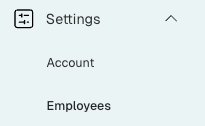 ... and open "Attribute Management."
 Next, locate the attribute you wish to modify and click on "Edit."
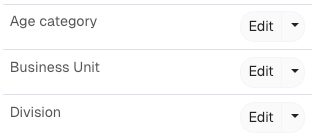 A new window will open, giving you the option to rename the attribute. Also you can make the attribute visible/invisible according to predefined roles:
 ***
**You can request individual support for analysis or dashboard optimization at any time from your Honestly Customer Success Manager** ([service@honestly.com](mailto:service@honestly.com)).
***
### Summary
* Heatmaps always display individual questions, not clusters/dimensions.
* Benchmarks and filters are determined by access rights.
* Clear clustering and segmentation of analyses increase clarity and the quality of insights.
***
**You can request individual support for analysis or dashboard optimization at any time from your Honestly Customer Success Manager** ([service@honestly.com](mailto:service@honestly.com)).
***
### Summary
* Heatmaps always display individual questions, not clusters/dimensions.
* Benchmarks and filters are determined by access rights.
* Clear clustering and segmentation of analyses increase clarity and the quality of insights.