> ## Documentation Index
> Fetch the complete documentation index at: https://help.honestly.com/llms.txt
> Use this file to discover all available pages before exploring further.
# How can I edit a user that has already been created?
> How can I edit a user that has already been created?
If you want to manually change something about an employee who is in the system, please follow these steps.\
 \
Go to the employee overview in your account
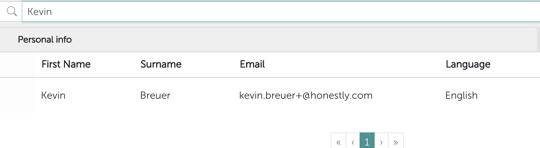
Now search for the user you want to change using the search function, you can filter by name, last name or email.\\
\
Go to the employee overview in your account
Now search for the user you want to change using the search function, you can filter by name, last name or email.\\
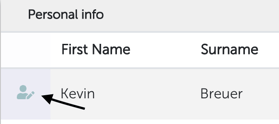
 in the next step move your mouse cursor to the left of the first name where the "edit" icon will appear\\
 now a pop-up window will open where you can adjust various settings,\
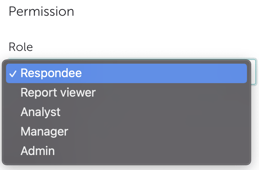 \
if you choose the "Respondee" role for the user, they become a survey participant only and can no longer access the system or see any more data.
**Note 1:** If you change someone to a "Respondee", only the user's access to the account will be removed permanently. Surveys or questionnaires that this user created or had access to in the past will remain and will not be deleted!
**Note 2:** Only account admins can delete users completely.
\
if you choose the "Respondee" role for the user, they become a survey participant only and can no longer access the system or see any more data.
**Note 1:** If you change someone to a "Respondee", only the user's access to the account will be removed permanently. Surveys or questionnaires that this user created or had access to in the past will remain and will not be deleted!
**Note 2:** Only account admins can delete users completely.