> ## Documentation Index
> Fetch the complete documentation index at: https://help.honestly.com/llms.txt
> Use this file to discover all available pages before exploring further.
# How do I create a user?
> Users can only be created and managed by administrators!
Users can only be created and managed by administrators!
a new user is created similar to a new employee for this purpose navigate to employee and add it
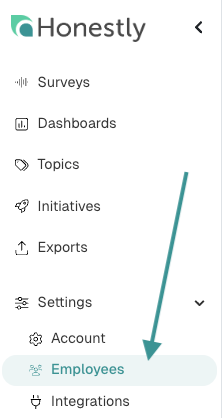 now you have to create a profile for the new user ( if an employee is already created and only a new user will be created skip this step )
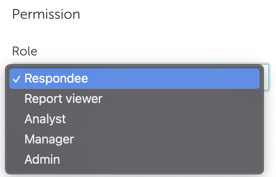
 if you have filled in this information you can now set the appropriate role for the user
 How do I find out which role has which rights?\
This article [about access rights](https://help.honestly.com/de/knowledge/zugriffsrechte-f%C3%BCr-neue-benutzer?__hstc=225001733.5c0bd1aa3dcd48b0047c40b87a7ac680.1631098205894.1640615465527.1640671040075.40&__hssc=225001733.11.1640671040075&__hsfp=3953584747\&hsLang=en) can help you with that.
How do I find out which role has which rights?\
This article [about access rights](https://help.honestly.com/de/knowledge/zugriffsrechte-f%C3%BCr-neue-benutzer?__hstc=225001733.5c0bd1aa3dcd48b0047c40b87a7ac680.1631098205894.1640615465527.1640671040075.40&__hssc=225001733.11.1640671040075&__hsfp=3953584747\&hsLang=en) can help you with that.