> ## Documentation Index
> Fetch the complete documentation index at: https://help.honestly.com/llms.txt
> Use this file to discover all available pages before exploring further.
# How to add employees without an email to the system?
> How to create codes or access data for employees without company email addresses in the Honestly system.
After speaking with your Honestly account manager and having the feature activated, we recommend uploading employees without company emails via Excel.
In the "Employee Management > Attribute Management" field, an additional attribute will appear, called "Code", for example. You choose the exact name.
Employees can be uploaded manually or via Excel.
You can assign the codes or access data yourself.
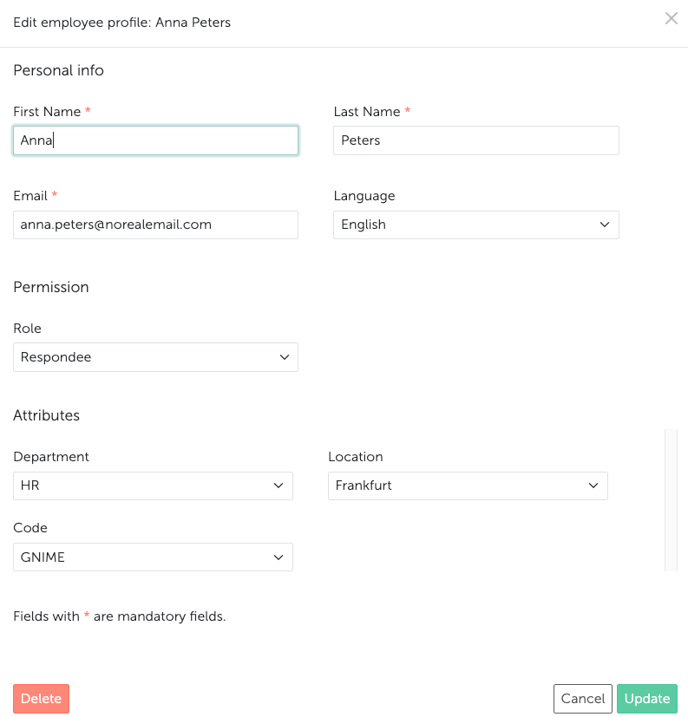 It is important that each employee receives a "fake" email, which must be unique. For example: [firstname.lastname@norealemail.com](mailto:firstname.lastname@norealemail.com)
Person 1: [anna.peters@norealemail.com](mailto:anna.peters@norealemail.com)\
Person 2: [jack.black@norealemail.com](mailto:jack.black@norealemail.com)\
Person 3: [susie.smith@norealemail.com](mailto:susie.smith@norealemail.com)\
Person 4: [david.jones@norealemail.com](mailto:david.jones@norealemail.com)
If you prefer to manage and upload this via Excel, all important information from your system should be included:
It is important that each employee receives a "fake" email, which must be unique. For example: [firstname.lastname@norealemail.com](mailto:firstname.lastname@norealemail.com)
Person 1: [anna.peters@norealemail.com](mailto:anna.peters@norealemail.com)\
Person 2: [jack.black@norealemail.com](mailto:jack.black@norealemail.com)\
Person 3: [susie.smith@norealemail.com](mailto:susie.smith@norealemail.com)\
Person 4: [david.jones@norealemail.com](mailto:david.jones@norealemail.com)
If you prefer to manage and upload this via Excel, all important information from your system should be included:
 *Info:* You can, of course, use the Excel template from your system. The template can be found on the "Menu > Employees" tab under "Import Employees".
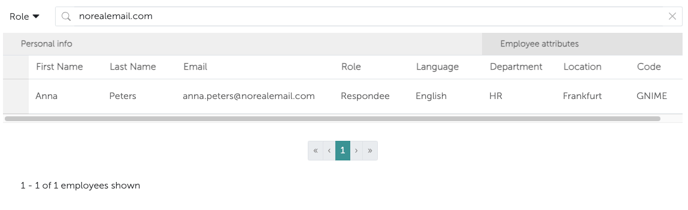
If you are adding people with codes for the second or third time, use the search function to find out if your "fake" addresses have already been used.
*Info:* You can, of course, use the Excel template from your system. The template can be found on the "Menu > Employees" tab under "Import Employees".
If you are adding people with codes for the second or third time, use the search function to find out if your "fake" addresses have already been used.
 Employees with a code can then participate in surveys via a separate link. In most cases, the link will be: **company\_name.honestly.com**
**In the following article, you can read in detail how exactly this works when employees log in there with their code data (which is defined as described above):[Link](/help/before-you-begin/participate-without-email)**
Employees with a code can then participate in surveys via a separate link. In most cases, the link will be: **company\_name.honestly.com**
**In the following article, you can read in detail how exactly this works when employees log in there with their code data (which is defined as described above):[Link](/help/before-you-begin/participate-without-email)**